

本文详解如何修改 jQuery.qrcode.js 以支持中文编码及自定义 Logo 图片。通过引入 UTF-8 转码逻辑解决中文乱码问题,并修改 createCanvas 与 createTable 函数实现图片叠加。同时包含对 IE 浏览器的兼容处理,提供完整修改后的代码供参考。
jQuery.qrcode.js 支持中文与自定义 Logo 的修改方案
本文分享了一段能够生成包含中文字符及 Logo 图片的二维码代码,供开发者参考使用。
资料搜索与方案选择
资料搜索
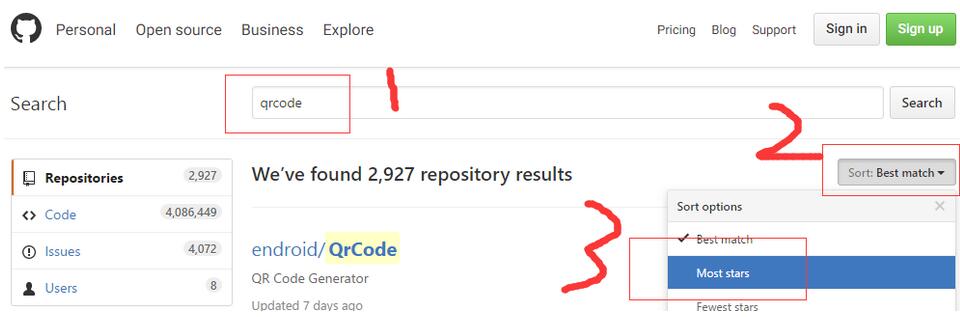
在相关资源中筛选 Star 数量最多的两个项目。
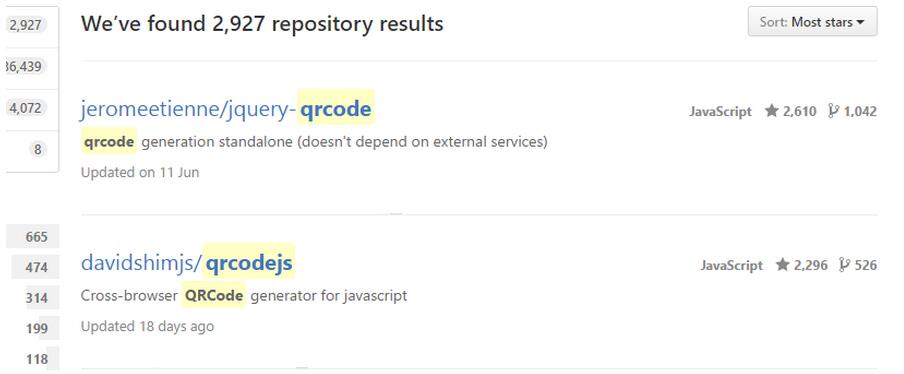
其中第一个是广泛使用的 jquery.qrcode.js,但它原生不支持中文且无法嵌入 Logo;第二个项目支持 IE6 及以上版本及中文显示,基于其源码对 jquery.qrcode.js 进行修改,使其具备中文支持能力。
实现中文支持
支持中文
//qrcode.js
function QR8bitByte(data) {
  this.mode = QRMode.MODE_8BIT_BYTE;
  this.data = data;
}

QR8bitByte.prototype = {

  getLength : function(buffer) {
    return this.data.length;
  },

  write : function(buffer) {
    for (var i = 0; i < this.data.length; i++) {
      // not JIS ...
      buffer.put(this.data.charCodeAt(i), 8);
    }
  }
};
具体修改方法如下,主要涉及复制并合并第二份代码的头部逻辑:
function QR8bitByte(data) {
  this.mode = QRMode.MODE_8BIT_BYTE;
  this.data = data;
  this.parsedData = [];

  // Added to support UTF-8 Characters
  for (var i = 0, l = this.data.length; i < l; i++) {
    var byteArray = [];
    var code = this.data.charCodeAt(i);

    if (code > 0x10000) {
      byteArray[0] = 0xF0 | ((code & 0x1C0000) >>> 18);
      byteArray[1] = 0x80 | ((code & 0x3F000) >>> 12);
      byteArray[2] = 0x80 | ((code & 0xFC0) >>> 6);
      byteArray[3] = 0x80 | (code & 0x3F);
    } else if (code > 0x800) {
      byteArray[0] = 0xE0 | ((code & 0xF000) >>> 12);
      byteArray[1] = 0x80 | ((code & 0xFC0) >>> 6);
      byteArray[2] = 0x80 | (code & 0x3F);
    } else if (code > 0x80) {
      byteArray[0] = 0xC0 | ((code & 0x7C0) >>> 6);
      byteArray[1] = 0x80 | (code & 0x3F);
    } else {
      byteArray[0] = code;
    }

    this.parsedData.push(byteArray);
  }

  this.parsedData = Array.prototype.concat.apply([], this.parsedData);

  if (this.parsedData.length != this.data.length) {
    this.parsedData.unshift(191);
    this.parsedData.unshift(187);
    this.parsedData.unshift(239);
  }
}

QR8bitByte.prototype = {
  getLength: function (buffer) {
    return this.parsedData.length;
  },
  write: function (buffer) {
    for (var i = 0, l = this.parsedData.length; i < l; i++) {
      buffer.put(this.parsedData[i], 8);
    }
  }
};
网络上提供的另一种解决方案如下:
//在传入文本处转码也可
function utf16to8(str) {
  var out, i, len, c;
  out = "";
  len = str.length;
  for(i = 0; i < len; i++) {
    c = str.charCodeAt(i);
    if ((c >= 0x0001) && (c <= 0x007F)) {
      out += str.charAt(i);
    } else if (c > 0x07FF) {
      out += String.fromCharCode(0xE0 | ((c >> 12) & 0x0F));
      out += String.fromCharCode(0x80 | ((c >> 6) & 0x3F));
      out += String.fromCharCode(0x80 | ((c >> 0) & 0x3F));
    } else {
      out += String.fromCharCode(0xC0 | ((c >> 6) & 0x1F));
      out += String.fromCharCode(0x80 | ((c >> 0) & 0x3F));
    }
  }
  return out;
}
实现自定义 Logo 支持
支持自定义 Logo
需要修改 jquery.qrcode.js 中的 createCanvas 函数。
var createCanvas  = function(){
      // create the qrcode itself
      var qrcode = new QRCode(options.typeNumber, options.correctLevel);
      qrcode.addData(options.text);
      qrcode.make();

      // create canvas element
      var canvas = document.createElement('canvas');
      canvas.width  = options.width;
      canvas.height  = options.height;
      var ctx   = canvas.getContext('2d');

      //增加以下代码,把图片画出来
      if( options.src ) {//传进来的图片地址
        //图片大小
        options.imgWidth = options.imgWidth || options.width / 4.7;
        options.imgHeight = options.imgHeight || options.height / 4.7;
        var img = new Image();
        img.src = options.src;
        //不放在onload里,图片出不来
        img.onload = function () {
          ctx.drawImage(img, (options.width - options.imgWidth) / 2, (options.height - options.imgHeight) / 2, options.imgWidth, options.imgHeight);
        }
      }
      // compute tileW/tileH based on options.width/options.height
      var tileW  = options.width / qrcode.getModuleCount();
      var tileH  = options.height / qrcode.getModuleCount();

      // draw in the canvas
      for( var row = 0; row < qrcode.getModuleCount(); row++ ){
        for( var col = 0; col < qrcode.getModuleCount(); col++ ){
          ctx.fillStyle = qrcode.isDark(row, col) ? options.foreground : options.background;
          var w = (Math.ceil((col+1)*tileW) - Math.floor(col*tileW));
          var h = (Math.ceil((row+1)*tileW) - Math.floor(row*tileW));
          ctx.fillRect(Math.round(col*tileW),Math.round(row*tileH), w, h);
        }
      }
      // return just built canvas
      return canvas;
    };
同时需修改 jquery.qrcode.js 中的 createTable 函数,以便在不支持 Canvas 的环境中使用表格绘制二维码。
var createTable = function(){
      // create the qrcode itself
      var qrcode = new QRCode(options.typeNumber, options.correctLevel);
      qrcode.addData(options.text);
      qrcode.make();

      // create table element
      var $table  = $('<table></table>')
        .css("width", options.width+"px")
        .css("height", options.height+"px")
        .css("border", "0px")
        .css("border-collapse", "collapse")
        .css('background-color', options.background);

      // compute tileS percentage
      var tileW  = options.width / qrcode.getModuleCount();
      var tileH  = options.height / qrcode.getModuleCount();

      // draw in the table
      for(var row = 0; row < qrcode.getModuleCount(); row++ ){
        var $row = $('<tr></tr>').css('height', tileH+"px").appendTo($table);

        for(var col = 0; col < qrcode.getModuleCount(); col++ ){
          $('<td></td>')
            .css('width', tileW+"px")
            .css('background-color', qrcode.isDark(row, col) ? options.foreground : options.background)
            .appendTo($row);
        }
      }

      //主要思想,把table,和img标签放在同一个div下,div relative定位,然后使得图片absolute定位在table中间
      if( options.src ) {
        options.imgWidth = options.imgWidth || options.width / 4.7;
        options.imgHeight = options.imgHeight || options.height / 4.7;
        var $img = $('<img>').attr("src", options.src)
          .css("width", options.imgWidth)
          .css("height", options.imgHeight)
          .css("position", "absolute")
          .css("left", (options.width - options.imgWidth) / 2)
          .css("top", (options.height - options.imgHeight) / 2);
        $table = $('<div style="position:relative;"></div>')
          .append($table)
          .append($img);
      }

      // return just built canvas
      return $table;
    };
IE 浏览器兼容处理
针对 IE 浏览器进行特殊判断与兼容处理。
//判断是否IE, IE8以下,用 table,否则用 canvas
    var isIE = function() {
      var b = document.createElement('b');
      b.innerHTML = '<!--[if IE]><i></i><![endif]-->';
      return b.getElementsByTagName('i').length === 1;
    };
    options.render = options.render ||
      (isIE(6) || isIE(7) || isIE(8))? "table": "canvas";
以下是修改完成后的 jquery.qrcode.js 完整代码:
(function( $ ){
  $.fn.qrcode = function(options) {
    // if options is string,
    if( typeof options === 'string' ){
      options = { text: options };
    }

    //判断是否IE, IE8以下,用 table,否则用 canvas
    var isIE = function() {
      var b = document.createElement('b');
      b.innerHTML = '<!--[if IE]><i></i><![endif]-->';
      return b.getElementsByTagName('i').length === 1;
    };
    options.render = options.render ||
      (isIE(6) || isIE(7) || isIE(8))? "table": "canvas";
    // set default values
    // typeNumber < 1 for automatic calculation
    options = $.extend( {}, {
      // render    : "canvas",
      width    : 256,
      height   : 256,
      typeNumber : -1,
      correctLevel  : QRErrorCorrectLevel.H,
            background   : "#ffffff",
            foreground   : "#000000"
    }, options);

    var createCanvas  = function(){
      // create the qrcode itself
      var qrcode = new QRCode(options.typeNumber, options.correctLevel);
      qrcode.addData(options.text);
      qrcode.make();

      // create canvas element
      var canvas = document.createElement('canvas');
      canvas.width  = options.width;
      canvas.height  = options.height;
      var ctx   = canvas.getContext('2d');

      //在中间画logo
      if( options.src ) {
        options.imgWidth = options.imgWidth || options.width / 4.7;
        options.imgHeight = options.imgHeight || options.height / 4.7;
        var img = new Image();
        img.src = options.src;
        img.onload = function () {
          ctx.drawImage(img, (options.width - options.imgWidth) / 2, (options.height - options.imgHeight) / 2, options.imgWidth, options.imgHeight);
        }
      }
      // compute tileW/tileH based on options.width/options.height
      var tileW  = options.width / qrcode.getModuleCount();
      var tileH  = options.height / qrcode.getModuleCount();

      // draw in the canvas
      for( var row = 0; row < qrcode.getModuleCount(); row++ ){
        for( var col = 0; col < qrcode.getModuleCount(); col++ ){
          ctx.fillStyle = qrcode.isDark(row, col) ? options.foreground : options.background;
          var w = (Math.ceil((col+1)*tileW) - Math.floor(col*tileW));
          var h = (Math.ceil((row+1)*tileW) - Math.floor(row*tileW));
          ctx.fillRect(Math.round(col*tileW),Math.round(row*tileH), w, h);
        }
      }
      // return just built canvas
      return canvas;
    };

    // from Jon-Carlos Rivera (https://github.com/imbcmdth)
    var createTable = function(){
      // create the qrcode itself
      var qrcode = new QRCode(options.typeNumber, options.correctLevel);
      qrcode.addData(options.text);
      qrcode.make();

      // create table element
      var $table  = $('<table></table>')
        .css("width", options.width+"px")
        .css("height", options.height+"px")
        .css("border", "0px")
        .css("border-collapse", "collapse")
        .css('background-color', options.background);

      // compute tileS percentage
      var tileW  = options.width / qrcode.getModuleCount();
      var tileH  = options.height / qrcode.getModuleCount();

      // draw in the table
      for(var row = 0; row < qrcode.getModuleCount(); row++ ){
        var $row = $('<tr></tr>').css('height', tileH+"px").appendTo($table);

        for(var col = 0; col < qrcode.getModuleCount(); col++ ){
          $('<td></td>')
            .css('width', tileW+"px")
            .css('background-color', qrcode.isDark(row, col) ? options.foreground : options.background)
            .appendTo($row);
        }
      }

      //生成logo
      if( options.src ) {
        options.imgWidth = options.imgWidth || options.width / 4.7;
        options.imgHeight = options.imgHeight || options.height / 4.7;
        var $img = $('<img>').attr("src", options.src)
          .css("width", options.imgWidth)
          .css("height", options.imgHeight)
          .css("position", "absolute")
          .css("left", (options.width - options.imgWidth) / 2)
          .css("top", (options.height - options.imgHeight) / 2);
        $table = $('<div style="position:relative;"></div>')
          .append($table)
          .append($img);
      }

      // return just built canvas
      return $table;
    };


    return this.each(function(){
      var element = options.render == "canvas" ? createCanvas() : createTable();
      $(element).appendTo(this);
    });
  };
})( jQuery );
测试与总结
测试环节
jQuery('#qrcodeTable').qrcode({
  render : "table",
  text  : "中文://jetienne.com",
  src: './logo32.png'
});
jQuery('#qrcodeCanvas').qrcode({
  text  : "中午你://jetienne.com",
  src: './logo32.png'
});
以上就是本文的全部内容,希望能为各位的学习提供有益帮助,也欢迎大家继续支持本站。