

本文详细介绍JavaScript中Date对象和Math对象的用法。Date对象用于存储日期并精确到毫秒,涵盖获取年、月、日、时分秒等常用方法。Math对象为内置对象,无需实例化即可使用,提供ceil、floor、round、random、min、max等数学计算方法及数组极值处理技巧。
Date对象基础与常用方法
Date对象
1.什么是Date对象?
日期对象能够存储任意日期,且精度可达毫秒(1/1000秒)。
语法:var Udate=new Date();
注:初始值为当前时间(当前电脑系统时间)。
2.Date对象常用方法:
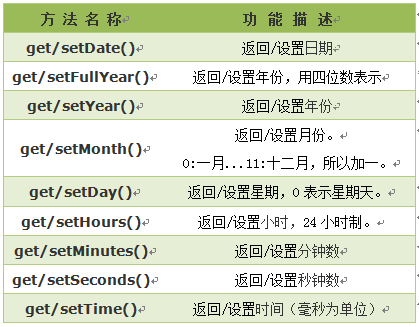
3.Date方法实例
代码如下:
var newTime=new Date();//获取当前时间
var millSecond=Date.now();//当前日期转换成的毫秒数
var fullYear=newTime.getFullYear();//获取年份
var year=newTime.getYear();//获取年份
var month=newTime.getMonth();//获取月份 返回0-11 0表示一月 11表示十二月
var week=newTime.getDay();//获取星期几 返回的是0-6的数字,0 表示星期天
var today=newTime.getDate();//获取当天日期
var hours=newTime.getHours();//获取小时数
var minutes=newTime.getMinutes();//获取分钟数
var seconds=newTime.getSeconds();//获取秒数
console.log(newTime);// Wed Feb 04 2015 10:54:17 GMT+0800 (中国标准时间)
console.log(millSecond);// 1423029309565
console.log(fullYear);// 2015
console.log(year);//115
console.log(month);//1 表示2月
console.log(week);//3 表示星期三
console.log(today);//4 4号
console.log(hours);//10小时
console.log(minutes);//54分钟
console.log(seconds);//17秒
Math对象属性与计算方法
Math对象
1.什么是Math对象?
Math对象,提供对数据的数学计算。
注意:Math 对象是一个固有的对象,无需创建它,直接把 Math 作为对象使用就可以调用其所有属性和方法。这是它与Date,String对象的区别。
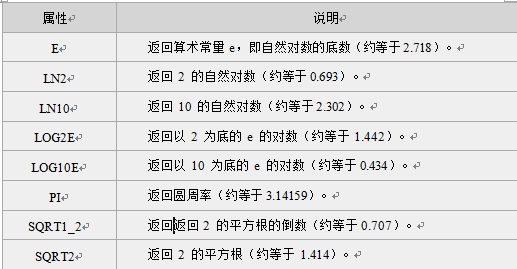
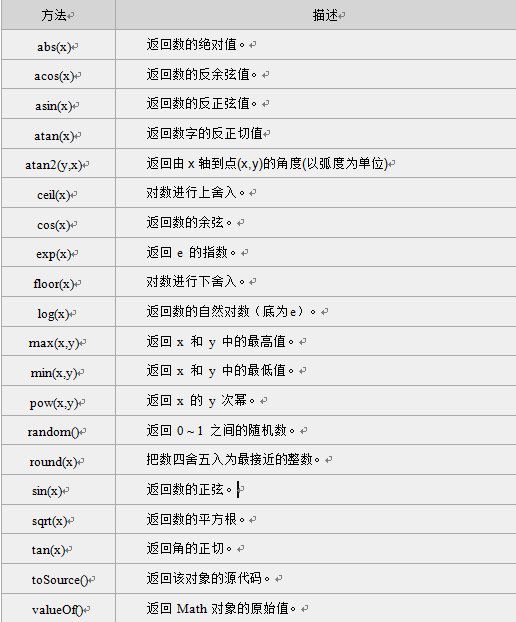
2.Math对象的属性和方法
Math对象属性
Math对象方法
3.Math对象个别方法实例
1):ceil()方法向上取整,返回的是大于或等于x,并且与x最接近的整数。
代码如下:
document.write(Math.ceil(0.8) + "<br />")//1
document.write(Math.ceil(6.3) + "<br />")//7
document.write(Math.ceil(5) + "<br />")//5
document.write(Math.ceil(3.5) + "<br />")//4
document.write(Math.ceil(-5.1) + "<br />")//-5
document.write(Math.ceil(-5.9))//-5
2):floor()方法向下取整,返回的是小于或等于x,并且与x最接近的整数。
代码如下:
document.write(Math.floor(0.8) + "<br />")//0
document.write(Math.floor(6.3) + "<br />")//6
document.write(Math.floor(5) + "<br />")//5
document.write(Math.floor(3.5) + "<br />")//3
document.write(Math.floor(-5.1) + "<br />")//-6
document.write(Math.floor(-5.9))//-6
3):round() 方法可把一个数字四舍五入为最接近的整数
代码如下:
document.write(Math.round(0.8) + "<br />")//1
document.write(Math.round(6.3) + "<br />")//6
document.write(Math.round(5) + "<br />")//5
document.write(Math.round(3.5) + "<br />")//4
document.write(Math.round(-5.1) + "<br />")//-5
document.write(Math.round(-5.9)+"<br />")//-6
4):random() 方法可返回介于 0 ~ 1(大于或等于 0 但小于 1 )之间的一个随机数。
代码如下:
document.write(Math.random());//返回0到1之间的数字 不包括1
document.write(Math.random()*10);//返回0到10之间的数字 不包括10
5):min()方法:返回一组数值中的最小值
代码如下:
document.write(Math.min(2,3,4,6));//2获取数组中最小值,使用apply()方法:
代码如下:
var values=[3,2,1,8,9,7];
document.write(Math.min.apply(Math,values)+"<br>");//1
Math对象作为apply第一个参数,任意数组作为第二参数
6):max()方法:返回一组数值中的最大值
代码如下:
document.write(Math.max(2,3,4,6));//6获取数组中最小值,使用apply()方法:
代码如下:
var values=[3,2,1,8,9,7];
document.write(Math.max.apply(Math,values)+"<br>");//9
以上就是关于JavaScript中Date(日期对象),Math对象的全部内容了,希望大家能够喜欢。