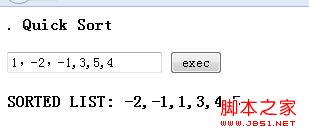
本文介绍如何在 JavaScript 中手动实现快速排序算法。由于原生缺乏直接比较字符串数字的函数,文章通过正则表达式提取正负整数,并利用 Sort 类的 prototype 定义 Partition、QuickSort 等核心方法,完成从输入解析到排序输出的完整流程。
JavaScript 手动实现快速排序算法详解
简述: 在使用 JavaScript 对一组数字进行排序时,由于 JS 没有直接的数字比较函数可以调用,因此需要手动编写一个快速排序算法。 涉及知识点: 1. 使用正则表达式提取正负数字的字符串。 2. 将字符串转换为数字并放入列表。 3. 声明及定义 JS 的 Sort 类。 4. 定义 Sort 类的构造函数及成员函数(使用 prototype)。 5. 实现快速排序算法逻辑。 代码示例如下:
代码如下:
<!DOCTYPE html>
<meta http-equiv="Content-Type" content="text/html; charset=utf-8" />.
<html>
<title>Quick Sort</title>
<head>
<script type = "text/javascript">
/*************Get Number From Input***********/
function getNumList(){
var result = "";
var nums = document.getElementById('numbers').value;
var reg = /([-][1-9][0-9]*)|([1-9][0-9]*)/g;
var numStrList = nums.match(reg);
var numList = new Array();
if(numStrList != null){
for(var i = 0;i < numStrList.length;i++){
var intNumber = parseInt(numStrList[i]);
numList.push(intNumber);
}
}
return MainProgram(numList);
};
/*****************Main*************************/
function MainProgram(numList){
var sort = new Sort(numList);
var sortedList = sort.getSortedList();
if(sortedList == null)
document.getElementById('result').innerHTML = "WRONG INPUT";
else{
document.getElementById('result').innerHTML = sortedList.join(',');
}
}
/**************Sort Class***********************/
var Sort = function(list){
this.resultList = list;
};
Sort.prototype.Partition = function(start,end){
var baseValue = this.resultList[start];
var basePos = start;
for(var j = start + 1;j <= end;j++){
if(baseValue > this.resultList[j]){
basePos++; //move the base position
this.Swap(basePos,j);
}
}
// move the base value to the correct place , before are smaller , behind are bigger
this.Swap(start,basePos);
return basePos;
}
Sort.prototype.QuickSort = function(start,end){
if(start < end){
var basePos = this.Partition(start,end);
this.QuickSort(start,basePos - 1);
this.QuickSort(basePos + 1, end);
}
};
Sort.prototype.Swap = function(pos1,pos2){
var temp = this.resultList[pos1];
this.resultList[pos1] = this.resultList[pos2];
this.resultList[pos2] = temp;
}
Sort.prototype.getSortedList = function(){
this.QuickSort(0,this.resultList.length - 1);
return this.resultList;
};
</script>
</head>
<body>
<B> Quick Sort</B>
<br>
<br>
<input type= "text" id = 'numbers' value = '' />
<input type = 'button' value = "exec" onclick = 'getNumList()'/>
<br>
<br>
<B>SORTED LIST: <B> <b id = 'result'></b>
</body>
</html>
输出结果: