

本文详细介绍如何利用AJAX技术在Java Web应用中实现自动完成(Auto Complete)功能。通过前端JavaScript处理用户输入与DOM操作,结合后端Servlet进行模糊匹配与XML数据返回,实现类似百度建议的即时搜索体验。文章包含完整的JS逻辑与Java后端代码示例,重点解析参数编码、XML解析及界面交互细节。
AJAX自动完成功能实现概述
百度建议功能为用户提供了极大的便利,其交互体验如同对话中的默契配合,无需过多言语即可达成理解,使沟通变得轻松愉悦。
虽然百度建议基于AJAX技术实现,但若要构建一个快速、稳定且具备可复制性与移植性的方案并非易事。网络上现有的解决方案多基于ASP或PHP,部分涉及jQuery但缺乏详尽说明文档。经过对相关资料的研究与耗时半天的开发,最终实现了该功能,特此分享。
实现原理的流程图如下所示:
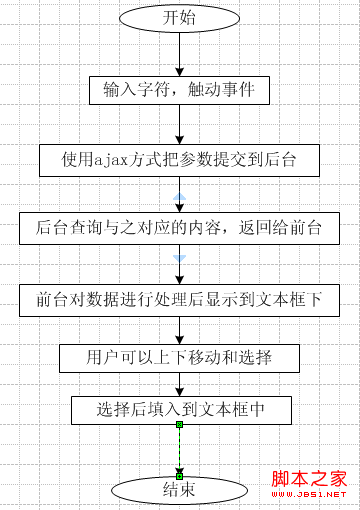
流程图已清晰展示逻辑,无需额外赘述,接下来直接展示相关代码。
前端JavaScript代码实现
前端JavaScript代码实现如下:
具体代码内容:
var xmlHttpRequest;
var table;
var tbody;
var div;
var input;
var curIndex;
var size;
var r_userId;
function createXMLHttpRequest(){
if(window.ActiveXObject){
xmlHttpRequest = new ActiveXObject("Microsoft.XMLHTTP");
}else if(window.XMLHttpRequest){
xmlHttpRequest = new XMLHttpRequest();
}
}
//发送请求
function findNames(){
if(event.keyCode==38||event.keyCode==40){
}else{
if(input.value.length>0){
createXMLHttpRequest();
var url = encodeURI(encodeURI("/jforum.html?module=posts&action=findDept&names="+input.value));
xmlHttpRequest.open("GET",url,true);
xmlHttpRequest.onreadystatechange=processMatchResponse;
xmlHttpRequest.send(null);
}else{
clearNames();
}
}
}
function processMatchResponse(){
if(xmlHttpRequest.readyState==4){
if(xmlHttpRequest.status==200){
//alert(xmlHttpRequest.status);
//var id = xmlHttpRequest.responseXML.getElementsByTagName("id");
var dept = xmlHttpRequest.responseXML.getElementsByTagName("dept");
var id = xmlHttpRequest.responseXML.getElementsByTagName("id");
setNames(dept,id);
}else{
window.alert("您所请求的页面有异常!");
}
}
}
function setNames(depts,ids){
clearNames();
size = depts.length;
if(size>0){
div.style.visibility = "visible";
var row,col1,col2,span;
for(var i = 0;i < size;i++){
row = document.createElement("tr");
col1 = document.createElement("td");
col1.innerText = depts[i].firstChild.data;
col2 = document.createElement("td");
col2.setAttribute("align","right");
col2.setAttribute("id","col2");
col2.setAttribute("width","5%");
span = document.createElement("span");
span.innerText = ids[i].firstChild.data;
span.style.display = "none";
col2.appendChild(span);
row.appendChild(col1);
row.appendChild(col2);
row.onmouseout = function(){
this.className = 'mouseOut';
}
row.onmouseover = function(){
clearSelected();
this.className = 'mouseOver';
curIndex = this.rowIndex;
}
row.onclick = function(){
input.value = this.cells[0].innerText;
r_userId.value = table.rows[curIndex].cells[1].innerText;
clearNames();
};
tbody.appendChild(row);
}
row = document.createElement("tr");
col2 = document.createElement("td");
col1 = document.createElement("td");
col2.setAttribute("align","right");
link = document.createElement("a");
link.href = "javascript:clearNames();";
link.innerHTML = "关闭";
col1.appendChild(link);
row.appendChild(col1);
row.appendChild(col2);
tbody.appendChild(row);
}
}
function setPosition(){
input = document.getElementById("names");
r_userId = document.getElementById("r_userId");
table = document.getElementById("table");
div = document.getElementById("div");
tbody = document.getElementById("tbody");
div.style.width = input.offsetWidth-2;
div.style.border = "gray 1px solid";
div.style.left = getLeft(input);
div.style.top = getTop(input)+input.offsetHeight+6;
curIndex = -1;
input.focus();//div.style.left+","+div.style.top
}
function clearNames(){
var ind = tbody.childNodes.length;
for(i=ind-1;i>=0;i--){
tbody.removeChild(tbody.childNodes[i]);
}
div.style.visibility="hidden";
curIndex = -1;
}
function clearSelected(){
var ind = tbody.childNodes.length;
for(var i = ind-1;i>=0;i--){
tbody.childNodes[i].className = "mouseOut";
}
}
function keyDown(){
if(div.style.visibility=="visible"){
if(event.keyCode ==38){
if(curIndex>=0){
table.rows[curIndex].className='mouseOut';
curIndex = curIndex-1;
if(curIndex>=0){
table.rows[curIndex].className = 'mouseOver';
input.value = table.rows[curIndex].cells[0].innerText;
r_userId.value = table.rows[curIndex].cells[1].innerText;
}
}
}
if(event.keyCode==40){
if(curIndex<size-1){
if(curIndex>=0){
table.rows[curIndex].className = 'mouseOut';
}
curIndex = curIndex+1;
table.rows[curIndex].className = 'mouseOver';
input.value = table.rows[curIndex].cells[0].innerText;
r_userId.value = table.rows[curIndex].cells[1].innerText;
}else{
table.rows[curIndex].className = 'mouseOut';
curIndex = -1;
}
}
}
}
//获取元素的纵坐标
function getTop(e){
var offset=e.offsetTop;
if(e.offsetParent!=null) offset+=getTop(e.offsetParent);
return offset;
}
//获取元素的横坐标
function getLeft(e){
var offset=e.offsetLeft;
if(e.offsetParent!=null) offset+=getLeft(e.offsetParent);
return offset;
}
代码量较大且结构较为复杂,虽未使用jQuery,但体现了对底层JS逻辑的掌控。以下分点阐述关键逻辑:
1,setPosition()函数用于初始化全局所需的DOM变量,应在页面加载时调用,例如通过body的onload事件或其他方式触发。
2,findNames()是执行AJAX请求的核心方法。其关键点在于对参数进行二次编码encodeURI(),相应的后端必须进行解码处理。
3,processMatchResponse()作为回调函数,负责处理从后台返回的数据,并调用setNames()进行后续处理。
4,setNames()函数采用table结构展示提示内容,此处涉及较多JS操作与DOM节点知识。
5,getTop和getLeft方法用于获取文本框相对于浏览器左上角的绝对坐标。
后端Java Servlet处理逻辑
后端Java代码实现如下:
具体代码内容:
public void findDept() throws IOException{
String partDeptName = this.request.getParameter("names");
partDeptName = java.net.URLDecoder.decode(partDeptName, "UTF-8");
Map<String,String> userMap = DataAccessDriver.getInstance().newUserDAO().getDeptByPart("%" + partDeptName + "%");
this.response.setContentType("text/xml;charset=UTF-8");
this.response.setHeader("Cache-Control", "no-cache");
ServletOutputStream pw = this.response.getOutputStream();
OutputStreamWriter out = new OutputStreamWriter(pw,"UTF-8");
out.write("<res>");
Iterator<Map.Entry<String, String>> it = userMap.entrySet().iterator();
while(it.hasNext()){
Map.Entry<String, String> entry=(Map.Entry<String,String>)it.next();
out.write("<id>"+entry.getKey()+"</id>");
out.write("<dept>"+entry.getValue()+"</dept>");
}
out.write("</res>");
out.flush();
out.close();
} 要点:
1,注意对参数进行解码处理。
2,查询时根据实际需求进行模糊匹配。
3,返回数据格式此处采用XML方式,也可根据需求改为JSON方式。
4,数据返回方式此处采用了
具体代码内容:
ServletOutputStream pw = this.response.getOutputStream();
OutputStreamWriter out = new OutputStreamWriter(pw,"UTF-8");
这样的流输出方式受限于本系统框架;若使用纯Servlet,可采用PrintWriter out = response.getWriter();,其方法为println(),也可根据具体框架灵活调整。