

本文介绍了Markdown轻量级标记语言及其广泛应用,并详细阐述了使用JavaScript通过正则表达式替换字符来实现简单Markdown语法解析器的原理。文中提供了完整的HTML与JavaScript代码示例,展示了如何监听输入变化并实时将Markdown文本转换为HTML输出,适合前端开发者参考学习。
Markdown简介
Markdown 是一种轻量级标记语言,由约翰·格鲁伯(John Gruber)创建。它允许用户以易读易写的纯文本格式编写文档,并将其转换为有效的 XHTML(或 HTML)文档。这种语言借鉴了电子邮件中已有的纯文本标记特性。
得益于 Markdown 的轻量化、易读易写特性,以及对图片、图表和数学公式的支持,许多网站广泛使用 Markdown 来撰写帮助文档或发布论坛消息。例如 GitHub、Reddit、Diaspora、Stack Exchange、OpenStreetMap、SourceForge 和简书等平台都支持 Markdown,甚至可用于撰写电子书。目前我们使用的 segmentfault 编辑器也支持 Markdown 语法。
代码示例
</!DOCTYPE html>
<html>
<head>
    <title></title>
    <meta charset="utf-8">
    <script src="https://cdn.staticfile.org/jquery/3.6.1/jquery.min.js"></script>
    <style>
        *{
            padding: 0;
            margin: 0;
            font-family: system-ui,-apple-system,BlinkMacSystemFont,Helvetica Neue,PingFang SC,Hiragino Sans GB,Microsoft YaHei UI,Microsoft YaHei,Arial,sans-serif;
        }
        #app{
            width: 810px;
            height: 400px;
            margin: 30px auto 0;
            padding: 20px 20px;
            background: #00965e;
        }
        #app .md-editor{
            width: 400px;
            height: 400px;
            float: left;
        }
        #app .md-content{
            width: 100%;
            height: 400px;
            outline: none;
            resize: none;
            padding: 10px 10px;
            font-size: 17px;
            border: none;
            background: #eee;
        }
        #app .md-html{
            width: 400px;
            height: 400px;
            float: right;
            background: #eee;
        }
        #app code{
            color: #666;
            padding: 2px 5px;
            background: #fff;
            border-radius: 5px;
            font-size: 14px;
        }
    </style>
</head>
<body>

<h3 style="text-align: center;margin-top: 100px;">JavaScript实现一个简单的MarkDown语法解析器</h3>
<div id="app">

    <div class="md-editor">
        <form>
            <textarea name="md-content" class="md-content" placeholder="在这里使用markdown语法编写"></textarea>
        </form>
    </div>
    <div class="md-html">这里会实时显示markdown语法的解析结果</div>
</div>

<script type="text/javascript">

// 解析markdown语法为html
function markdownToHTML(markdownContent) {

  // 处理标题
  markdownContent = markdownContent.replace(/^#\s(.*)$/gm, '<h1>$1</h1>');
  markdownContent = markdownContent.replace(/^##\s(.*)$/gm, '<h2>$1</h2>');
  markdownContent = markdownContent.replace(/^###\s(.*)$/gm, '<h3>$1</h3>');
  markdownContent = markdownContent.replace(/^####\s(.*)$/gm, '<h4>$1</h4>');
  markdownContent = markdownContent.replace(/^#####\s(.*)$/gm, '<h5>$1</h5>');
  markdownContent = markdownContent.replace(/^######\s(.*)$/gm, '<h6>$1</h6>');

  // 处理加粗、斜体、删除线
  markdownContent = markdownContent.replace(/\*\*(.*)\*\*/gm, '<strong>$1</strong>');
  markdownContent = markdownContent.replace(/__(.*)__/gm, '<strong>$1</strong>');
  markdownContent = markdownContent.replace(/\*(.*)\*/gm, '<em>$1</em>');
  markdownContent = markdownContent.replace(/_(.*)_/gm, '<em>$1</em>');
  markdownContent = markdownContent.replace(/~~(.*)~~/gm, '<del>$1</del>');

  // 处理链接和图片
  markdownContent = markdownContent.replace(/\[(.*?)\]\((.*?)\)/gm, '<a href="$2" rel="external nofollow" >$1</a>');
  markdownContent = markdownContent.replace(/!\[(.*?)\]\((.*?)\)/gm, '<img src="$2" alt="$1">');

  // 处理行内代码和代码块
  markdownContent = markdownContent.replace(/`(.*?)`/gm, '<code>$1</code>');
  markdownContent = markdownContent.replace(/```([\s\S]*?)```/gm, '<pre>$1</pre>');

  // 处理换行
  markdownContent = markdownContent.replace(/\n/g, "<br>");

  return markdownContent;
}

// 实时解析markdown语法
$("#app .md-editor .md-content").bind("input propertychange",function(event){

    let md_content = $('#app .md-editor .md-content').val();
    $('#app .md-html').html(markdownToHTML(md_content));
});


</script>
</body>
</html>
实现原理
实现过程非常简单,主要通过对预定义字符进行正则替换,从而生成对应的 HTML 输出。
演示效果
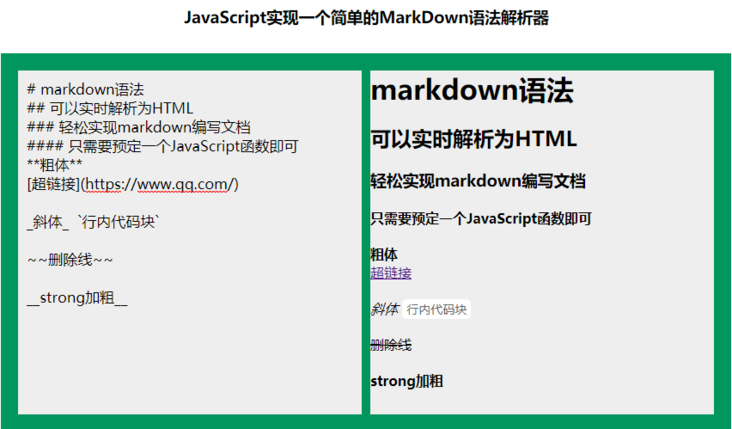
关于 JavaScript 实现简单 Markdown 语法解析器的介绍到此结束。如需了解更多相关内容,请搜索本站以前的文章或继续浏览下面的相关文章。希望大家以后多多支持本站!