

本文介绍在PC与安卓平板共用代码的场景下,如何判断设备是否为安卓平板且运行在Cordova环境中。通过检测window.actionSheet方法区分原生应用与浏览器,从而禁用ElementUI上传组件并调用Cordova接口处理拍照与相册选择,解决混合开发中的上传兼容问题。
需求背景与判断逻辑
需求背景是PC端和安卓平板共用同一套代码。在平板端,应用通过Cordova打包成壳子运行。如果检测到使用了Cordova环境,则不支持ElementUI组件库中的上传功能,因此需要进行环境判断。此外,用户在平板上也可能通过浏览器直接打开项目,所以需要实现两层判断逻辑。
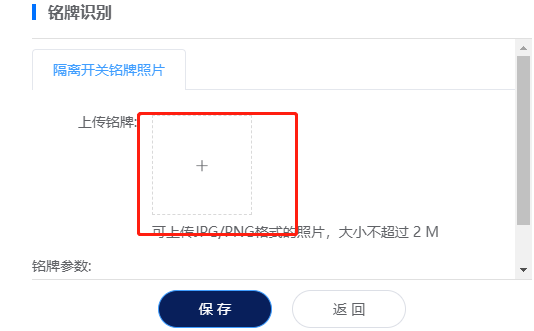
在App内部,通过Cordova提供的window.actionSheet方法调用上传接口,分别读取相机和图库中的图片。
代码实现与处理流程
具体实现代码如下。
<el-upload
                      class="avatar-uploader repost-pic-upload"
                      ref="uploadImgRef"
                      action=""
                      :accept="fileType"
                      :disabled="isAndroid"
                      :show-file-list="false"
                      :on-preview="picPreview"
                      :http-request="
                        file => {
                          beforeUpload(file, index);
                          return false;
                        }
                      "
                      :before-remove="
                        (file, fileList) => {
                          handleRemove(file, fileList, index);
                          return false;
                        }
                      "
                    >
                      <div
                        v-if="uploadFlag"
                        class="progress-wrap"
                        @click.stop="handleCancelUpload"
                      >
                        <p class="progress-rate">{{ uploadPercent }}%</p>
                        <p class="progress-cancel">取消上传</p>
                      </div>
                      <img
                        v-else-if="item.dstImageData"
                        :src="item.dstImageData"
                        class="avatar"
                      />
                      <i v-else class="el-icon-plus avatar-uploader-icon"></i>
                      <div
                        class="android-wrap"
                        v-if="isAndroid"
                        @click="selectPhotoSheet(index)"
                      ></div>
                    </el-upload>
首先定义计算属性,用于判断当前运行环境。
  computed: {
    // 判断是否安卓APP中打开应用还是浏览器
    isAndroid() {
      if (
        /(iPhone|iPad|iPod|iOS|Android)/i.test(navigator.userAgent) &&
        typeof window.actionSheet == "function"
      ) {
        return true;
      } else {
        return false;
      }
    }
  },
针对安卓环境的处理方法。
  // 选择图片弹窗按钮
    selectPhotoSheet(arrIndex) {
      let that = this;
      window.actionSheet(["拍照", "相册"]).then(index => {
        that.cameraGetPicture(index, arrIndex);
      });
    },
    // 拍照或相册选择
    cameraGetPicture(data, arrIndex) {
      // data == 2 为相册
      window
        .cameraGetPicture(data)
        .then(base64 => {
          console.log(base64);
          this.uploadImg(arrIndex, base64);
        })
        .then(err => {
          console.log(err);
        });
    },
针对PC环境或其他浏览器的处理方法。
 // 上传图片
    beforeUpload(file, index) {
      this.uploadFlag = true;
      let picType = file.file.type;
      if (
        !(
          picType == "image/png" ||
          picType == "image/jpg" ||
          picType == "image/jpeg"
        )
      ) {
        this.$message.warning("只能JPG/PNG格式的照片");
        this.list[index].src = "";
        return false;
      }
      if (file.file.size > 2 * 1024 * 1024) {
        this.$message.warning("图片大小不能超多2M");
        return false;
      }
      // let params = new FormData();
      // params.append("file", file.file);
      common.getBase64(file.file).then(base64 => {
        // this.list[index].dstImageData = base64;
        this.uploadImg(index, base64);
      });

      this.dialogVisible = true;
      return false;
    },
    // 上传图片
    uploadImg(index, base64) {
      let arr = base64.split(",");
      let params = {
        prefix: arr[0],
        dataString: arr[1]
      };

      let CancelToken = axios.CancelToken;
      let self = this;
      axios({
        url: this.imgUploadUrlBase,
        method: "post",
        data: params,
        headers: {
          "Content-Type": "application/json;charser=utf-8",
          Authorization: `Bearer${store.state.login.login.access_token}`
        },
        cancelToken: new CancelToken(function executor(c) {
          self.cancel = c;
        }),
        onUploadProgress: progressEvent => {
          this.uploadPercent = Math.round(
            (progressEvent.loaded / progressEvent.total) * 100
          );
        }
      })
        .then(({ data: { data } }) => {
          api
            .getRecognition({
              imgPath: data.filePath
            })
            .then(res => {
              this.list[index].dstImageData = data.filePath;
              this.list[index].nameplateTableJson = res;
              this.$message.success("上传成功");
            });
        })
        .catch(() => {
          this.$message.error("上传失败");
        })
        .finally(() => {
          this.uploadFlag = false;
          this.uploadPercent = 0;
        });

    },
到此这篇关于JS判断当前是否平板安卓并是否支持cordova方法的文章就介绍到这了,更多相关js判断当前平板安卓内容请搜索本站以前的文章或继续浏览下面的相关文章希望大家以后多多支持本站!