

本文介绍了基于Vue和JS实现三级分类全选与单选的完整代码方案。通过v-model绑定与事件监听,处理一级、二级及三级分类的勾选状态联动,支持全选、半选及取消操作,并触发相应接口刷新数据,适用于复杂列表的批量选择场景。
Vue三级分类全选与单选实现概述
本文分享了一个使用JavaScript和Vue.js实现三级分类全选与单选功能的具体代码示例,供读者参考学习。
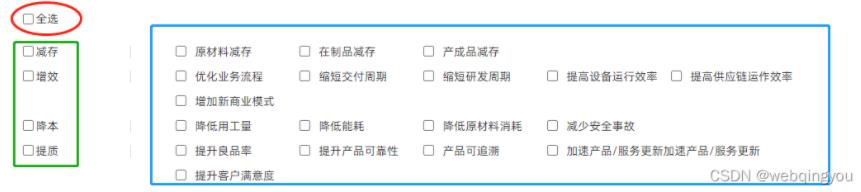
HTML模板结构
HTML结构部分
<div class="demand-class">
    <div class="demand-class-title">需求分类</div>
    <div class="demand-check">
        <input
        class="collect-top-checked"
        type="checkbox"
        v-model="demandChecked"
        @change="handledemandChecked"
        />全选
    </div>
    <div
        class="package-type package-type2"
        v-for="(itns, itds) in classiFications"
        :key="itns.id"
    >
        <div class="package-type-title upgrading-title">
        <input
            class="collect-top-checked"
            type="checkbox"
            v-model="ficationsCheck[itds]"
            @change="handleFicationsCheck(itds)"
        />{{ itns.name }}
        <div class="title-bor"></div>
        </div>
        <div class="package-type-content">
        <div
            v-for="cd in itns.children"
            :key="cd.id"
            class="package-type-list"
        >
            <input
            class="collect-top-checked"
            type="checkbox"
            :value="cd.id"
            @change="handlechildrenCheck(itds, cd.id)"
            v-model="childrenCheck"
            />
            <div>{{ cd.name }}</div>
        </div>
        </div>
    </div>
</div>
核心逻辑处理
JavaScript逻辑部分
data () {
    classiFications: [], //需求分类 接口给的集合
    demandChecked: false, // 需求分类全选
    ficationsCheck: [], //一级分类的单个全选
    childrenCheck: [], //二级分类的全选
    demandCheckedShow: false, //二级全选不触发接口
}

methods: {
    // 需求分类全选
    handledemandChecked() {

        if (this.demandChecked) {
            this.classiFications.forEach((it, is) => {
            this.ficationsCheck[is] = true;
            this.handleFicationsCheck(is);
            });
        } else {
            this.classiFications.forEach((it, is) => {
            this.ficationsCheck[is] = false;
            this.handleFicationsCheck(is);
            });
        }
        },
        //一级分类所选
        async handleFicationsCheck(id) {

        this.demandCheckedShow = true;
        let tmp = this.classiFications[id].childrenIds; //当前选择的id子集合
        let tmpAdd = this.childrenCheck; //当前选择的id子集合
        if (this.ficationsCheck[id]) {
            tmp.forEach((item) => {
            for (let i = 0; i < tmp.length; i++) {
                if (tmpAdd.indexOf(item) === -1) {
                this.childrenCheck.push(item);
                }
            }
            });
        } else {
            tmp.forEach((item) => {
            for (let i = 0; i < tmp.length; i++) {
                if (tmpAdd.indexOf(item) !== -1) {
                this.childrenCheck.splice(this.childrenCheck.indexOf(item), 1);
                }
            }
            });
        }
        // this.handleType();
        this.currentPage = 0;
        await this.initSolutionAllPage();
        this.demandCheckedShow = false;
        },
        //二级分类所选
        handlechildrenCheck(ids, cd) {

        console.log(cd);
        let cont = 0;
        // let conts = 0;
        let tmp = this.classiFications[ids].childrenIds; //当前选择的id子集合
        let tmpAdd = this.childrenCheck; //当前选择的id子集合
        if (this.ficationsCheck[ids]) {
            tmp.forEach((item) => {
            for (let i = 0; i < tmp.length; i++) {
                if (tmpAdd.indexOf(item) === -1) {
                this.ficationsCheck[ids] = false;
                }
            }
            });
        } else {
            let tmpl = tmp.length === 1 ? 1 : tmp.length - 1;
            tmp.forEach((item) => {
            for (let i = 0; i < tmpl; i++) {
                if (tmpAdd.indexOf(item) !== -1) {
                // console.log(item);
                cont = cont + 1;
                }
            }
            });
            if (cont === this.classiFications[ids].childrenIds.length) {
            this.ficationsCheck[ids] = true;
            }
        }
        // this.handleType();
        if (!this.demandCheckedShow) {
            this.currentPage = 0;
            this.initSolutionAllPage();
        }
    },
}
以上就是本文的全部内容,希望读者能从中获得帮助,也欢迎大家继续支持本站获取更多技术资源。