

本文深入解析JavaScript中正则表达式test方法连续调用时出现的意外结果。核心原因在于全局匹配(g标志)下RegExp对象的lastIndex属性会随匹配成功而更新,导致后续匹配从指定位置开始而非字符串开头。文章提供了重置lastIndex的手动修复法以及使用String.match()作为更优替代方案,帮助开发者避免此类常见陷阱。
引言
相信很多开发者在日常编码中都会频繁使用最基础的正则表达式写法,用来判断目标字符串中是否包含特定的子串,这几乎是编程入门的常见操作。
const pattern = /ab/g
pattern.test("abcd") // true
这种基础的匹配方式看似简单,但在实际使用中是否存在潜在的隐患呢?
不妨先思考一下,下面这段代码执行后的输出结果究竟是什么?
const pattern = /ab/g
console.log(pattern.test("abcd"))
console.log(pattern.test("abcd"))
console.log(pattern.test("abcd"))
直觉上,很多人会认为这三次调用都会返回 true。
但实际在控制台运行代码后,结果往往与预期不符,令人感到意外。
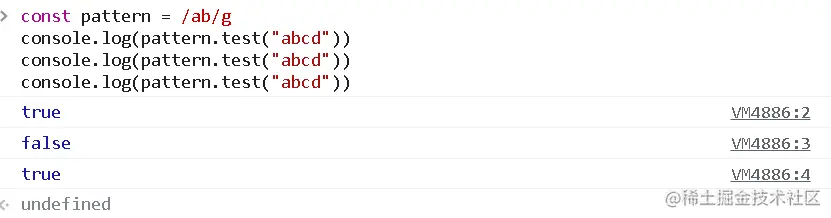
为什么连续三次调用会分别返回 true、false 和 true?
这里隐藏着一个常见的开发陷阱:在使用 test() 方法进行连续匹配时,如果正则表达式设置了全局匹配标志,结果会受到一个关键属性的影响,即正则对象的 lastIndex 属性。
lastIndex 属性决定了下一次正则匹配开始搜索的起始索引位置。
当使用 RegExp.exec() 或 RegExp.test() 进行匹配时,若匹配成功(返回 true),lastIndex 的值会被更新为当前匹配子串结束后的位置,并以此作为下一次检索的起点;若匹配失败(返回 false),lastIndex 则会被重置为 0。
通过打印 lastIndex 的值,我们可以清晰地观察到这一变化过程。
const pattern = /ab/g
console.log(pattern.test("abcd")) // true
console.log(pattern.lastIndex) // 2
console.log(pattern.test("abcd")) // false
console.log(pattern.lastIndex) // 0
console.log(pattern.test("abcd")) // true
console.log(pattern.lastIndex) // 2
当第一次调用 pattern.test("abcd") 时,pattern.lastIndex 的值变为 2,指向字符 'b' 的索引;第二次调用 pattern.test("abcd") 时,正则引擎从索引 2 之后继续搜索,无法找到完整的 'ab' 子串,因此返回 false,同时 lastIndex 被重置为 0;第三次调用 pattern.test("abcd") 时,由于 lastIndex 已归零,匹配从字符串开头重新开始,故再次返回 true,且 lastIndex 更新为 2。
了解这一机制后,你是否也曾因忽视它而踩过类似的坑?
针对这一问题,有哪些有效的解决策略?
第一种方法是手动重置 lastIndex 属性。
const pattern = /ab/g
console.log(pattern.test("abcd")) // true
pattern.lastIndex = 0
console.log(pattern.test("abcd")) // true
虽然这种方法可行,但每次匹配后都需要手动清理状态,代码显得繁琐且不够优雅,因此通常推荐采用第二种方案。
第二种方法是改用 String.match() 方法进行匹配。
const pattern = /ab/g
console.log("abcd".match(pattern)) // ['ab']
console.log("abcdab".match(pattern)) // ['ab', 'ab']
console.log("123".match(pattern)) // null
match 是更为推荐的匹配方式,它无需手动管理 lastIndex 状态。当存在匹配时,它会返回包含所有匹配结果的数组;若无匹配,则直接返回 null,逻辑更加直观清晰。
以上就是对正则 test 匹配陷阱及其解决方案的详细解析,如需了解更多关于正则表达式的高级用法,欢迎查阅本站其他相关文章。