

本文介绍如何利用JavaScript与CSS配合实现网页换肤效果。通过预先定义不同主题样式,监听小圆点点击事件,获取当前点击元素的类名,并将其动态设置给body元素,从而改变页面整体配色方案。
以下代码展示了如何使用JavaScript和CSS实现网页换肤功能,供读者参考。
具体效果如下图所示:
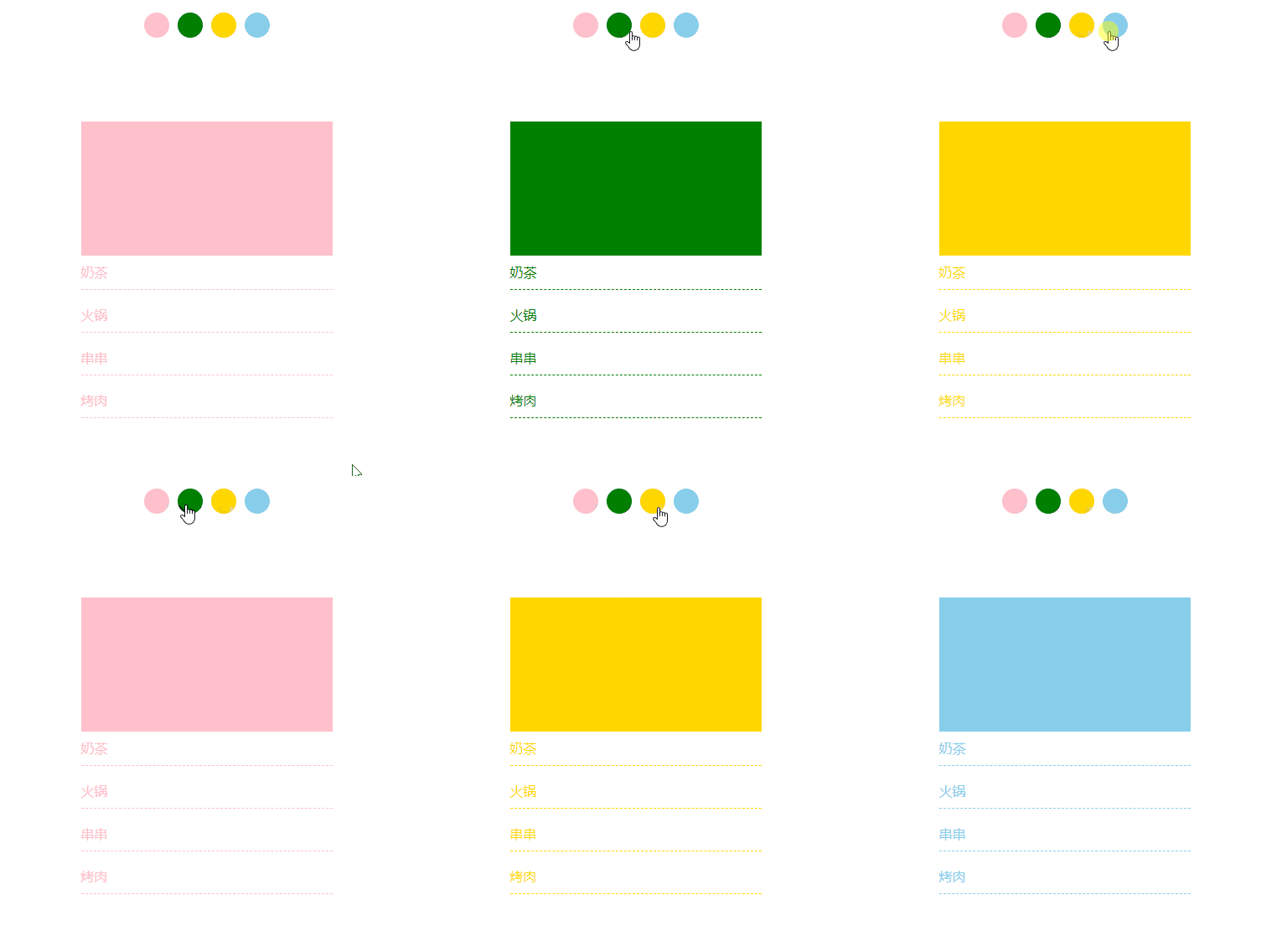
功能需求:当用户点击对应的小圆点时,下方内容的颜色应随之改变。
核心实现思路如下:
1. 在CSS文件中预先编写好各种主题对应的样式; 2. 获取代表主题的小圆点元素,并为它们绑定点击事件; 3. 在事件处理函数中,获取当前被点击元素的类名(className); 4. 将该类名设置为body元素的class属性,从而应用对应的主题样式。
该实现主要考察JavaScript中获取元素属性值以及设置元素属性值的基本操作。
<style>
        *{
            margin:0;
            padding:0;
            list-style: none;
        }
        .dot{

            margin:100px auto;
            display: flex;
            justify-content: center;

        }
        .dot li{
            width: 30px;
            height: 30px;
            border-radius: 50%;
           cursor: pointer;
        }
        .dot li:first-child{
            background:pink;
        }
        .dot li:nth-child(2){
            background:green;
        }
        .dot li:nth-child(3){
            background:gold;
        }
        .dot li:last-child{
            background:skyblue;
        }
        .dot li:not(:last-child){
            margin-right: 10px;
        }
        .content{
            margin:100px auto;
            width: 300px;
        }
        .pink .content .banner{
            height: 160px;
            width: 100%;
            background:pink;
        }
        .pink .content li{
            color:pink;
            margin-bottom: 10px;
            border-bottom: 1px dashed pink;
            line-height: 40px;
        }

        .green .content .banner{
            height: 160px;
            width: 100%;
            background:green;
        }
        .green .content li{
            color:green;
            margin-bottom: 10px;
            border-bottom: 1px dashed green;
            line-height: 40px;
        }

        .gold .content .banner{
            height: 160px;
            width: 100%;
            background:gold;
        }
        .gold .content li{
            color:gold;
            margin-bottom: 10px;
            border-bottom: 1px dashed gold;
            line-height: 40px;
        }

        .skyblue .content .banner{
            height: 160px;
            width: 100%;
            background:skyblue;
        }
        .skyblue .content li{
            color:pink;
            margin-bottom: 10px;
            border-bottom: 1px dashed skyblue;
            line-height: 40px;
        }
</style>
<body class="pink">
<ul class="dot">
<li class="pink"></li>
<li class="green"></li>
<li class="gold"></li>
<li class="skyblue"></li>
</ul>
<div class="content">
<div class="banner"></div>
<ul>
<li>奶茶</li>
<li>火锅</li>
<li>串串</li>
<li>烤肉</li>
</ul>
</div>
<script>
window.onload = function(){
let lis = document.querySelectorAll('.dot li');
let body = document.querySelector('body');
for(let i=0;i<lis.length;i++){
lis[i].addEventListener('click',function(){
// 获取属性值:元素名.属性名 设置属性值:元素名.属性名 = 属性值 ; 移除属性:元素名.属性名 = "";(此种方法不能获取,设置,移除自定义属性)
//获取属性值 :元素名.getAttribute('属性名') ;设置属性值:元素名.setAttribute('属性名','属性值') ;移除属性:元素名.removeAttribute('属性名') (此种方法能获取,设置,移除自定义属性,可对任何属性有效)
let color = this.getAttribute('class')
body.setAttribute('class',color)
})
}
}
</script>
</body>以上就是本文的全部内容,希望对读者有所帮助,欢迎继续支持本站。