

本文详细介绍Vue移动端项目中Vant组件库Tag标签的使用。涵盖基础用法、空心样式及图标嵌入,重点讲解如何通过三元表达式结合active状态实现动态分类选择,并指出类名未加引号导致样式失效的常见错误,帮助开发者避坑。
本文聚焦于Vant组件库中的Tag标签组件。
以下是具体的代码实现部分。
<template>
  <div class="pd50">
    <!-- Tag标签的属性与Button按钮的大体相同 -->
    <!-- 基础用法
        其他第三方ui库的颜色可能不一致
    -->
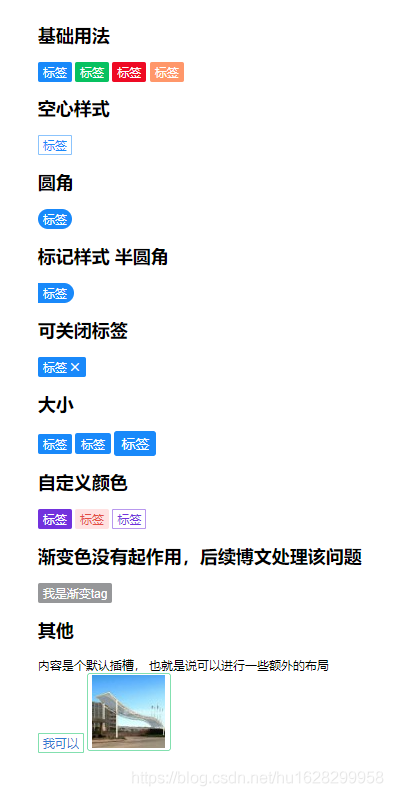
    <h2>基础用法</h2>
    <van-tag type="primary">标签</van-tag>
    <van-tag type="success">标签</van-tag>
    <van-tag type="danger">标签</van-tag>
    <van-tag type="warning">标签</van-tag>
    <!-- 空心样式
        多数第三方都是采用 plain 作为空心样式
    -->
    <h2>空心样式</h2>
    <van-tag plain type="primary">标签</van-tag>
    <h2>圆角</h2>
    <van-tag round type="primary">标签</van-tag>
    <h2>标记样式 半圆角</h2>
    <van-tag mark type="primary">标签</van-tag>
    <h2>可关闭标签</h2>
    <!-- 需要自己写逻辑控制关闭 -->
    <van-tag v-if="show" closeable type="primary" @close="close">
      标签
    </van-tag>
    <h2>大小</h2>
    <van-tag type="primary">标签</van-tag>
    <van-tag type="primary" size="medium">标签</van-tag>
    <van-tag type="primary" size="large">标签</van-tag>
    <h2>自定义颜色</h2>
    <!--
        color 背景颜色
        text-color 文本颜色
     -->
    <van-tag color="#7232dd">标签</van-tag>
    <van-tag color="#ffe1e1" text-color="#e44e44">标签</van-tag>
    <van-tag color="#7232dd" plain>标签</van-tag>
    <h2>渐变色没有起作用,后续博文处理该问题</h2>
    <van-tag color="linear-gradient(to right, #ff6034, #ee0a24)">我是渐变tag</van-tag>
    <!--  -->
    <h2>其他</h2>
    <div>内容是个默认插槽, 也就是说可以进行一些额外的布局</div>
    <van-tag type="success" plain><span style="color:#347ad0">我可以</span></van-tag>
    <van-tag type="success" plain>
        <img src="@/assets/1.jpg" alt="">
    </van-tag>
  </div>
</template>
<script>
import { Tag } from "vant";
export default {
components: {
vanTag: Tag,
},
data() {
return {
show: true,
};
},
methods: {
close() {
this.show = false;
},
},
};
</script>
<style lang="scss" scoped>
</style>运行效果如下所示。
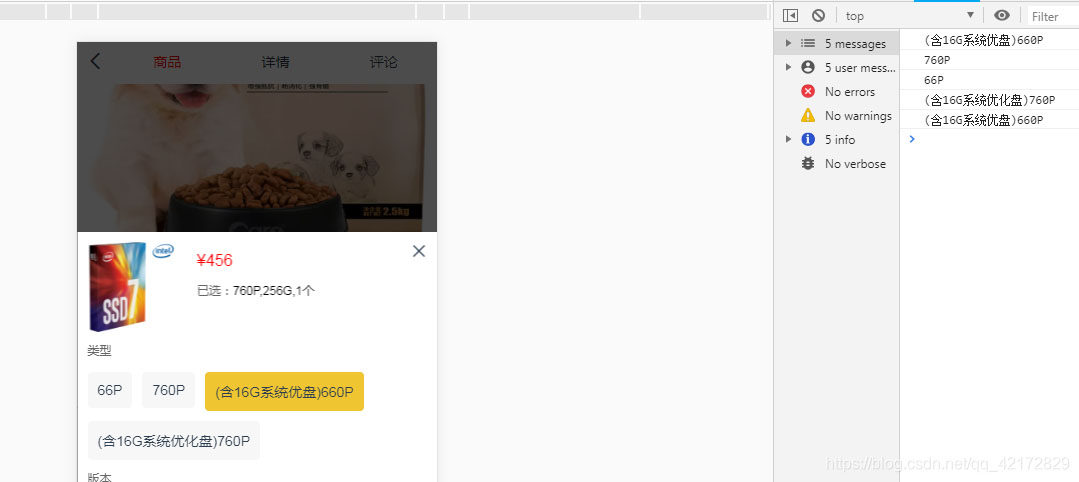
Tag标签的选中状态处理(涉及类型选择与分类筛选)。
利用三元表达式为类选择器赋值。当变量active被点击并赋值时,应用active样式;若未点击,则使用Classification样式。
看似简单的操作,有时却容易让人困惑。编写代码时若报错找不到Classification,可能会让人疑惑这并非变量名。最终发现原因是'active':'Classification'中缺少了单引号(这是常见的自我疏忽)。
界面显示效果如下:
<div v-for="(item,index) in data">
	<span :class="active==item.type?'active':'Classification'" @click="oncheck(item.type)">
         {{item.type}}</span>
</div>
JavaScript逻辑部分:
data() {
	return {
		data: [{
			    type: '66P'
			}, {
			    type: '760P'
			}, {
			    type: '(含16G系统优盘)660P'
			}, {
			    type: '(含16G系统优化盘)760P'
			}],
			active:''
			}
},

methods: {
    oncheck(name){
		 console.log(name)
		 this.active=name
	}
}
CSS样式部分:
.active{
		float: left;
		margin-left: 10px;
		padding: 10px;
		background: #efc531;
		margin-bottom: 10px;
		border-radius: 4px;
		font-size: 14px;
	}
.Classification {
		float: left;
		margin-left: 10px;
		padding: 10px;
		background: #f7f7f7;
		margin-bottom: 10px;
		border-radius: 4px;
		font-size: 14px;
	}
以上为个人经验分享,希望能为大家提供参考,也希望大家多多支持本站。