

本文介绍如何在 BootstrapVue 的 b-tabs 组件中为动态生成的标签页标题添加关闭按钮。通过利用 v-slot:title 插槽自定义标题内容,插入带有 @click 事件的图标或按钮,并配合 JavaScript 方法处理数组移除逻辑,实现标签页的动态增删功能。
BootstrapVue 动态标签页添加关闭按钮的实现方案
在 BootstrapVue 中,若需为选项卡标题增加关闭功能,可参考以下具体实现方式。
BootstrapVue 官方文档的选项卡组件示例中,并未直接展示带有关闭按钮的标题样式。此处基于官方示例进行扩展,旨在为每个标签页标题添加独立的关闭操作入口。
官方提供的原始示例代码如下:
<template>
  <div>
    <b-card no-body>
      <b-tabs card>
        <!-- Render Tabs, supply a unique `key` to each tab -->
        <b-tab v-for="i in tabs" :key="'dyn-tab-' + i" :title="'Tab ' + i">
          Tab contents {{ i }}
          <b-button size="sm" variant="danger" class="float-right" @click="closeTab(i)">
            Close tab
          </b-button>
        </b-tab>

        <!-- New Tab Button (Using tabs-end slot) -->
        <template v-slot:tabs-end>
          <b-nav-item @click.prevent="newTab" href="#" ><b>+</b></b-nav-item>
        </template>

        <!-- Render this if no tabs -->
        <template v-slot:empty>
          <div class="text-center text-muted">
            There are no open tabs<br>
            Open a new tab using the <b>+</b> button above.
          </div>
        </template>
      </b-tabs>
    </b-card>
  </div>
</template>

<script>
  export default {
    data() {
      return {
        tabs: [],
        tabCounter: 0
      }
    },
    methods: {
      closeTab(x) {
        for (let i = 0; i < this.tabs.length; i++) {
          if (this.tabs[i] === x) {
            this.tabs.splice(i, 1)
          }
        }
      },
      newTab() {
        this.tabs.push(this.tabCounter++)
      }
    }
  }
</script>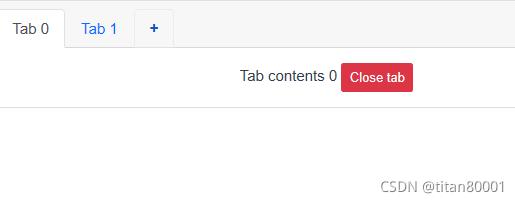
核心思路是利用插槽机制向标签页标题注入自定义内容。具体做法是选择一个关闭样式的图标,并为其绑定点击事件以触发关闭逻辑。调整后的代码结构如下:
<template>
  <div>
    <div>
          <b-nav-item @click.prevent="newTab" href="#" ><b>添加Tab页</b></b-nav-item>
    </div>

    <div>
      <b-card no-body>
        <b-tabs card>
          <!-- Render Tabs, supply a unique `key` to each tab -->
          <b-tab v-for="i in tabs" :key="'dyn-tab-' + i">
            <!--用插槽想标题添加icon图标,同时将关闭按钮调用的时间转移到图标的点击事件中执行-->
            <template v-slot:title>
                    Tab{{ i }}
                    <!--插入icon图标,关闭按钮图形-->
                    <a @click="closeTab(i)">
                        <b-icon icon="x-square"></b-icon>
                    </a>
            </template>
            <h1> Tab-{{i}} </h1>

          </b-tab>

          <!-- New Tab Button (Using tabs-end slot) -->
          <!-- Render this if no tabs -->
          <template v-slot:empty>
            <div class="text-center text-muted">
              There are no open tabs<br>
              Open a new tab using the <b>+</b> button above.
            </div>
          </template>
        </b-tabs>
      </b-card>
    </div>

  </div>
</template>

<script>
export default {
  data () {
    return {
      tabs: [],
      tabCounter: 0
    }
  },
  methods: {
    closeTab (x) {
      for (let i = 0; i < this.tabs.length; i++) {
        if (this.tabs[i] === x) {
          this.tabs.splice(i, 1)
        }
      }
    },
    newTab () {
      this.tabs.push(this.tabCounter++)
    }
  }
}
</script>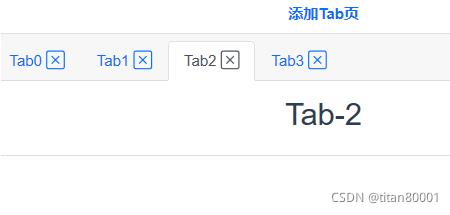
相关官方文档链接
以上内容即为在 BootstrapVue 中实现标签页关闭功能的完整方案,希望能为相关开发工作提供参考。