

本文详解如何利用JavaScript的onfocus和onblur事件实现表单输入框的默认文字显示与隐藏功能。通过判断输入框焦点状态及值是否为空,动态修改输入框内容及样式,提升用户体验。
本文分享了使用JavaScript实现表单输入框默认文字动态显示与隐藏的具体代码,供读者参考。
实现思路
核心逻辑基于onfocus和onblur两个事件。
onfocus事件在用户获取焦点时触发,表现为鼠标点击输入框后,内部出现闪烁的光标。
onblur事件在用户失去焦点时触发,表现为鼠标离开输入框后,内部闪烁的光标消失。
首先,为输入框设置一个初始的默认值。
其次,获取输入框对象并绑定onfocus和onblur事件。当触发onfocus(获取焦点)时,检查输入框的value是否等于默认初始值,若相等则将其清空,以便用户输入自定义内容。当触发onblur(失去焦点)时,检查输入框的value是否为空,若为空则重新赋值为默认值,确保未输入内容时显示提示信息。
此外,还可以针对获取焦点和失去焦点两种状态设置不同的文字颜色,以增强视觉区分度。
示例1
代码实现如下:
<!DOCTYPE html>
<html lang="en">

<head>
    <meta charset="UTF-8">
    <meta http-equiv="X-UA-Compatible" content="IE=edge">
    <meta name="viewport" content="width=device-width, initial-scale=1.0">
    <title>获取/失去焦点</title>
    <style>
        input {
            color: #ccc;
            outline: none;
        }
    </style>
</head>

<body>
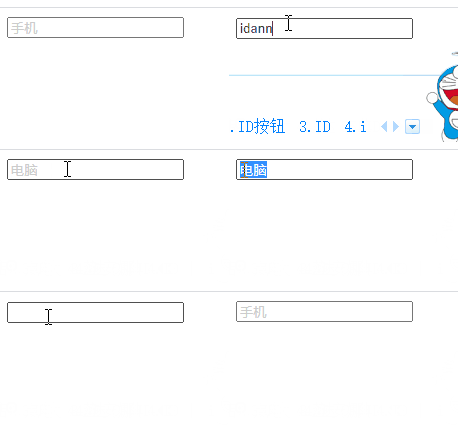
    <input type="text" value="手机">
    <script>
        var text = document.querySelector('input');
        text.onfocus = function() {
            if (this.value === '手机') {
                this.value = '';
            }
            this.style.color = '#333';
        }

        text.onblur = function() {
            if (this.value === '') {
                this.value = '手机';
            }
            this.style.color = '#ccc';
        }
    </script>
</body>

</html>
页面运行效果如图所示:
示例2
代码实现如下:
<!DOCTYPE html>
<html lang="en">

<head>
    <meta charset="UTF-8">
    <meta http-equiv="X-UA-Compatible" content="IE=edge">
    <meta name="viewport" content="width=device-width, initial-scale=1.0">
    <title>用户名 显示 隐藏</title>
    <style>
        input {
            font-size: 14px;
            color: #999;
            outline: none;
            padding: 3px 0 3px 10px;
            border: 1px solid #ccc;
        }
    </style>
</head>

<body>
    <!--用户名 显示隐藏内容 -->
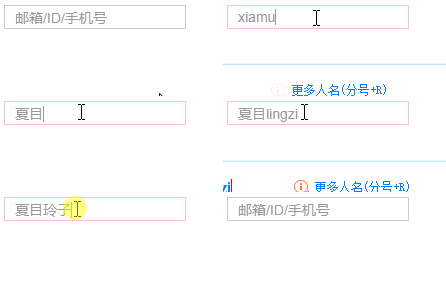
    <input type="text" value="邮箱/ID/手机号" class="userName">
    <script>
        var userName = document.querySelector('.userName');
        userName.onfocus = function() {
            if (this.value === '邮箱/ID/手机号') {
                this.value = '';
                this.style.borderColor = 'pink';
            } else {
                this.style.borderColor = 'pink';
                this.style.color = '#999';
            }
        }
        userName.onblur = function() {
            if (this.value === '') {
                this.value = '邮箱/ID/手机号';
                this.style.borderColor = '#ccc';
                this.style.color = '#999';
            } else {
                this.style.borderColor = '#ccc';
                this.style.color = '#333';
            }
        }
    </script>
</body>

</html>
页面运行效果如图所示:
以上就是本文的全部内容,希望对大家的学习有所帮助,也希望大家多多支持本站。