

本文介绍如何使用 HTML、CSS 和 JavaScript 制作一个简单的网页时钟。通过 HTML 定义指针结构,CSS 控制样式与居中,JavaScript 利用 setInterval 定时器结合 Date 对象获取时间,并通过 CSS transform 属性实现指针旋转效果。
JavaScript 网页时钟实现概述
本文将展示如何利用 JavaScript 在网页中实现一个动态时钟,最终运行效果如图所示:
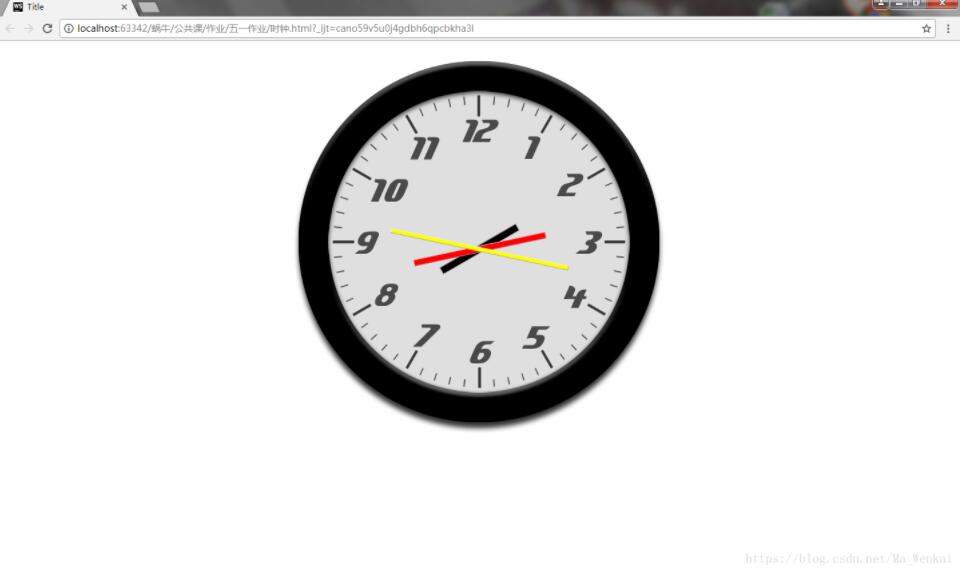
HTML 结构构建
首先需要在 HTML 的 body 部分构建表盘及指针的基础资源结构:
<div><img src="../../image/clockface.jpg" alt=""></div>
<hr id="hour" >
<hr id="min">
<hr id="second">
CSS 样式设置
接下来配置 CSS 样式以定义外观和布局:
<style>
        body{
            margin: 0;
        }
        div{
            margin: 0 auto;
            width: 600px;
            height: 600px;
        }
        #hour{
            background-color: black;
            width: 130px;
            height: 10px;
            position: fixed;
            top: 295px;
            left: 50%;
            margin-left: -65px;
        }
        #min{
            background-color: red;
            width: 200px;
            height: 8px;
            position: fixed;
            top: 296px;
            left: 50%;
            margin-left: -100px;
        }
        #second{
            background-color: yellow;
            width: 270px;
            height: 5px;
            position: fixed;
            top: 297.5px;
            left: 50%;
            margin-left: -135px;
        }
</style>
JavaScript 逻辑实现
最后是 JavaScript 代码部分。程序使用循环定时器 setInterval() 每秒调用一次主函数。主函数内部通过 new Date() 创建时间对象,并分别调用 .getHours()、.getMinutes() 和 .getSeconds() 获取当前的时、分、秒数值。随后,利用 CSS 的旋转动画功能改变指针角度:
setInterval(watch,1000);
var anjleSeconds=0,anjleMin=0,anjleHours=0;
function watch() {
        var Time= new Date();
        anjleSeconds=Time.getSeconds()/60*360+90;
        anjleMin=Time.getMinutes()/60*360+90;
        anjleHours=nowHours/12*360+90;
        document.getElementById("second").style.transform="rotate("+anjleSeconds+"deg)";
        document.getElementById("min").style.transform="rotate("+anjleMin+"deg)";
        document.getElementById("hour").style.transform="rotate("+anjleHours+"deg)";
    }
现有问题说明
目前存在的一个问题是,由于时分秒指针均使用 hr 标签表示,导致指针两端长度一致,无法直观区分长短。
完整代码示例
完整的代码示例如下:
<!DOCTYPE html>
<html lang="en">
<head>
    <meta charset="UTF-8">
    <title>Title</title>
    <style>
        body{
            margin: 0;
        }
        div{
            margin: 0 auto;
            width: 600px;
            height: 600px;
        }
        #hour{
            background-color: black;
            width: 130px;
            height: 10px;
            position: fixed;
            top: 295px;
            left: 50%;
            margin-left: -65px;
        }
        #min{
            background-color: red;
            width: 200px;
            height: 8px;
            position: fixed;
            top: 296px;
            left: 50%;
            margin-left: -100px;
        }
        #second{
            background-color: yellow;
            width: 270px;
            height: 5px;
            position: fixed;
            top: 297.5px;
            left: 50%;
            margin-left: -135px;
        }
    </style>
</head>
<body>
<div><img src="../../image/clockface.jpg" alt=""></div>
<hr id="hour" >
<hr id="min">
<hr id="second">
<script>
    setInterval(watch,1000);
    var anjleSeconds=0,anjleMin=0,anjleHours=0;
    function watch() {
        var Time= new Date();
        anjleSeconds=Time.getSeconds()/60*360+90;
        anjleMin=Time.getMinutes()/60*360+90;
        anjleHours=Time.getHours()/12*360+90;
        document.getElementById("second").style.transform="rotate("+anjleSeconds+"deg)";
        document.getElementById("min").style.transform="rotate("+anjleMin+"deg)";
        document.getElementById("hour").style.transform="rotate("+anjleHours+"deg)";
    }
</script>
</body>
</html>
以上内容即为本文的全部讲解,希望能为读者的学习提供有益帮助,也欢迎大家继续支持本站。