

本文深入解析 JavaScript 中 reduce() 方法的核心机制与使用场景。通过对比 forEach、map 等遍历方法,详细阐述 reduce 的语法参数及初始值对执行逻辑的影响。文章提供了数组去重、对象分组合并以及后端菜单数据转换为层级树形结构的完整代码示例,帮助开发者掌握利用 reduce 高效处理复杂数据结构的技术。
定义
reduce() 方法会对数组内的每个元素依次执行提供的 reducer 函数,按升序顺序执行,最终将计算结果汇总为一个单一的值返回。
与 forEach()、map() 和 filter() 等数组遍历方法类似,reduce() 也会遍历数组的每一项。但 reduce() 的独特之处在于,它能够将前一次遍历产生的结果与当前遍历项进行运算,从而实现累积计算。
语法
array.reduce(function(prev, cur, index, array){
    ...
}, init);
回调函数中涉及的参数说明如下:
- prev:必需参数。表示调用回调函数时返回的值,或者指定的初始值 init。
- cur:必需参数。表示当前正在处理的数组元素。
- index:可选参数。表示当前元素的索引位置。
- array:表示被调用 reduce() 方法的原始数组。
- init:可选参数。指定初始值,该值将作为第一次调用回调函数时的第一个参数 prev。
在实际使用中,prev 和 cur 是最常用的两个参数。
需要注意的是,回调函数第一次执行时,prev 和 cur 的取值取决于是否提供了初始值 init:如果提供了 init,prev 取 init 的值,cur 取数组的第一个元素,此时索引从 0 开始;如果未提供 init,prev 取数组的第一个元素,cur 取数组的第二个元素,此时索引从 1 开始。
实例
1. 没有传递初始值 init
const arr = [1, 3, 5, 7]
arr.reduce(function(prev, cur, index, arr){
    console.log(prev, cur, index)
    return prev + cur
})
每次调用时的参数和返回值情况如下表所示:
| callback | prev | cur | index | array | return value |
|---|---|---|---|---|---|
| 第1次 | 1 | 3 | 1 | [1, 3, 5, 7] | 4 |
| 第2次 | 4 | 5 | 2 | [1, 3, 5, 7] | 9 |
| 第3次 | 9 | 7 | 3 | [1, 3, 5, 7] | 16 |
由于未传入初始值,索引从 1 开始,回调函数共被调用三次。初始时 prev 为数组第一项 1,cur 为第二项 3,两者相加得到返回值 4 作为下一轮回调的 prev 值,随后继续执行后续回调直至完成并返回最终结果。
2. 传递初始值的情况下
const arr = [1, 3, 5, 7]
arr.reduce(function(prev, cur, index, arr){
    console.log(prev, cur, index)
    return prev + cur
}, 10)
每次调用时的参数和返回值情况如下表所示:
| callback | prev | cur | index | array | return value |
|---|---|---|---|---|---|
| 第1次 | 10 | 1 | 0 | [1, 3, 5, 7] | 11 |
| 第2次 | 11 | 3 | 1 | [1, 3, 5, 7] | 14 |
| 第3次 | 14 | 5 | 2 | [1, 3, 5, 7] | 19 |
| 第4次 | 19 | 7 | 3 | [1, 3, 5, 7] | 26 |
3. 数组去重
const arr = ['ab', 'v', 'd', 'ab', 'h', 'e', 'dc', 'e', 'e', 'f']
const newArr = arr.reduce(function(prev, cur){
    !prev.includes(cur) && prev.push(cur)
    return prev
}, [])
console.log(newArr) // ["ab", "v", "d", "h", "e", "dc", "f"]
执行步骤如下:
- 首先初始化一个空数组作为初始值。
- 第一次调用时,prev 为初始的空数组,cur 为数组的第一项 arr[0](注:原文写arr[1]但结合代码arr[0]更准确,此处依原文表述逻辑修正为第一项),在 prev 中查找 cur 是否存在,若不存在则将其添加到 prev 中,并返回 prev 进入下一次回调。
- 第二次回调时,prev 为上一轮的返回值,cur 为数组的第二项 arr[1],同样在 prev 中查找 cur 是否存在,若不存在则添加到 prev 中,并返回 prev 进入下一次回调。
- 最后,将 prev 这个包含去重后元素的数组返回。
4. 利用 reduce 对数组中的 Object 对象进行分组及合并
//从后台获取的对象数组,根据对象的type进行分组合并成tree树形展示数据
const dataArr = [
{ type: '治理层', name: 'hive_82', reserve: '2', id: 1 },
{ type: '原始数据层', name: 'qwe', reserve: '1', id: 2 },
{ type: '贴源层', name: 'mysql_exchangis', reserve: '3', id: 3 },
{ type: '治理层', name: 'links_188', reserve: '1', id: 4 },
{ type: '贴源层', name: 'mysql_ces', reserve: '2', id: 5 }
]
const treeData = dataArr.reduce((cur, next) => {
const obj = cur.find(curItem => curItem.label === next.type)
if (obj) {
if (obj.children.indexOf(next.id) === -1) { //去重处理
obj.children.push({
...next,
label: next.name
})
}
} else {
const newObj = {
label: next.type,
children: [{
...next,
label: next.name
}]
}
cur.push(newObj)
}
return cur
}, [])
// 合并后的结果:
treeData = [
{
label: '治理层',
children: [
{ type: '治理层', name: 'hive_82', reserve: '2', id: 1, label: 'hive_82' },
{ type: '治理层', name: 'links_188', reserve: '1', id: 4, label: 'links_188' }
]
},
{
label: '原始数据层',
children: [
{ type: '原始数据层', name: 'qwe', reserve: '1', id: 2, label: 'qwe' }
]
},
{
label: '贴源层',
children: [
{ type: '贴源层', name: 'mysql_exchangis', reserve: '3', id: 3, label: 'mysql_exchangis' },
{ type: '治理层', name: 'mysql_ces', reserve: '2', id: 5, label: 'mysql_ces' }
]
}
]5. 利用 reduce 处理菜单后端返回的菜单结构
需要根据 parentId 字段将这些平铺数据转换成层级结构。
方法一:
const dataArr = [
{id: '18', name: '重置密码', parentId: '30',parentName: '用户管理'},
{id: '13', name: '审计日志', parentId: '29', parentName: '系统管理'},
{id: '29', name: '系统管理', parentId: '0', parentName: null},
{id: '14', name: '修改', parentId: '33', parentName: '部门管理'},
{id: '2', name: '用户列表', parentId: '30', parentName: '用户管理'},
{id: '30', name: '用户管理', parentId: '29', parentName: '系统管理'},
{id: '33', name: '部门管理', parentId: '0', parentName: null},
{id: '37', name: '添加用户', parentId: '30', parentName: '用户管理'},
{id: '6', name: '添加', parentId: '33', parentName: '部门管理'},
{id: '7',name: '删除', parentId: '33', parentName: '部门管理'}
]
//创建菜单id的映射关系
const idMapping = dataArr.reduce((prev, next, i) => {
prev[next.id] = i
return prev
}, {})
const treeData = []
dataArr.map(el => {
// 一级菜单
if (el.parentId === '0') {
treeData.push(el)
return
}
// 通过映射找到父元素
const parentEl = dataArr[idMapping[el.parentId]]
// 把当前元素添加到父元素的`children`数组中
parentEl.children = [...(parentEl.children || []), el]
})
console.log(treeData)方法二:
//根据parentId创建映射关系
const result = dataArr.reduce((prev, next) => {
    prev[next.parentId] ? prev[next.parentId].push(next) : prev[next.parentId] = [next];
    return prev;
}, {});

Object.keys(result).map(key => {
    result[key].map((item, i) => {
        result[item.id] ? item.children = result[item.id] : ''
    });
})
this.treeData = result[0]
console.log(treeData)
此外,还可以通过递归的方法来实现,具体细节此处不再赘述。
最终生成的数据结构如下图所示:
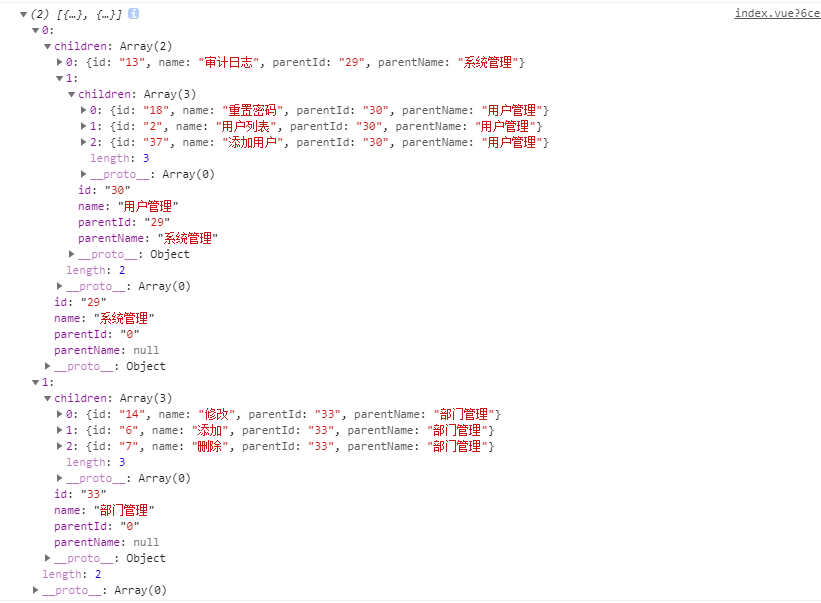
以上就是JS使用reduce()方法处理树形结构数据的详细内容,更多关于JS的资料请关注本站其它相关文章!