

本文介绍如何使用原生JavaScript实现一个数字点击小游戏。游戏在容器中随机生成数字,玩家需凭记忆按升序点击,数字5秒后消失。通过完整代码示例展示关卡逻辑、计时器及DOM操作,适合前端初学者练习DOM操作与事件处理。
游戏概述与规则
本文介绍如何使用原生JavaScript实现一个数字点击小游戏,供读者参考。
近期公司季度测试中有一道有趣的题目,要求使用内部工具IVX实现。虽然该工具颇具特色,但本文仍采用原生JavaScript进行演示,具体题目如下。
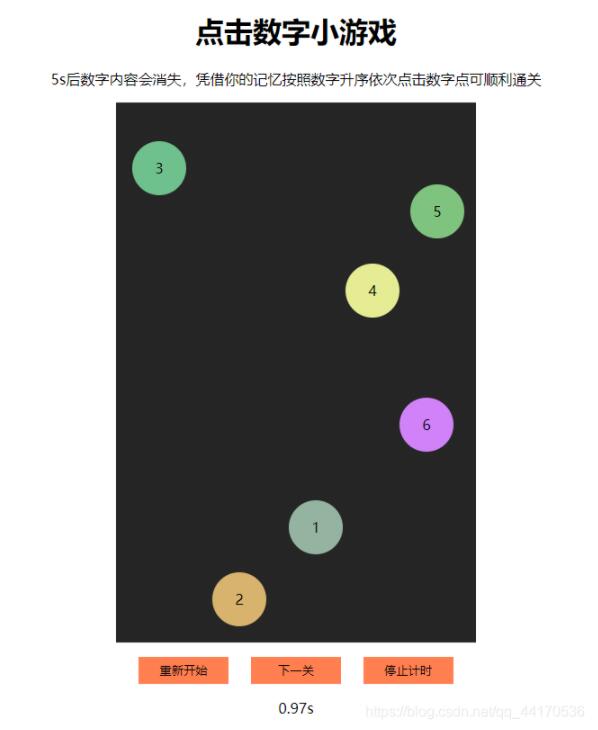
游戏目标是依次点击容器中随机生成的数字元素。这些数字元素会在5秒后自动消失,玩家需要凭借记忆,按照数字从小到大的顺序依次点击,方可通过当前关卡。
以下是游戏的实际运行效果展示。
代码实现
具体实现代码如下。
<!DOCTYPE html>
<html lang="en">
  <head>
    <meta charset="UTF-8" />
    <meta http-equiv="X-UA-Compatible" content="IE=edge" />
    <meta name="viewport" content="width=device-width, initial-scale=1.0" />
    <title>点击数字小游戏</title>
    <style>
      #cointainer {
        margin: auto;
        height: 600px;
        width: 400px;
        background-color: rgb(37, 37, 37);
        position: relative;
      }
      .header {
        width: auto;
        text-align: center;
        margin: auto;
      }
      .parm {
        height: 60px;
        width: 60px;
        border-radius: 30px;
        position: absolute;
        text-align: center;
        line-height: 60px;
      }
      .parm:hover {
        cursor: pointer;
      }
      .todo {
        text-align: center;
        margin-top: 16px;
      }
      button {
        width: 100px;
        height: 30px;
        background-color: coral;
        border: none;
        outline: none;
      }
    </style>
  </head>
  <body>
    <div class="header">
      <h1>点击数字小游戏</h1>
      <p>
        5s后数字内容会消失,凭借你的记忆按照数字升序依次点击数字点可顺利通关
      </p>
    </div>
    <div id="cointainer"></div>
    <div class="todo">
      <button onclick="restart(6)">重新开始</button>
      <button style="margin-left: 20px" onclick="nextPass()">下一关</button>
      <button
        style="margin-left: 20px"
        onclick="window.clearInterval(timmer2);window.clearTimeout(timmer1)"
      >
        停止计时
      </button>
      <p>时间</p>
    </div>
  </body>
  <script>
    let circleList = [];
    //circle构造器
    function getPosition() {
      let parm = { x: "", y: "" };
      parm.x = Math.round(Math.random() * 340);
      parm.y = Math.round(Math.random() * 540);
      return parm;
    }
    //创建不重叠circle
    function createCircle(total) {
      if (circleList.length === 0) {
        circleList.push(getPosition());
      }
      //限制创建次数200
      for (let i = 0; i < 200; i++) {
        if (circleList.length < total) {
          let circle = getPosition();
          let distan = [];
          for (let n = 0; n < circleList.length; n++) {
            let dis =
              Math.abs(circle.x - circleList[n].x) ** 2 +
              Math.abs(circle.y - circleList[n].y) ** 2;
            distan.push(dis);
          }
          if (Math.min(...distan) > 3600) {
            circleList.push(circle);
          }
        } else {
          break;
        }
      }
    }
    //创建8个circle
    createCircle(8);
    //随机颜色选择器
    function selectColor() {
      let r = 100 + Math.round(Math.random() * 155);
      let g = 100 + Math.round(Math.random() * 155);
      let b = 100 + Math.round(Math.random() * 155);
      return `rgb(${r},${g},${b})`;
    }
    //在DOM中创建circle
    let containner = document.getElementById("cointainer");
    //构造关卡
    function creatGame(num) {
      circleList = [];
      createCircle(num);
      for (let i = 0; i < circleList.length; i++) {
        let node = document.createElement("span");
        containner.appendChild(node);
        node.className = "parm";
        node.innerText = i + 1;
        node.style.left = circleList[i].x + "px";
        node.style.top = circleList[i].y + "px";
        node.style.backgroundColor = selectColor();
      }
    }
    //点击答案
    let asw = [];
    //设置5s后开始游戏
    let start = function () {
      let list = document.querySelectorAll("span");
      let right = "";
      for (let i = 0; i < list.length; i++) {
        list[i].innerText = "";
        list[i].number = i + 1;
        right = right + (i + 1);
        list[i].addEventListener(
          "click",
          function () {
            asw.push(list[i].number);
            if (asw.length === pass && asw.join("") === right) {
              window.clearInterval(timmer2);
              alert("恭喜过关,你的用时为:" + time.toFixed(2) + "s");
              asw = [];
            } else if (asw.length === pass && asw.join("") !== right) {
              asw = [];
              window.clearInterval(timmer2);
              alert("抱歉没能过关");
            }
          },
          false
        );
      }
    };
    let time = 0;
    let sumTime = function () {
      time = time + 0.01;
      document.querySelectorAll("p")[1].innerText = time.toFixed(2) + "s";
    };
    //初始关卡
    let pass = 6;
    creatGame(pass);
    let timmer1 = setTimeout(start, 5000);
    let timmer2 = setInterval(sumTime, 10);
    //重新开始
    function restart(nowerPass) {
      while (containner.hasChildNodes()) {
        containner.removeChild(containner.firstChild);
      }
      pass = nowerPass;
      creatGame(nowerPass);
      clearTimeout(timmer1);
      clearInterval(timmer2);
      time = 0;
      timmer1 = setTimeout(start, 5000);
      timmer2 = setInterval(sumTime, 10);
    }
    //下一关
    function nextPass() {
      if (pass < 20) {
        pass++;
        restart(pass);
      }
    }
  </script>
</html>
至此,这个锻炼大脑逻辑的有趣小游戏分享完毕。
希望本文内容能对读者有所帮助,欢迎继续支持本站。