
使用 firstElementChild 属性或 querySelector 方法,避免直接访问数组索引导致 undefined 错误。

当前位置:首页 > JavaScript DOM 与事件 > 正文
JS安全获取第一个子元素:怎么处理无子节点时的undefined错误
作者:小圆点
时间:2026-11-29
浏览:253
文章目录
理解 DOM 子节点获取方式
在 JavaScript 中,获取元素的第一个子元素通常有几种方式,但并非所有方式都能安全处理空子节点的情况。常见的误区是直接操作 childNodes 数组或使用不存在的属性。
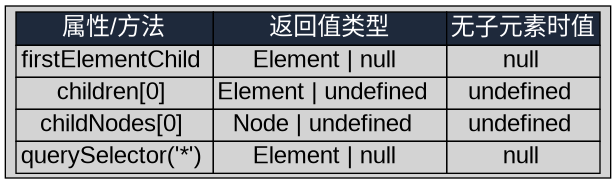
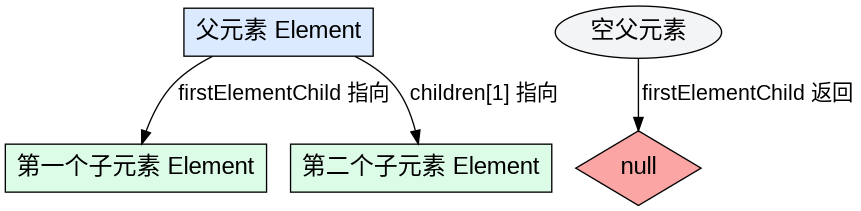
childNodes 返回的是包含文本节点和元素节点的集合,而 children 仅返回元素节点。如果父元素没有子元素,children[0] 会返回 undefined,此时若尝试访问其属性(如 .style)就会抛出错误。相比之下,firstElementChild 专门用于获取第一个子元素节点,若无子元素则返回 null,这在逻辑判断上更为清晰和安全。
安全获取与代码实现
下面提供一个完整的 HTML 文件示例,演示如何安全地获取第一个子元素,并处理无子节点时的情况。

<!DOCTYPE html>
<html lang="zh">
<head>
    <meta charset="UTF-8">
    <title>JS 安全获取第一个子元素</title>
    <style>
        body { font-family: sans-serif; padding: 20px; }
        .container { border: 1px solid #ccc; padding: 10px; margin-bottom: 10px; }
        button { margin-top: 5px; cursor: pointer; }
        .result { color: blue; font-weight: bold; }
    </style>
</head>
<body>
    <h3>测试用例</h3>

    <!-- 有子元素的容器 -->
    <div id="hasChildren" class="container">
        <span>我是第一个子元素</span>
        <span>我是第二个子元素</span>
    </div>
    <button onclick="testHasChildren()">测试有子元素</button>
    <p class="result" id="res1"></p>

    <!-- 无子元素的容器 -->
    <div id="emptyContainer" class="container"></div>
    <button onclick="testEmptyChildren()">测试无子元素</button>
    <p class="result" id="res2"></p>

    <script>
        function testHasChildren() {
            const parent = document.getElementById('hasChildren');
            // 使用 firstElementChild 获取第一个子元素
            const firstChild = parent.firstElementChild;

            if (firstChild) {
                // 安全访问属性
                firstChild.style.color = 'red';
                document.getElementById('res1').textContent = '成功:第一个子元素是 ' + firstChild.textContent;
            } else {
                document.getElementById('res1').textContent = '无子元素';
            }
        }

        function testEmptyChildren() {
            const parent = document.getElementById('emptyContainer');
            const firstChild = parent.firstElementChild;

            if (firstChild) {
                document.getElementById('res2').textContent = '意外:找到了子元素';
            } else {
                // firstElementChild 在无子元素时返回 null
                document.getElementById('res2').textContent = '安全处理:无子元素,firstElementChild 为 null';
            }
        }
    </script>
</body>
</html>
运行上述 HTML 文件后,点击“测试有子元素”按钮,第一个 span 标签文字变红,并在下方显示成功信息。点击“测试无子元素”按钮,由于容器为空,firstElementChild 返回 null,程序进入 else 分支,输出安全提示信息,未发生任何错误。这证明了使用 firstElementChild 配合 null 检查可以有效避免 undefined 导致的运行时异常。
该程序创建了一个包含不同状态的容器,通过按钮触发获取逻辑。重点在于检查返回值是否为 null 或 undefined,从而避免后续的属性访问错误。
处理 null 与 undefined 的差异
当父元素为空时,firstElementChild 返回 null,而 children[0] 返回 undefined。两者在严格相等判断中表现一致,但在类型检查和调试工具中显示不同。推荐使用 null 判断,因为它是 DOM API 的标准行为。
在实际开发中,建议始终使用可选链操作符 ?. 或直接判断 if (element) 来确保代码的健壮性。例如,parent.firstElementChild?.style.color = 'red' 可以在无子元素时静默失败,而不会中断脚本执行。
实用工具推荐
电子包浆
使用 ›绿化、压缩、噪点和虚拟水印,自由调节做旧程度。
图片压缩
使用 ›选择画质和输出格式,预览压缩前后的大小。
作者最新文章
相关文章