
获取服务器本机 IP 需遍历网络接口并过滤回环地址,获取客户端 IP 需解析 HTTP 请求头。核心在于区分直连与代理场景,确保在 Nginx 等反向代理后仍能拿到真实客户端地址。

当前位置:首页 > Node.js 基础 > 正文
Node.js中获取服务器本机IP与客户端请求IP的方法
作者:后端茶话
时间:2026-11-28
浏览:606
文章目录
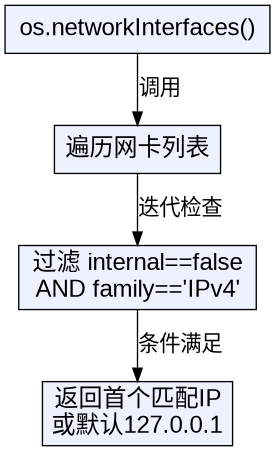
确定服务器本机IP地址
Node.js通过os.networkInterfaces()获取所有网卡信息。需遍历该对象,筛选出非内部(non-loopback)且为IPv4的地址。通常取第一个符合条件的IP作为本机对外标识。

os.networkInterfaces()返回的对象中,每个键是网卡名,值是地址数组。每个地址对象包含address、family和internal属性。过滤时需排除internal: true的记录,这对应127.0.0.1或::1。若存在多个有效IP,可根据业务需求选择第一个或特定网段。此方法适用于物理机、虚拟机及大多数容器环境。
解析客户端真实IP地址
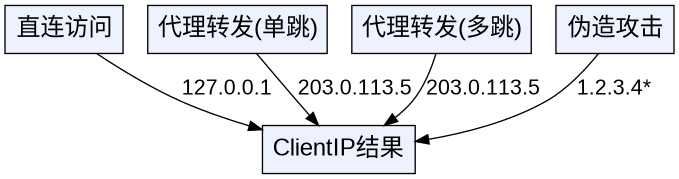
客户端IP不能仅依赖req.socket.remoteAddress,因为经过代理后该值变为代理服务器IP。需检查X-Forwarded-For请求头,从中提取最左侧的原始客户端IP。若未配置代理或头部不存在,则降级使用socket地址。
const os = require('os');
const http = require('http');

/**
 * 获取服务器本机首个非回环IPv4地址
 */
function getServerLocalIP() {
  const interfaces = os.networkInterfaces();
  for (const name of Object.keys(interfaces)) {
    for (const iface of interfaces[name]) {
      // 跳过内部回环地址和非IPv4
      if (iface.internal || iface.family !== 'IPv4') continue;
      return iface.address;
    }
  }
  return '127.0.0.1'; //  fallback
}

/**
 * 从请求中获取客户端真实IP
 * @param {object} req - HTTP请求对象
 * @param {boolean} trustProxy - 是否信任X-Forwarded-For头
 */
function getClientIP(req, trustProxy = false) {
  let ip = null;

  if (trustProxy && req.headers['x-forwarded-for']) {
    // X-Forwarded-For 可能是逗号分隔的字符串
    const list = req.headers['x-forwarded-for'].split(',');
    // 取第一个非空且非内部的IP
    for (let i = 0; i < list.length; i++) {
      const candidate = list[i].trim();
      if (candidate && !isInternalIP(candidate)) {
        ip = candidate;
        break;
      }
    }
  }

  // 如果代理头未提供有效IP,回退到socket地址
  if (!ip) {
    ip = req.socket.remoteAddress;
  }

  return ip;
}

// 辅助函数:简单判断是否为内部IP(简化版)
function isInternalIP(ip) {
  return ip.startsWith('127.') || ip.startsWith('192.168.') || ip.startsWith('10.') || ip === '::1';
}

// 创建示例服务器
const server = http.createServer((req, res) => {
  const localIP = getServerLocalIP();
  const clientIP = getClientIP(req, true); // 假设信任代理

  res.writeHead(200, { 'Content-Type': 'application/json' });
  res.end(JSON.stringify({
    serverLocalIP: localIP,
    clientIP: clientIP,
    rawHeaders: req.headers['x-forwarded-for'] ? 'present' : 'absent'
  }));
});

server.listen(3000, () => {
  console.log(`Server running at http://localhost:3000/`);
  console.log(`Server Local IP: ${getServerLocalIP()}`);
});
运行此脚本后,访问http://localhost:3000/将返回JSON响应。若直接本地访问,clientIP通常为127.0.0.1或::1;若通过Nginx反向代理并设置X-Forwarded-For头,则返回真实客户端IP。getServerLocalIP()始终返回本机第一个有效IPv4。注意:isInternalIP为简化实现,生产环境建议使用ipaddr.js库进行RFC标准校验。若trustProxy=false,即使存在代理头也会忽略,确保安全性。
X-Forwarded-For是一个逗号分隔的列表,格式为client, proxy1, proxy2。最左侧为发起请求的真实客户端IP。需注意该头部可被客户端伪造,生产环境中应信任上游可信代理。代码逻辑应先尝试从该头解析,若无效再回退到req.socket.remoteAddress。
完整实现与安全校验逻辑
以下代码封装了本机IP获取与客户端IP解析的健壮逻辑,包含对代理头的信任判断、非法格式处理及默认回退机制。可直接集成至Express/Koa中间件或工具模块中。
实用工具推荐
电子包浆
使用 ›绿化、压缩、噪点和虚拟水印,自由调节做旧程度。
图片压缩
使用 ›选择画质和输出格式,预览压缩前后的大小。
作者最新文章
相关文章