
系统讲解Node.js中使用async/await配合node:fs/promises异步读写文件的实用方案,涵盖错误处理、并发限制、大文件流式处理与原子写入实践。

当前位置:首页 > Node.js 基础 > 正文
Node.js中async/await异步读写文件最佳实践
作者:接口漫谈
时间:2026-11-22
浏览:124
文章目录
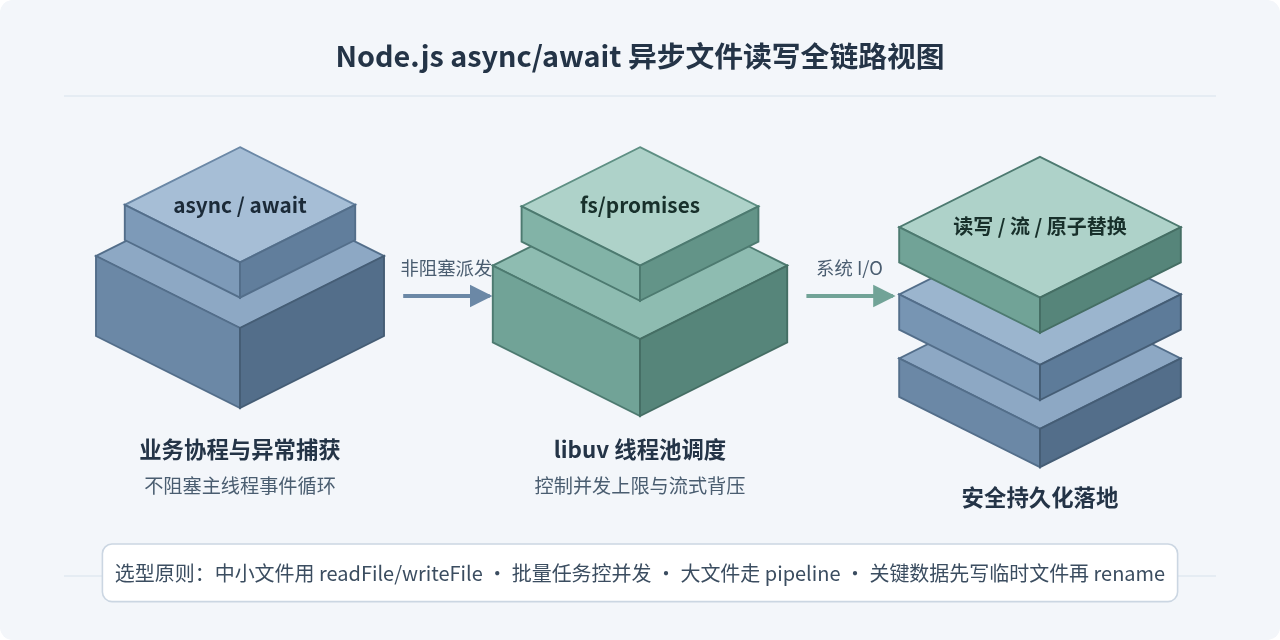
在 Node.js 中使用 async/await 异步读写文件,核心做法是直接引入内置的 node:fs/promises 模块处理常规中小文件,配合 try/catch 识别系统错误码;面对上千个文件时限制最大并发数以保护文件描述符;处理大文件时改用 node:stream/promises 的 pipeline 进行流式读写;更新关键配置文件时则通过“临时文件 + 落盘同步 + 原子重命名”避免半截数据损坏。
为什么优先选用 node:fs/promises,而不是回调或同步 API
Node.js 的文件系统模块同时提供了三套接口:同步方法(如 readFileSync)、传统回调方法(如 readFile(path, cb))和 Promise 接口(node:fs/promises)。使用 async/await 时,应该直接从 node:fs/promises 导入方法,而不是手动用 util.promisify 去包装旧版回调。
不建议在服务端请求处理路径中频繁使用同步方法,因为 readFileSync 和 writeFileSync 会直接阻塞 JavaScript 主线程。只要磁盘读写耗时几十毫秒,同一进程内所有其他 HTTP 请求和定时器都会被迫排队等待。而传统的回调写法在需要“先检查目录、再读取配置、最后写回日志”的多步操作中很容易产生多层嵌套,异常处理也容易遗漏分支。
node:fs/promises 原生返回 Promise 对象,可以直接搭配 async/await 和 try/catch 写出接近同步阅读顺序的异步代码。使用 node: 前缀导入还能明确标识这是 Node.js 内置核心模块,避免与同名第三方包混淆。你可以先在终端运行 node -v 确认当前环境版本(现代长期支持版本均原生支持 node:fs/promises)。
同步 API 的合理边界: 只有在进程启动初始化(例如服务监听端口前加载一次本地配置文件)或一次性短命 CLI 脚本中,同步读写才值得考虑;进入业务异步流程后应一律使用异步接口。
单文件异步读写的标准写法与错误处理该怎么做
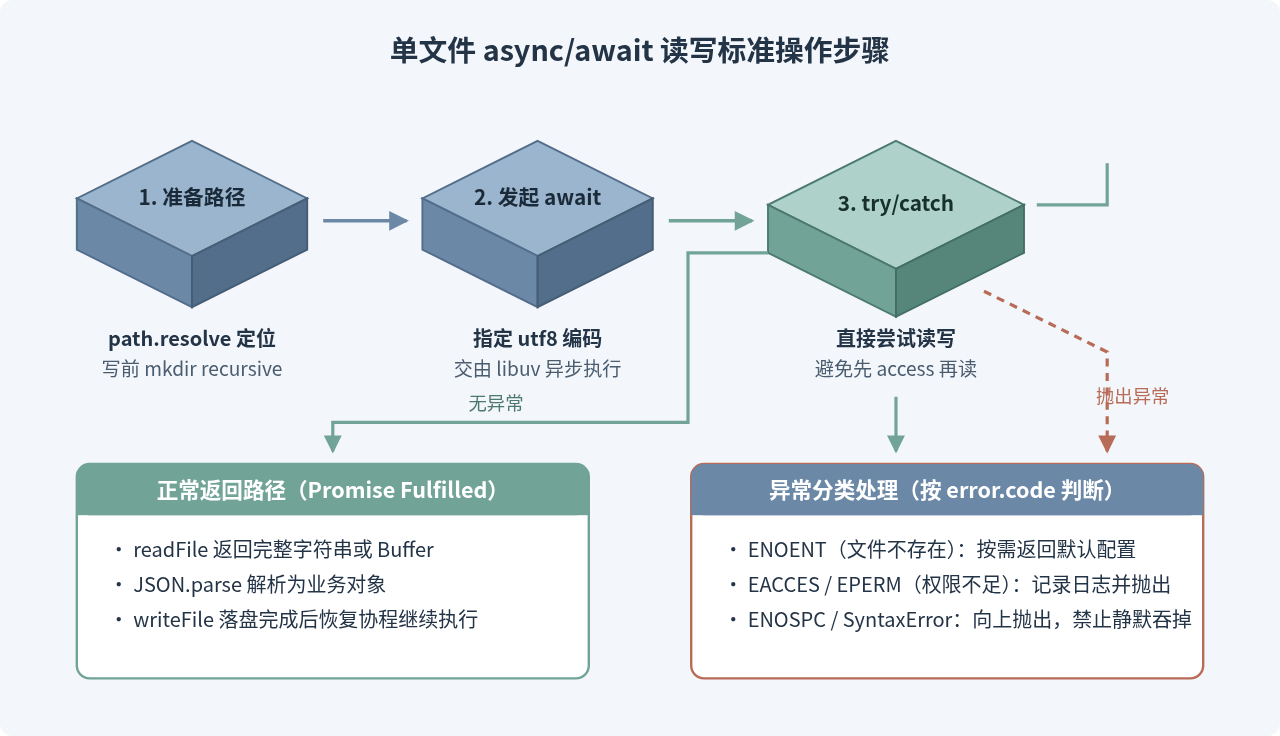
读取或写入单个文本文件、JSON 配置文件时,最稳妥的模式是:先用 path.resolve 确定绝对路径,写入前调用 mkdir(..., { recursive: true }) 确保父目录存在,读写时显式指定 'utf8' 编码,并用 try/catch 根据 error.code 区分不同异常情况。
下面这段完整示例演示了如何异步读取一个 JSON 配置文件并在修改后写回,如果文件不存在则返回默认配置。运行环境为支持 ES 模块的 Node.js(将文件保存为 config-store.mjs 并在项目根目录执行 node config-store.mjs)。
// config-store.mjs
import { readFile, writeFile, mkdir } from 'node:fs/promises';
import path from 'node:path';

const CONFIG_PATH = path.resolve(import.meta.dirname, 'data', 'app-config.json');

async function loadConfig(filePath) {
  try {
    const content = await readFile(filePath, { encoding: 'utf8' });
    return JSON.parse(content);
  } catch (error) {
    // 仅在文件确实不存在时回退默认值;权限不足或 JSON 损坏应继续抛出
    if (error.code === 'ENOENT') {
      return { theme: 'light', retryLimit: 3 };
    }
    throw error;
  }
}

async function saveConfig(filePath, config) {
  const dir = path.dirname(filePath);
  await mkdir(dir, { recursive: true });
  const serialized = JSON.stringify(config, null, 2) + '\n';
  await writeFile(filePath, serialized, { encoding: 'utf8' });
}

async function main() {
  const config = await loadConfig(CONFIG_PATH);
  config.lastUpdated = new Date().toISOString();
  await saveConfig(CONFIG_PATH, config);
  console.log('配置已更新:', config);
}

main().catch((err) => {
  console.error('配置文件处理失败:', err.message);
  process.exitCode = 1;
});
示例输出(首次执行时):
配置已更新: { theme: 'light', retryLimit: 3, lastUpdated: '2026-11-12T06:24:14.000Z' }
这段代码中有三个容易被忽略的细节值得注意:
- 为什么不用
fs.access先检查文件是否存在: 很多人习惯在readFile前先调用await access(filePath)。但在异步环境下,检查完到真正读取之间存在时间窗口,文件仍可能被外部进程删除或改写(即检查与使用之间的竞态条件)。官方推荐直接尝试readFile,在catch中判断error.code === 'ENOENT',少一次系统调用也更安全。 - 为什么显式传入
{ encoding: 'utf8' }: 不传编码时,readFile返回的是二进制Buffer,后续直接调用字符串方法或JSON.parse虽然有时能隐式转换,但显式指定编码能确保类型清晰,也避免处理多字节中文字符时出现意外。 - 为什么
catch里只吞掉ENOENT: 如果磁盘空间满(ENOSPC)、没有读写权限(EACCES)或 JSON 格式本身损坏(SyntaxError),悄悄返回默认配置会掩盖真实故障甚至导致旧配置被覆盖。
批量处理多个文件时,如何控制并发才不会出错
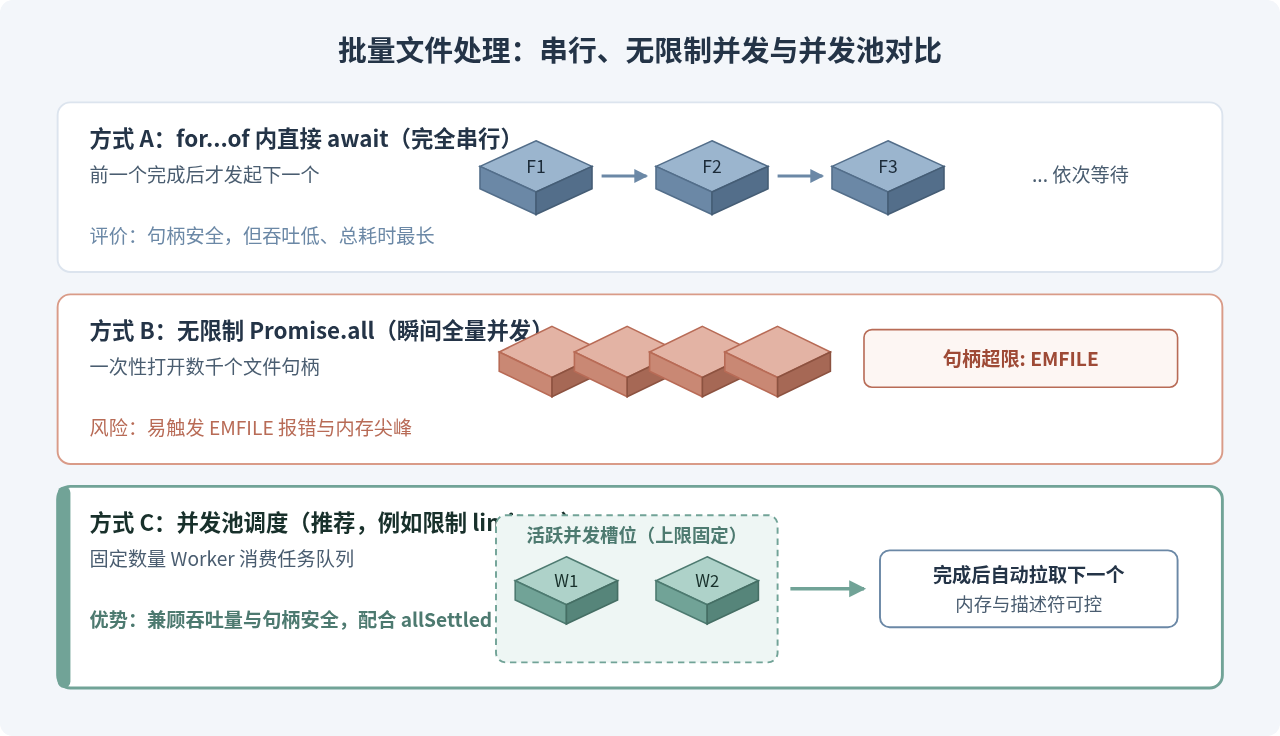
当需要读取几十甚至上千个文件时,常见有两种极端写法:一种是在 for...of 循环里直接写 await readFile(file),让所有任务完全串行;另一种是直接写 await Promise.all(files.map(readFile)),把全部请求一次性塞给操作系统。
这两种写法各有隐患。完全串行无法利用异步 I/O 的并发能力,文件数量一多耗时就会线性拉长。反过来,如果文件列表有几千甚至上万个,无限制的 Promise.all 会瞬间打开大量文件描述符,很快就会触发操作系统限制并报错 EMFILE: too many open files,同时瞬时内存占用也会暴涨。
更稳妥的做法是限制最大并发数(例如同时最多执行 8 个或 16 个文件任务),既能让线程池保持忙碌,又不会打爆系统句柄上限。下面提供一个不依赖第三方库的轻量并发控制函数,同时使用 Promise.allSettled 避免单个文件报错导致整批任务中断。
// batch-read.mjs
import { readFile } from 'node:fs/promises';
import path from 'node:path';

async function runWithConcurrency(items, limit, worker) {
  const results = new Array(items.length);
  let nextIndex = 0;

  async function runWorker() {
    while (nextIndex < items.length) {
      const currentIndex = nextIndex;
      nextIndex += 1;
      try {
        const value = await worker(items[currentIndex], currentIndex);
        results[currentIndex] = { status: 'fulfilled', value };
      } catch (reason) {
        results[currentIndex] = { status: 'rejected', reason };
      }
    }
  }

  const workerCount = Math.min(limit, items.length);
  await Promise.all(Array.from({ length: workerCount }, () => runWorker()));
  return results;
}

async function readMarkdownSummaries(fileNames) {
  const baseDir = path.resolve(import.meta.dirname, 'docs');
  const results = await runWithConcurrency(fileNames, 8, async (name) => {
    const fullPath = path.join(baseDir, name);
    const text = await readFile(fullPath, 'utf8');
    return { name, length: text.length };
  });

  const succeeded = [];
  const failed = [];
  results.forEach((res, idx) => {
    if (res.status === 'fulfilled') {
      succeeded.push(res.value);
    } else {
      failed.push({ file: fileNames[idx], code: res.reason.code });
    }
  });

  return { succeeded, failed };
}

readMarkdownSummaries(['a.md', 'b.md', 'missing.md']).then((summary) => {
  console.log('批量处理结果:', summary);
});
示例输出(假设 missing.md 不存在):
批量处理结果: { succeeded: [ { name: 'a.md', length: 420 }, { name: 'b.md', length: 815 } ], failed: [ { file: 'missing.md', code: 'ENOENT' } ] }
避坑提醒: 不要在
Array.prototype.forEach(async (item) => { ... }) 中执行异步文件操作。forEach 不会等待内部的 async 函数完成,外层函数会在所有文件读写刚发起时就提前返回,引发难以排查的竞态错误或未捕获异常。
大文件为什么不能直接用 readFile 一次读入内存
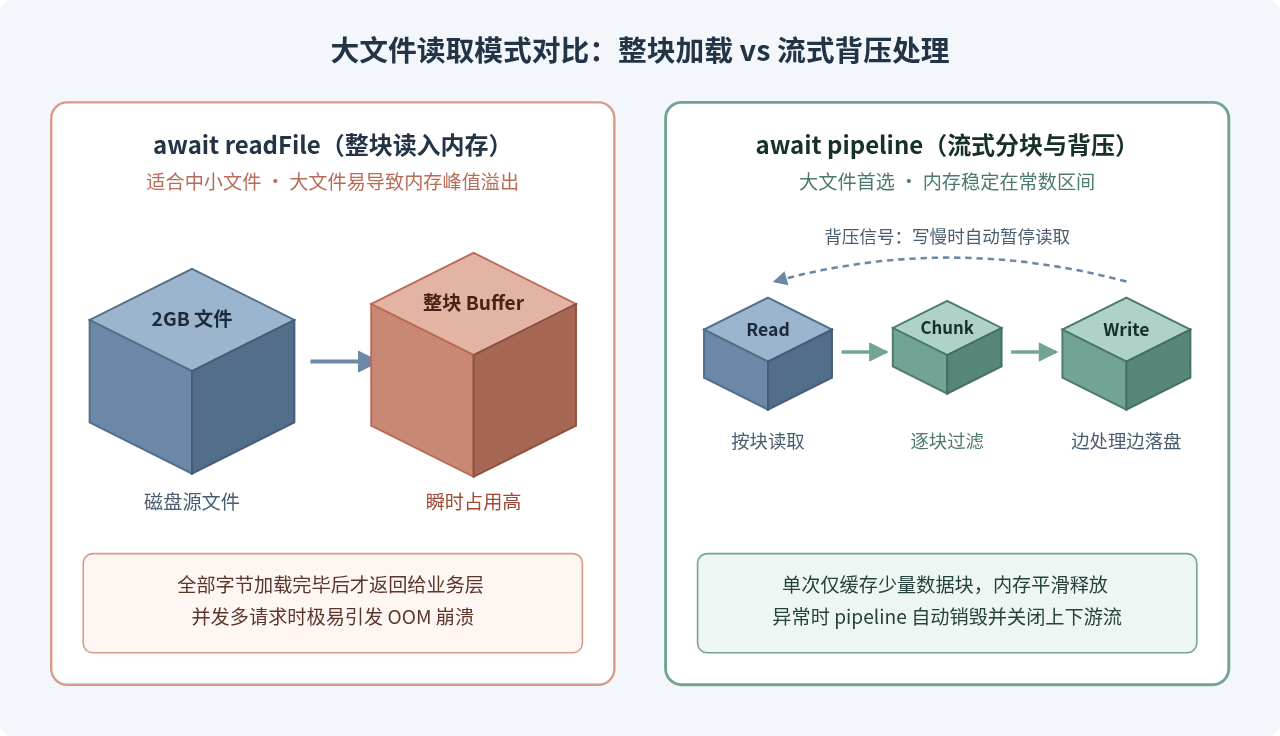
readFile 和 writeFile 的工作方式是把整个文件的数据一次性完整读入内存缓冲区后再返回。处理几 KB 到几 MB 的文本或 JSON 文件时这样做简洁高效;但如果面对几百 MB 甚至数 GB 的日志文件、导出报表或媒体文件,直接 await readFile 会把整块文件压入进程内存,不仅容易触发 V8 堆内存或 Buffer 上限溢出,还会拖慢垃圾回收。
针对大文件,最佳实践依然可以使用 async/await,但底层需要切换到流(Stream):
- 文件复制、压缩或格式转换: 使用
node:stream/promises提供的pipeline函数。它能自动处理背压(Backpressure,即写入慢于读取时暂停读取),并在任意一环报错或完成时统一关闭所有流,避免内存泄漏。 - 逐行分析大日志: 使用
fs.createReadStream配合node:readline/promises,直接用for await (const line of rl)异步逐行消费,内存占用始终维持在几十 KB 到几 MB 的常数级别。
// stream-filter.mjs
import { createReadStream, createWriteStream } from 'node:fs';
import { pipeline } from 'node:stream/promises';
import { createInterface } from 'node:readline/promises';
import path from 'node:path';

async function extractErrorLines(inputPath, outputPath) {
  const readStream = createReadStream(inputPath, { encoding: 'utf8' });
  const writeStream = createWriteStream(outputPath, { encoding: 'utf8' });
  const rl = createInterface({ input: readStream, crlfDelay: Infinity });

  async function* filterErrorLines(source) {
    for await (const line of source) {
      if (line.includes('[ERROR]')) {
        yield line + '\n';
      }
    }
  }

  // pipeline 会等待整条流链路结束,并在失败时自动销毁未关闭的流
  await pipeline(filterErrorLines(rl), writeStream);
}

const src = path.resolve(import.meta.dirname, 'logs', 'app.log');
const dst = path.resolve(import.meta.dirname, 'logs', 'errors-only.log');

extractErrorLines(src, dst)
  .then(() => console.log('大日志过滤完成:', dst))
  .catch((err) => {
    console.error('流式处理失败:', err.message);
    process.exitCode = 1;
  });
示例输出:
大日志过滤完成: /your-project/logs/errors-only.log
这里没有手工监听 'data'、'end' 和 'error' 事件,而是用 async function* 异步生成器搭配 pipeline。好处是背压由运行时的异步迭代器协议自动衔接:如果下游磁盘写入较慢,writeStream 积压达到水位线,pipeline 会暂停从 filterErrorLines 拉取下一行,上游读取流也随之暂停。
写入重要数据时,怎样防止文件写一半损坏
直接调用 await writeFile(targetPath, data) 时,默认会先把目标文件截断为空,再把新内容写入。如果写入中途进程被强杀、断电或磁盘写满,目标文件就会变成空白或只剩半截无效 JSON;而且在写入完成前,其他正在读取该文件的进程也可能读到不完整的数据。
防止数据写坏的通用做法是原子写入(Atomic Write),关键分为四步:
- 在目标文件所在的同一目录下创建一个唯一命名的临时文件(同一文件系统内才能保证后续重命名是原子操作,不能放到系统
/tmp后跨分区移动)。 - 通过
open()获取FileHandle,写入全部内容后调用await handle.sync(),强制操作系统把缓存数据刷入磁盘。 - 在
finally块中确保await handle.close()被执行,防止句柄泄漏。 - 调用
await rename(tempPath, targetPath)原子替换目标文件;若前面任何一步失败,在catch中清理掉残留的临时文件。
// atomic-write.mjs
import { open, rename, rm, mkdir } from 'node:fs/promises';
import { randomUUID } from 'node:crypto';
import path from 'node:path';

async function atomicWriteFile(targetPath, content) {
  const dir = path.dirname(targetPath);
  await mkdir(dir, { recursive: true });

  const tempPath = path.join(dir, `.${path.basename(targetPath)}.${randomUUID()}.tmp`);
  let handle;

  try {
    handle = await open(tempPath, 'w');
    await handle.writeFile(content, 'utf8');
    await handle.sync();
  } catch (error) {
    // 写入或刷盘阶段出错时,清理未完成的临时文件
    await rm(tempPath, { force: true }).catch(() => {});
    throw error;
  } finally {
    if (handle) {
      await handle.close();
    }
  }

  try {
    await rename(tempPath, targetPath);
  } catch (error) {
    await rm(tempPath, { force: true }).catch(() => {});
    throw error;
  }
}

const stateFile = path.resolve(import.meta.dirname, 'data', 'checkpoint.json');
const payload = JSON.stringify({ offset: 1024, status: 'committed' }, null, 2) + '\n';

atomicWriteFile(stateFile, payload)
  .then(() => console.log('原子写入成功:', stateFile))
  .catch((err) => {
    console.error('原子写入失败:', err.message);
    process.exitCode = 1;
  });
示例输出:
原子写入成功: /your-project/data/checkpoint.json
使用 open() 拿到 FileHandle 时,务必记住“谁打开、谁关闭”的原则。只要 open() 成功返回,就必须在 try/finally 中调用 handle.close(),否则一旦中间抛出序列化或写入异常,文件句柄会一直挂到垃圾回收才被被动清理。
日常开发中最常踩的坑与最佳实践速查
结合前面各个场景,下面将异步文件读写中最容易遗漏的约束和选型原则汇总成对照表和流程图,方便在写代码或 Code Review 时快速核对。
| 常见场景 / 问题 | 容易出错的做法 | 推荐实践 |
|---|---|---|
| 路径拼接 | 直接传相对路径如 './data/a.json',受启动目录 process.cwd() 变化影响 |
基于模块目录使用 path.resolve(import.meta.dirname, ...)(CommonJS 用 __dirname) |
遗漏 await |
调用 writeFile(...) 忘写 await,导致后续逻辑读不到新数据或异常未捕获 |
对每个文件 Promise 显式 await 或返回给调用方,并配合 ESLint 规则检查浮空 Promise |
| 手动管理句柄 | 调用 open() 后直接顺序执行,出错时跳过 close() |
统一用 try { ... } finally { await handle?.close(); } 保证关闭 |
| 批量目录遍历 | 直接对上千文件路径执行 Promise.all(paths.map(readFile)) |
使用并发池限制活跃任务数(如 8~16),结合 allSettled 思路隔离局部错误 |
| 大文件处理 | 用 readFile 一次读入几百 MB 日志再 split('\n') |
使用 createReadStream + readline/promises 或 pipeline 流式处理 |
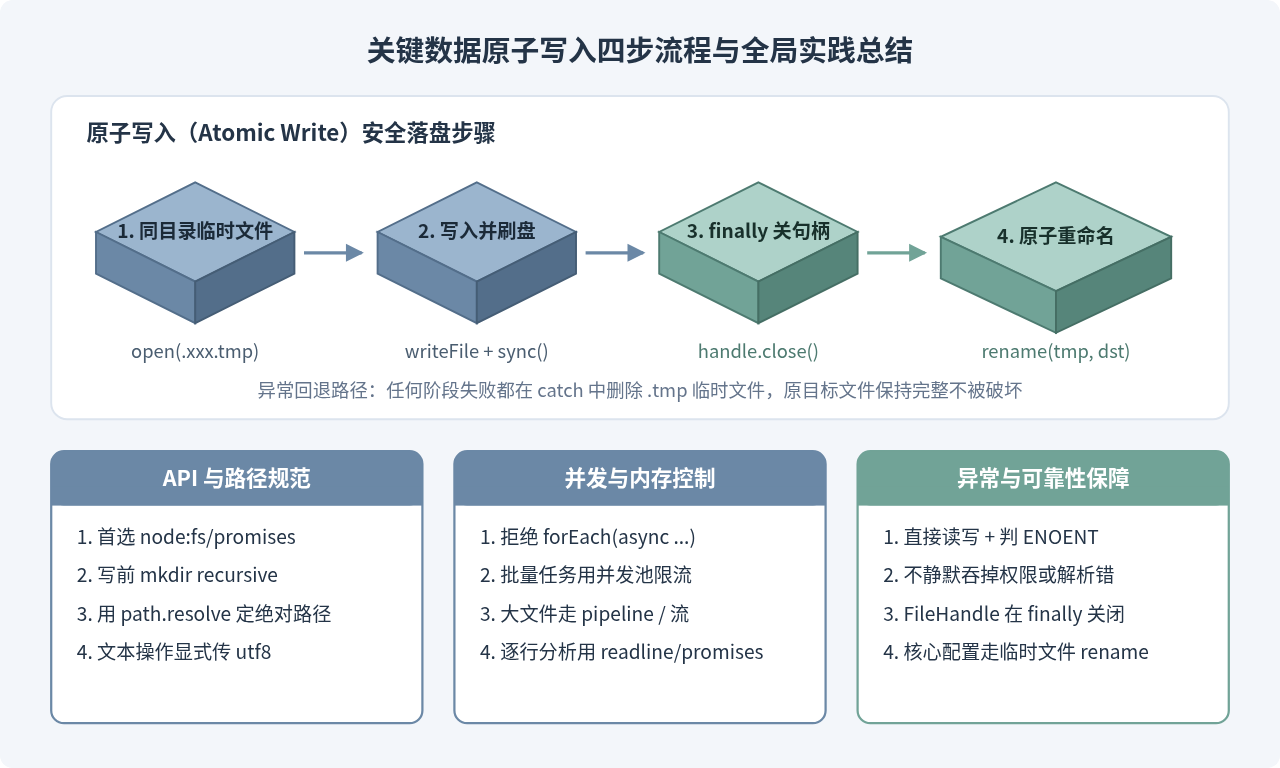
把以上几条原则落到日常代码里:普通配置和中小文本用 node:fs/promises 搭配 try/catch,上千个文件加上并发池限制,大文件交给 pipeline 流式处理,关键状态落地先写同目录临时文件再原子重命名,就能覆盖 Node.js 业务开发里绝大多数异步文件读写场景。
实用工具推荐
电子包浆
使用 ›绿化、压缩、噪点和虚拟水印,自由调节做旧程度。
图片压缩
使用 ›选择画质和输出格式,预览压缩前后的大小。
作者最新文章
相关文章