

本文介绍如何使用原生JavaScript实现一个年份轮播选择组件。通过Flex布局展示五个年份,利用首尾索引控制左右箭头的点击逻辑,实现年份数据的动态渲染与选中状态切换,无需依赖第三方库。
前言
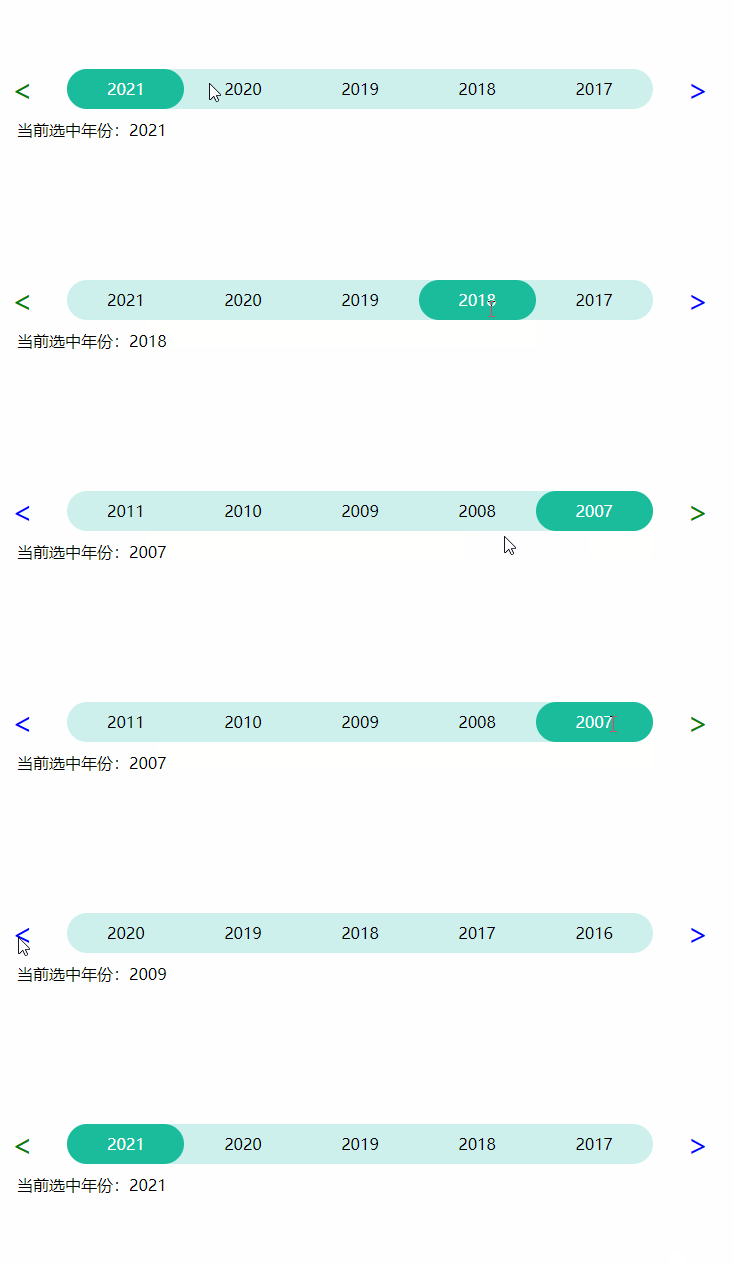
本文演示如何利用JavaScript实现年份滚动选择功能。具体效果可参考下图:
一、实现思路
- 布局方面,左右箭头分别使用实体字符 < 和 > 表示,中间包含5个span元素用于显示年份。整体采用Flex布局进行横向排列。
- JavaScript逻辑说明:(注:年份数据为number类型数组)
- a> 默认状态下,页面展示年份数据的前5项。
- b> 使用变量firstIndex记录当前显示的5个年份的起始索引。点击右侧箭头时,firstIndex加1,直到firstIndex+5等于年份数组长度时停止递增;点击左侧箭头时,firstIndex减1,直到firstIndex为0时停止递减。初始值设为0。
- c> 使用变量selectedIndex记录用户当前点击选中的年份索引。默认选中第一个年份(如2021),初始值设为0。
- d>.firstIndex值发生变化,获取firstIndex,firstIndex+1,firstIndex+2…firstIndex+4对应的年份,渲染到页面。并且这5个索引中某一个和selectedIndex相等,说明选中的年份,刚好在当前页面显示的年份当中。所以,与之相等的index对应的span添加选中样式,其他4个span移除选中样式。
- CSS方面,左右箭头默认均添加可点击样式。当firstIndex等于0时,移除左侧箭头的可点击样式;当firstIndex+5等于年份数组长度时,移除右侧箭头的可点击样式。
二、完整代码实现
1. HTML结构
具体代码实现如下:
<!DOCTYPE html>
<html lang="en">
<head>
<meta charset="UTF-8">
<title>Title</title>
<link rel="stylesheet" href="index.css" rel="external nofollow" type="text/css"/>
<script type="text/javascript" src="echarts.min.js"></script>
<script type="text/javascript" src="index.js"></script>
</head>
<body>
<div class="container">
<div id="left" class="arrow_left" onclick="clickBefore()" style="cursor:default" unselectable="on" onselectstart="return false;">
<span><</span>
</div>
<div id="wrap" class="wrap">
<span onclick="selected(this)">1</span>
<span onclick="selected(this)">2</span>
<span onclick="selected(this)">3</span>
<span onclick="selected(this)">4</span>
<span onclick="selected(this)">5</span>
</div>
<div id="right" class="arrow_right arrow_active" onclick="clickNext()" style="cursor:default" unselectable="on" onselectstart="return false;">
<span>></span>
</div>
</div>
<div class="content" id="content">
</div>
</body>
</html>
2. JavaScript逻辑
具体代码实现如下:
window.onload = function () {
 //首次渲染列表
 initList(firstIndex);
};

let yearArr = [2007, 2008, 2009, 2010, 2011, 2012, 2013, 2014, 2015, 2016, 2017, 2018, 2019, 2020, 2021];
yearArr.reverse();

//起始索引
let firstIndex = 0;
//选中索引,默认选中第一个
let selectedIndex = 0;


/**
 * 初始化列表
 */
function initList(firstIndex) {

 //渲染页面span列表
 let spanList = document.getElementById('wrap').getElementsByTagName('span');
 for (let i = 0; i < spanList.length; i++) {
 let index = firstIndex + i;
 let span = spanList[i];
 span.innerText = yearArr[index];

 //选中样式添加和移除
 if (index === selectedIndex) {
  span.classList.add('active');
 } else {
  span.classList.remove('active')
 }
 }
 //页面内容显示值
 document.getElementById('content').innerText = '当前选中年份:' + yearArr[selectedIndex];
}

/**
 * 下一页
 */
function clickNext(div) {
 if (firstIndex + 5 < yearArr.length) {
 firstIndex = firstIndex + 1;
 initList(firstIndex)
 }
 arrowActive();
}

/*
* 上一页
 */
function clickBefore(div) {
 if (firstIndex > 0) {
 firstIndex = firstIndex - 1;
 initList(firstIndex)
 }
 arrowActive();
}

/**
 * 选中
 */
function selected(span) {
 let value = span.innerText;
 let index = yearArr.findIndex((el) => {
 return el + "" === value;
 })
 selectedIndex = index !== -1 ? index : 0;
 initList(firstIndex);
}

/**
 * 左右箭头激活
 * firstIndex = 0: 右激活 左不
 * firstIndex = length-5:左激活 右不
 * 其他:全激活
 */
function arrowActive() {
 let left = document.getElementById('left')
 let right = document.getElementById('right')
 left.classList.add('arrow_active');
 right.classList.add('arrow_active');
 if (firstIndex === 0) {
 left.classList.remove('arrow_active');
 } else if (firstIndex === yearArr.length - 5) {
 right.classList.remove('arrow_active');
 }
}
3. CSS样式
具体代码实现如下:
body{
 margin-top: 80px;
}
.container {

 display: flex;
 justify-content: center;
 align-items: center;
 margin: 10px;
}

.wrap {
 height: 40px;
 z-index: 1;
 color: black;
 display: flex;
 flex: 1;
 background: rgba(155,226,219,0.5);
 border-radius: 20px;
 margin-left: 20px;
 margin-right: 20px;
}

.wrap span {
 flex: 1;
 text-align: center;
 height: 40px;
 line-height: 40px;
 border-radius: 20px;

}

.active{
 background: #1abc9c;
 color:#fff;
}


.arrow_left {
 left: 10px;
 color: green;
 padding: 0px 14px;
 border-radius: 50%;
 font-size: 30px;
 z-index: 2;
}


.arrow_right {
 right: 10px;
 color: green;
 padding: 0px 14px;
 border-radius: 50%;
 font-size: 30px;
 z-index: 2;
}
.arrow_active{
 color: blue;
}

.content{
 margin-left: 30px;
}
总结
每日记录一点,从新手逐渐成长为熟练开发者!
至此,关于使用原生JavaScript实现年份轮播选择效果的介绍已完成。如需了解更多相关原生JS实现年份轮播的内容,可搜索本站往期文章或继续浏览后续相关文章,感谢大家的支持!