

本文详细介绍如何使用HTML、CSS3和JavaScript实现仿支付宝风格的滑块验证码。内容涵盖前端样式排版、CSS3闪光移动动画效果以及基于鼠标点击、移动和拖拽事件的JS交互逻辑。提供完整Demo代码及下载链接,可直接运行测试。
滑块验证码效果概述
支付宝推出的滑块验证机制刷新了用户对验证码的传统认知,显著提升了交互体验。除了外观设计与用户体验的优化外,其安全性并未因此降低,后端通过深入分析用户行为数据,依然确保了校验过程的安全可靠。
接下来将重点介绍该滑块效果在前端的具体实现方案。
实现内容主要包含三个方面:首先是滑块的前端样式构建(基于HTML排版);其次是利用CSS3动画实现滑块的闪光移动特效;最后是编写JavaScript脚本,处理鼠标移动、点击及拖拽等交互事件。
注:本实例在现有网络Demo基础上,增加了CSS视觉效果并修复了部分JS逻辑缺陷。用户只需将代码复制至对应文件,即可直接运行查看效果。
运行效果展示
首先展示几张实际运行的效果图。
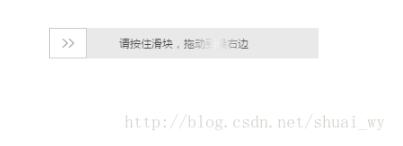
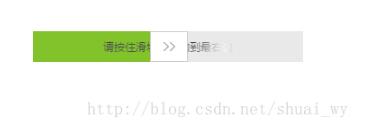
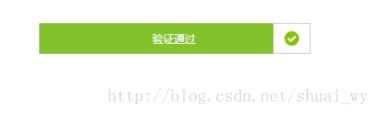
前端实现代码解析
滑块前端HTML结构
<!DOCTYPE html>
<html lang="en">
<head>
 <meta charset="UTF-8">
 <title>滑动</title>
 <link rel="stylesheet" href="css/drag.css" >
 <script src="js/jquery-1.7.1.min.js"></script>
 <script src="js/drag.js"></script>
 <style type="text/css">
 .slidetounlock{
 font-size: 12px;
 background:-webkit-gradient(linear,left top,right top,color-stop(0,#4d4d4d),color-stop(.4,#4d4d4d),color-stop(.5,#fff),color-stop(.6,#4d4d4d),color-stop(1,#4d4d4d));
 -webkit-background-clip:text;
 -webkit-text-fill-color:transparent;
 -webkit-animation:slidetounlock 3s infinite;
 -webkit-text-size-adjust:none
 }
 @-webkit-keyframes slidetounlock{0%{background-position:-200px 0} 100%{background-position:200px 0}}

 </style>
</head>
<body>
<div id="wrapper" style="position: relative;top: 300px;left:300px;">
 <div id="drag">
 <div class="drag_bg"></div>
 <div class="drag_text slidetounlock" onselectstart="return false;" unselectable="on">
 请按住滑块,拖动到最右边
 </div>
 <div class="handler handler_bg"></div>
 </div>
</div>

 <!--<a href="#" class="img"><img src="img/Lighthouse.jpg"/></a>-->
<script>
 $('#drag').drag();
</script>
</body>
</html>
滑块CSS样式代码
#drag{
 position: relative;
 background-color: #e8e8e8;
 width: 300px;
 height: 34px;
 line-height: 34px;
 text-align: center;
}
#drag .handler{
 position: absolute;
 top: 0px;
 left: 0px;
 width: 40px;
 height: 32px;
 border: 1px solid #ccc;
 cursor: move;
}
.handler_bg{
 background: #fff url("../img/slider.png") no-repeat center;
}
.handler_ok_bg{
 background: #fff url("../img/complet.png") no-repeat center;
}
#drag .drag_bg{
 background-color: #7ac23c;
 height: 34px;
 width: 0px;
}
#drag .drag_text{
 position: absolute;
 top: 0px;
 width: 300px;
 color:#9c9c9c;
 -moz-user-select: none;
 -webkit-user-select: none;
 user-select: none;
 -o-user-select:none;
 -ms-user-select:none;

 font-size: 12px; // add
}
滑块拖拽JavaScript逻辑
/**
 * Created by shuai_wy on 2017/3/14.
 */
$.fn.drag = function(options) {
 var x, drag = this, isMove = false, defaults = {
 };
 var options = $.extend(defaults, options);
 var handler = drag.find('.handler');
 var drag_bg = drag.find('.drag_bg');
 var text = drag.find('.drag_text');
 var maxWidth = drag.width() - handler.width(); //能滑动的最大间距

 //鼠标按下时候的x轴的位置
 handler.mousedown(function(e) {
 isMove = true;
 x = e.pageX - parseInt(handler.css('left'), 10);
 });

 //鼠标指针在上下文移动时,移动距离大于0小于最大间距,滑块x轴位置等于鼠标移动距离
 $(document).mousemove(function(e) {
 var _x = e.pageX - x;// _x = e.pageX - (e.pageX - parseInt(handler.css('left'), 10)) = x
 if (isMove) {
 if (_x > 0 && _x <= maxWidth) {
 handler.css({'left': _x});
 drag_bg.css({'width': _x});
 } else if (_x > maxWidth) { //鼠标指针移动距离达到最大时清空事件
 dragOk();
 }
 }
 }).mouseup(function(e) {
 isMove = false;
 var _x = e.pageX - x;
 if (_x < maxWidth) { //鼠标松开时,如果没有达到最大距离位置,滑块就返回初始位置
 handler.css({'left': 0});
 drag_bg.css({'width': 0});
 }
 });

 //清空事件
 function dragOk() {
 handler.removeClass('handler_bg').addClass('handler_ok_bg');
 text.removeClass('slidetounlock').text('验证通过').css({'color':'#fff'}); //modify
 // drag.css({'color': '#fff !important'});

 handler.css({'left': maxWidth}); // add
 drag_bg.css({'width': maxWidth}); // add

 handler.unbind('mousedown');
 $(document).unbind('mousemove');
 $(document).unbind('mouseup');

 }
};
资源下载
仿支付宝滑块效果完整代码下载
Demo项目下载链接
以上就是本文的全部内容,希望这些内容能对各位的学习有所帮助,也欢迎大家继续支持本站。