

本文详细介绍如何在 Vue.js 结合 Element UI 的 el-table 组件中实现动态添加、编辑、单独删除及批量删除行的功能。通过示例代码展示如何管理表格数据状态,处理输入框编辑与取消逻辑,以及利用 Checkbox 实现多选批量删除操作,帮助开发者快速掌握前端表格交互的核心技巧。
表格动态添加与删除行
本节演示如何动态向表格中添加新行,并支持对已有行进行删除操作。
<template>
 <div class="TestWord">
   <el-button @click="addLine">添加行数</el-button>
   <el-button @click="save">保存</el-button>
    <el-table
     :data="tableData"
     style="width: 100%">
     <el-table-column prop="bookname" label="书名">
       <template slot-scope="scope">
       <el-input v-model="scope.row.bookname" placeholder="书名"></el-input>
       </template>
     </el-table-column>
     <el-table-column prop="bookvolume" label="册数">
       <template slot-scope="scope">
       <el-input v-model="scope.row.bookvolume" placeholder="册数"></el-input>
       </template>
     </el-table-column>
     <el-table-column prop="bookbuyer" label="购买者">
       <template slot-scope="scope">

       <el-input v-model="scope.row.bookbuyer" placeholder="购买者"></el-input>
       </template>
     </el-table-column>
     <el-table-column prop="bookborrower" label="借阅者">
       <template slot-scope="scope">
       <el-input v-model="scope.row.bookborrower" placeholder="借阅者"></el-input>
       </template>
     </el-table-column>
     <el-table-column prop="bookbuytime" label="购买日期">
       <template slot-scope="scope">
        <el-date-picker
         v-model="scope.row.bookbuytime"
         type="date"
         format="yyyy-MM-dd"
         value-format="yyyy-MM-dd"
         placeholder="购买日期">
        </el-date-picker>
       </template>
     </el-table-column>
     <el-table-column prop="bookbuytime" label="购买日期">
       <template slot-scope="scope">
        <el-button
         size="mini"
         type="danger"
         v-if="!scope.row.editing"
         icon="el-icon-delete"
         @click="handleDelete(scope.$index, scope.row)">删除
        </el-button>
       </template>
     </el-table-column>
  </el-table>
 </div>
</template>
以下是实现该功能相关的 Vue.js 代码片段。
export default {
  name:'TestWorld',
  data() {
    return {
      tableData:[{
        bookname: '',
        bookbuytime: '',
        bookbuyer: '',
        bookborrower: '',
        bookvolume:''
      }]
    }
  },
  methods:{
    addLine(){ //添加行数
      var newValue = {
         bookname: '',
         bookbuytime: '',
         bookbuyer: '',
         bookborrower: '',
         bookvolume:''
       };
      //添加新的行数
      this.tableData.push(newValue);
    },
    handleDelete(index){ //删除行数
      this.tableData.splice(index, 1)
    },
    save(){
     //这部分应该是保存提交你添加的内容
     console.log(JSON.stringify(this.tableData))
    }
  }

}
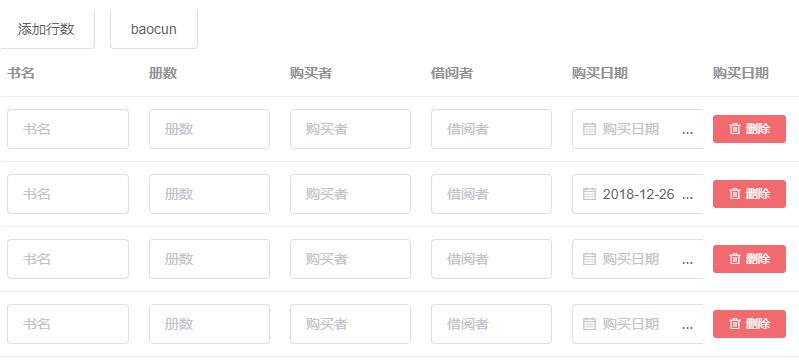
运行效果如下图所示。
表格编辑与取消逻辑
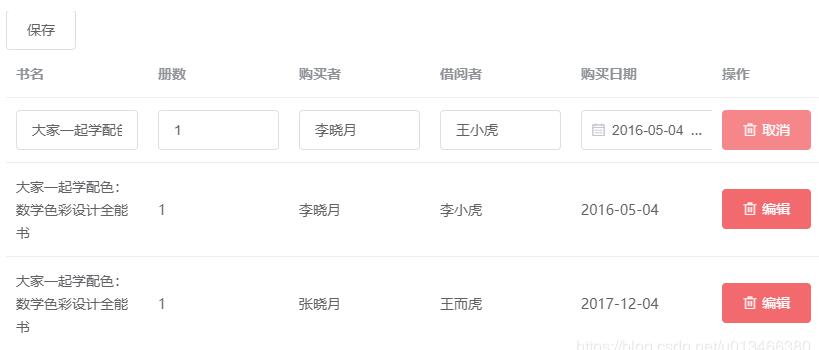
接下来介绍如何编辑表格内容。即使输入框中的数据已被修改,当用户点击取消按钮时,数据应恢复至原始状态,确保内容不变。
<template>
  <div class="TestWorld">
   <el-button @click="savemodify">保存</el-button>
    <el-table
     :data="modifyData"
     style="width: 100%">
     <el-table-column prop="bookname" label="书名">
      <template slot-scope="scope">
 	     	<template v-if="scope.row.editing">
 	      	<el-input class="edit-input" v-model="scope.row.bookname" placeholder="书名"></el-input>
 	     	</template>
 	     	<span v-else>{{ scope.row.bookname }}</span>
 	    </template>
     </el-table-column>
     <el-table-column prop="bookvolume" label="册数">
       <template slot-scope="scope">
        <template v-if="scope.row.editing">
         <el-input class="edit-input" v-model="scope.row.bookvolume" placeholder="册数"></el-input>
        </template>
        	<span v-else>{{ scope.row.bookvolume}}</span>
       </template>
     </el-table-column>
     <el-table-column prop="bookbuyer" label="购买者">
       <template slot-scope="scope">
        <template v-if="scope.row.editing">
         <el-input class="edit-input" v-model="scope.row.bookbuyer" placeholder="购买者"></el-input>
        </template>
        <span v-else>{{scope.row.bookbuyer}}</span>
       </template>
     </el-table-column>
     <el-table-column prop="bookborrower" label="借阅者">
       <template slot-scope="scope">
        <template v-if="scope.row.editing">
         <el-input class="edit-input" v-model="scope.row.bookborrower" placeholder="借阅者"></el-input>
        </template>
        <span v-else>{{scope.row.bookborrower}}</span>
       </template>
     </el-table-column>
     <el-table-column prop="bookbuytime" label="购买日期">
       <template slot-scope="scope">
        <template v-if="scope.row.editing">
         <el-date-picker
          v-model="scope.row.bookbuytime"
          type="date"
          value-format="yyyy-MM-dd"
          placeholder="购买日期">
         </el-date-picker>
        </template>
       <span v-else>{{scope.row.bookbuytime}}</span>
       </template>
     </el-table-column>
     <el-table-column prop="editing" label="操作">
       <template slot-scope="scope">
        <el-button
         type="danger"
         v-if="!scope.row.editing"
         icon="el-icon-delete"
         v-model="scope.$index"
         @click="handleEdit(scope.$index, scope.row)">编辑
        </el-button>
        <el-button
         v-else
         type="danger"
         icon="el-icon-delete"
         v-model="scope.$index"
         @click="handleCancle(scope.$index, scope.row)">取消
        </el-button>
       </template>
     </el-table-column>
    </el-table>
  </div>
</template>
对应的 Vue.js 实现代码如下。
export default {
  name:'TestWorld',
  data() {
    return {
       modifyData:[],
       prevValue:{}
    }
  },
  mounted(){
    this.getData()
  },
  methods:{
    getData(){
      this.$ajax({
        method: 'get',
        url:'../static/json/1.1.1.json', //<---本地地址
        //url: '/api/drummer/8bd17859',
      }).then((response)=>{
        console.log(JSON.stringify(response.data))

        let _data = response.data;
        let datalength = _data.length;
        for(let i = 0;i < datalength; i++){
          this.$set(_data[i], 'editing', false)
        }
        //赋值
        this.modifyData = _data;

       }).catch(function(err){
         console.log(err)
       })
    },
    handleEdit(index,row){
     row.editing = true;
     console.log(index)
     this.prevValue = JSON.parse(JSON.stringify(row));
    },
    handleCancle(index,row){
     row.editing = false;
     let prevContent = this.prevValue.bookname;
     this.$set(row,"bookname",prevContent);
    },
    savemodify(){
     console.log(JSON.stringify(this.modifyData))
    }
  }

}
此处引用本地 JSON 文件 1.1.1.JSON 中的数据源。
[{"bookname":"普通高等教育物联网工程专业规划用书:物联网技术概论","bookbuytime": "2016-05-04","bookbuyer": "李晓月","bookborrower": "王小虎","bookvolume":"1"},{"bookname":"区块链革命:比特币底层技术如何改变货币、商业和世界","bookbuytime": "2016-05-04","bookbuyer": "李晓月","bookborrower": "李小虎","bookvolume":"1"},{"bookname":"大家一起学配色:数学色彩设计全能书","bookbuytime": "2017-12-04","bookbuyer": "张晓月","bookborrower": "王而虎","bookvolume":"1"}]
若不使用获取本地数据的方式,Vue.js 代码可简化为以下形式。
export default {
  name:'TestWorld',
  data() {
    return {
       modifyData:[
          {
            bookname: '普通高等教育物联网工程专业规划用书:物联网技术概论',
            bookbuytime: '2016-05-04',
            bookbuyer: '李晓月',
            bookborrower: '王小虎',
            bookvolume: '1',
            editing: false
          },
          {
            bookname: '区块链革命:比特币底层技术如何改变货币、商业和世界',
            bookbuytime: '2016-05-04',
            bookbuyer: '李晓月',
            bookborrower: '李小虎',
            bookvolume: '1',
            editing: false
          },
          {
            bookname: '大家一起学配色:数学色彩设计全能书',
            bookbuytime: '2017-12-04',
            bookbuyer: '张晓月',
            bookborrower: '王而虎',
            bookvolume: '1',
            editing: false
          }
        ],
       prevValue:{}
    }
  },
  methods:{
    handleEdit(index,row){ //编辑
     row.editing = true;
     console.log(index)
     this.prevValue = JSON.parse(JSON.stringify(row));
    },
    handleCancle(index,row){ //取消
     row.editing = false;
     let prevContent = this.prevValue.bookname;
     this.$set(row,"bookname",prevContent);
    },
    savemodify(){
     console.log(JSON.stringify(this.modifyData))
    }
  }

}
运行界面如图所示。
批量删除行功能实现
最后介绍如何实现批量删除多行数据的功能。
<template>
  <div class="TestWorld">
    <el-table ref="multipleTable" :data="tableData3" tooltip-effect="dark"   style="width: 100%" @selection-change="handleSelectionChange">
      <el-table-column type="selection" width="55">
      </el-table-column>
      <el-table-column label="日期" width="120">
        <template slot-scope="scope">{{ scope.row.date }}</template>
      </el-table-column>
      <el-table-column prop="name" label="姓名" width="120">
      </el-table-column>
      <el-table-column prop="address" label="地址" show-overflow-tooltip>
      </el-table-column>
   </el-table>
   <div style="margin-top: 20px">
     <el-button @click="batchDelete">批量删除</el-button>
     <el-button @click="toggleSelection()">取消选择</el-button>
   </div>
  </div>
</template>
相关的 Vue.js 代码实现如下。
export default {
  name:'TestWorld',
  data() {
    return {
        tableData3: [
          {
           date: '2016-05-03',
           name: '王小虎',
           address: '上海市普陀区金沙江路 1518 弄'
          },
          {
           date: '2016-05-02',
           name: '王小虎',
           address: '上海市普陀区金沙江路 1518 弄'
          },
          {
           date: '2016-05-04',
           name: '王小虎',
           address: '上海市普陀区金沙江路 1518 弄'
          },
          {
           date: '2016-05-01',
           name: '王小虎',
           address: '上海市普陀区金沙江路 1518 弄'
          },
          {
           date: '2016-05-08',
           name: '王小虎',
           address: '上海市普陀区金沙江路 1518 弄'
          },{
           date: '2016-05-06',
           name: '王小虎',
           address: '上海市普陀区金沙江路 1518 弄'
          },{
           date: '2016-05-07',
           name: '王小虎',
           address: '上海市普陀区金沙江路 1518 弄'
          }],
          multipleSelection: []
    }
  },
  methods:{
    toggleSelection(rows) {
      if (rows) {
        rows.forEach(row => {
        this.$refs.multipleTable.toggleRowSelection(row);
      });
      } else {
        this.$refs.multipleTable.clearSelection();
      }
     },
     batchDelete(){
       let multData = this.multipleSelection;
       let tableData =this.tableData3;
       let multDataLen = multData.length;
       let tableDataLen = tableData.length;
       for(let i = 0; i < multDataLen ;i++){
         for(let y=0;y < tableDataLen;y++){
           if(JSON.stringify(tableData[y]) == JSON.stringify(multData[i])){ //判断是否相等,相等就删除
            this.tableData3.splice(y,1)
            console.log("aa")
           }
         }
       }
     },
     handleSelectionChange(val) {
      this.multipleSelection = val;
     }
  }

}
关于数据验证的具体代码可参考前文示例,相关内容将持续更新。
以上即为 Vue.js 结合 Element UI 表格组件实现添加行、修改、单独删除行及批量删除行的完整操作指南,希望对大家有所帮助,欢迎支持本站。