

本文介绍使用jQuery和CSS实现流程进度条的两种方案。通过定义CSS变量控制样式,利用JS方法loadProgress动态计算节点状态与线条长度。支持传入进度长度与激活节点索引,具备节点优先级控制机制,适用于多步骤流程展示。
本文分享利用jQuery和CSS构建流程进度条的具体实现代码,供读者参考学习。
进度条实现方案
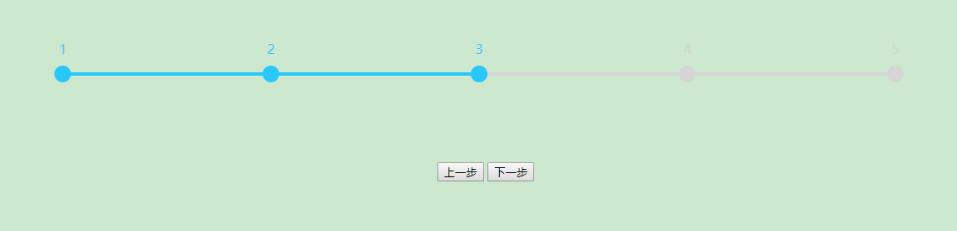
方案一:
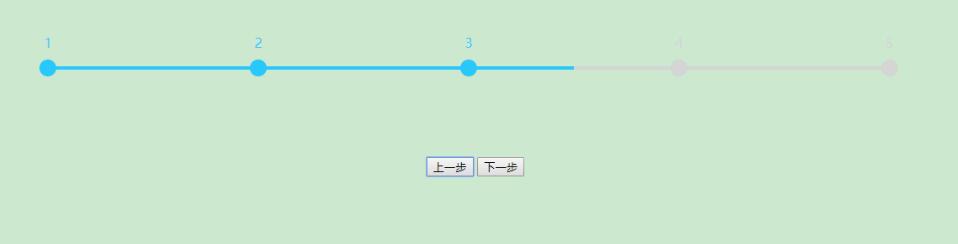
方案二:
完整代码结构
<!DOCTYPE html>
<html>

<head>
<meta charset="utf-8">
<title>流程进度条</title>
<style type="text/css">
 .div_home{
 width: 100%;
 height: 720px;
 background: pink;
 }
 .div_button{
 width: 100%;
 background: rgba(249, 214, 81, 1);
 text-align: center;
 }

 :root {
 --progress_div-height: 100px;
 --progress_div-width: 100%;
 --progress_div-background: rgba(204,232,207,1);

 --progress_line-top: 50px;
 --progress_line-height: 4px;

 --progress_node-height: 20px;
 --progress_node-width: 20px;
 --progress_node-top: -8px;
 --progress_node-lineHeight: 20px;

 --progress_text-heigth: 20px;
 --progress_text-width: 120px;
 --progress_text-top: -30px;

 --progress_color-yes: rgba(40 ,200 ,252 ,1);
 --progress_color-no: rgba(213 ,213 ,213 ,1);
 }
 .progress_div{
 height: var(--progress_div-height);
 width: var(--progress_div-width);
 background: var(--progress_div-background);
 text-align: center;
 margin: auto 0;
 }
 /*灰条样式*/
 .progress_line_no{
 position: relative;
 top: var(--progress_line-top);
 height: var(--progress_line-height);
 background: var(--progress_color-no);
 }
 /*蓝条样式*/
 .progress_line_yes{
 height: var(--progress_line-height);
 background: var(--progress_color-yes);
 }
 /*未激活节点样式*/
 .progress_node_no{
 position: absolute;
 border-radius: 100%;
 width: var(--progress_node-width);
 height: var(--progress_node-height);
 top: var(--progress_node-top);
 line-height: var(--progress_node-lineHeight);
 background: var(--progress_color-no);
 color: var(--progress_color-no);
 }
 /*已激活节点样式*/
 .progress_node_yes{
 position: absolute;
 border-radius: 100%;
 width: var(--progress_node-width);
 height: var(--progress_node-height);
 top: var(--progress_node-top);
 line-height: var(--progress_node-lineHeight);
 background: var(--progress_color-yes);
 color: var(--progress_color-yes);
 }
 /*节点文字*/
 .progress_text{
 position: absolute;
 vertical-align: middle;
 text-align: center;
 width: var(--progress_text-width);
 height: var(--progress_text-heigth);
 top: var(--progress_text-top);
 }
 /*当前激活节点标记*/
 .progress_node_currentActive{
 }
</style>
</head>

<body>
 <div class="div_home">
 <div class="progress_div">
 <div class="progress_line_no">
 <div class="progress_line_yes">
 <div>
 <div class="progress_text">1</div>
 </div>
 <div>
 <div class="progress_text">2</div>
 </div>
 <div>
 <div class="progress_text">3</div>
 </div>
 <div class="progress_node_currentActive">
 <div class="progress_text">4</div>
 </div>
 <div>
 <div class="progress_text">5</div>
 </div>
 </div>
 </div>
 </div>
 <div class="div_button">
 <input type="button" οnclick="skipNode(-1)" value="上一步">
 <input type="button" οnclick="skipNode(1)" value="下一步">
 </div>
 </div>
<script type="text/javascript" src="jquery-3.3.1.min.js"></script>
<script type="text/javascript">
 $(function(){
 //传入灰条长度,传入最后一个激活节点下标
 loadProgress(1000 ,2);
 });

 //上一步type=-1,下一步type=1
 function skipNode(type){
 var currentNum = 0;
 var countNum = $('.progress_line_no > .progress_line_yes > div').length;
 //获取当前激活节点的下标
 $('.progress_line_no > .progress_line_yes > div').each(function(i ,data){
 if($(data).hasClass('progress_node_currentActive') == true){
 currentNum = i;
 }
 });
 //当前为first,上一步无效;当前为last,下一步无效
 if((type == -1 && currentNum == 0) || (type == 1 && currentNum == countNum - 1)){
 return;
 }
 //重新设置激活节点标记
 $('.progress_line_no > .progress_line_yes > div').each(function(i ,data){
 $(data).removeClass();
 if(type == -1 && currentNum - 1 == i){
 $(data).addClass('progress_node_currentActive');
 }
 if(type == 1 && currentNum + 1 == i){
 $(data).addClass('progress_node_currentActive');
 }
 });
 //重新载入流程进度条样式(传入原进度条长度)
 loadProgress($('.progress_line_no').width());
 }

 //加载流程进度条,inLineWidth进度条长度,inCurrentNum最后一个激活节点下标(从0开始到length-1)
 function loadProgress(inLineWidth ,inCurrentNum){
 var countNum = $('.progress_line_no > .progress_line_yes > div').length;//总节点数
 var currentNum;//当前激活节点下标

 //当前激活节点优先级:loadProgress()方法传入为最高级别,其次是div上class="progress_node_currentActive",最后默认0
 if(inCurrentNum != undefined && inCurrentNum > -1 && inCurrentNum < countNum){
 //传入的节点正确取传入的节点为当前激活节点
 currentNum = inCurrentNum;
 } else {
 //存入的节点不正确,根据节点上的progress_node_currentActive设置当前激活节点
 $('.progress_line_no > .progress_line_yes > div').each(function(i ,data){
 if($(data).hasClass('progress_node_currentActive') == true){
 currentNum = i;
 }
 });
 }
 if(currentNum == undefined){
 //未传入节点或传入的节点不正确 且div上没发现progress_node_currentActive标识,设置当前激活节点为0
 currentNum = 0;
 }

 var line_width_no = inLineWidth;//灰条长度
 var line_width_yes;//蓝条长度
 var node_distance = line_width_no / (countNum - 1);//两点间距
 var node_mid_distance = node_distance / 2;//两点中距(间距/2)

 $('.progress_line_no').width(line_width_no + 'px');//设置灰条长度
 $('.progress_line_no').css('left' ,($('.progress_line_no').parent().width() - line_width_no) / 2 + 'px');//设置灰条相对于父级div居中偏移

 //设置节点和文字
 $('.progress_line_no > .progress_line_yes > div').each(function(i ,data){
 $(data).removeClass();//移除所有样式
 //设置当前激活节点为progress_node_currentActive
 if(currentNum == i){
 $(data).addClass('progress_node_currentActive');
 }
 if(i == 0){
 //设置first节点
 $(data).addClass('progress_node_yes').css('left' ,i * node_distance - ($(data).width() / 2) + 'px');
 }else if(i <= currentNum){
 //设置激活节点
 $(data).addClass('progress_node_yes').css('left' ,i * node_distance - ($(data).width() / 2) + 'px');
 }else{
 //设置未激活节点
 $(data).addClass('progress_node_no').css('left' ,i * node_distance - ($(data).width() / 2) + 'px');
 }
 //设置文字偏移位置
 $(data).children().css('left' ,-($(data).children().width() / 2) + 10+'px');
 });

 /*方案1,计算蓝条长度
 */
 line_width_yes = line_width_no * currentNum / (countNum - 1);

 /*方案2,计算蓝条长度
 if(currentNum == 0){
 //first节点为progress_node_currentActive时蓝条长度
 line_width_yes = node_mid_distance * 1;
 }else if(currentNum == countNum - 1){
 //last节点为progress_node_currentActive时蓝条长度
 line_width_yes = node_mid_distance * (countNum - 1) * 2;
 }else{
 //中间节点为progress_node_currentActive时蓝条长度
 line_width_yes = node_mid_distance * (currentNum * 2 + 1);
 }
 */

 //设置蓝条长度
 $('.progress_line_yes').width( line_width_yes + 'px');
 }
</script>
</body>

</html>
具体使用步骤
使用步骤如下:
首先,需要在页面中引入jQuery库文件。
<script type="text/javascript" src="jquery-3.3.1.min.js"></script>
其次,编写CSS样式部分。
建议在:root中定义全局CSS变量,这样修改样式时只需调整:root内的变量值即可。
接着,编写JavaScript逻辑部分。
保留所有js方法 调用loadProgress(1000,2)方法,传入进度条长度、最后一个激活节点下标(0到节点的length-1) 186行设置了整体相对于父级div居中,自己看需求改一下就好
标签结构与节点优先级
第四,理解HTML标签结构。
主要关注class为"progress_line_no"的div内部元素。最内层的两层div代表具体节点,class为"progress_text"的div用于显示文字说明,而它们的直接父级div则表现为圆点样式。
第五,了解激活节点的优先级规则。
在调用loadProgress(width, index)时,传入的index参数具有最高优先级。其次,检查div上是否包含class="progress_node_currentActive"类名。若均未指定,则默认激活索引为0。
以上内容即为本文的全部讲解,希望能为读者的学习提供有益帮助,同时也欢迎大家继续支持本站。