

本文提供了一套无需引用jQuery的原生JavaScript日历实现方案,包含完整的HTML结构、CSS样式及JS逻辑。代码支持月份左右切换、动态渲染日期及随机主题色,适用于移动端网页开发,可直接参考学习。
原生JavaScript日历功能概述
本文详细介绍如何使用原生JavaScript编写一个日历功能模块,全程不依赖jQuery等第三方库。文中通过详细的示例代码展示了实现过程,对希望掌握前端基础或进行相关开发工作的读者具有较高的参考价值,建议收藏参考。
最终实现的日历组件支持用户通过左右按钮切换显示不同的月份,界面交互流畅。
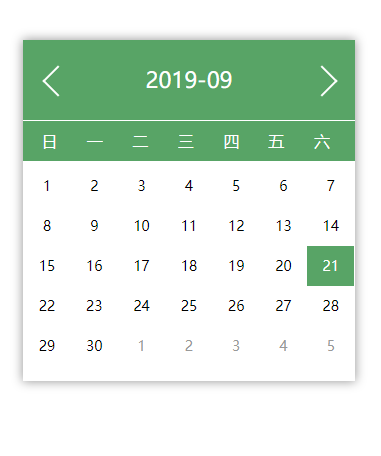
HTML结构实现
以下是构建日历所需的HTML结构代码,定义了日历容器的基本布局。
HTML核心代码
<!DOCTYPE html>
<html>
<head>
 <meta charset="UTF-8">
 <meta name="viewport" content="width=device-width, initial-scale=1.0">
 <meta http-equiv="X-UA-Compatible" content="ie=edge">
 <title>移动端日历</title>
 <link rel="stylesheet" href="./css/calendar.css" rel="external nofollow" >
</head>
<body>
 <div id="calendarElement">
  <div class="header">
   <div class="prev">
    <i class="previ"></i>
   </div>
   <div class="date"></div>
   <div class="next">
    <i class="nexti"></i>
   </div>
  </div>
  <div class="content">
   <div class="week">
    <div>日</div>
    <div>一</div>
    <div>二</div>
    <div>三</div>
    <div>四</div>
    <div>五</div>
    <div>六</div>
   </div>
   <div class="weekMany clearfloat">
   </div>
  </div>
 </div>
 <script src="./js/calendar.js"></script>
</body>
</html>
CSS样式设计
接下来是CSS样式代码,负责日历的视觉呈现、布局对齐及响应式适配。
CSS核心代码
*{
 margin: 0;
 padding: 0;
}
/*清除浮动代码*/
.clearfloat:after{display:block;clear:both;content:"";visibility:hidden;height:0}
.clearfloat{zoom:1}
#calendarElement{
 margin: 100px auto;
 width: 80%;
 box-shadow: 0 0 10px #999999;
}
#calendarElement>.header{
 height: 80px;
 background-color: coral;
 display: flex;
 border-bottom: 1px solid #fff;
}
#calendarElement>.header .prev{
 width: 20%;
 position: relative;
}
#calendarElement>.header .prev i{
 width: 20px;
 height: 20px;
 display: block;
 position: absolute;
 left: 50%;
 top: 50%;
 margin-top: -10px;
 margin-left: -10px;
 transform: rotate(45deg);
 border: 2px solid #fff;
 border-right: none;
 border-top: none;
}
#calendarElement>.header .next{
 position: relative;
}
#calendarElement>.header .next i{
 width: 20px;
 height: 20px;
 display: block;
 position: absolute;
 left: 50%;
 top: 50%;
 margin-top: -10px;
 margin-left: -10px;
 transform: rotate(45deg);
 border: 2px solid #fff;
 border-left: none;
 border-bottom: none;
}
#calendarElement>.header .date{
 width: 60%;
 font-size: 22px;
 line-height: 80px;
 color: #fff;
 text-align: center;
}
#calendarElement>.header .next{
 width: 20%;
}
#calendarElement>.content >.week{
 box-sizing: border-box;
 width: 100%;
 height: 40px;
 color: #fff;
 display: flex;
 padding: 0 1%;
}
#calendarElement>.content >.week >div{
 width: 14%;
 text-align: center;
 line-height: 40px;
}
#calendarElement>.content >.weekMany{
 padding-top: 5px;
 padding-bottom: 15px;
}
#calendarElement>.content >.weekMany>div{
 float: left;
 width: 14.28%;
 height: 40px;
 text-align: center;
 line-height: 40px;
 font-size: 14px;
}
#calendarElement>.content >.weekMany>.otherMonth{
 color: #999999
}
JavaScript逻辑实现
核心JavaScript逻辑代码,负责获取当前时间、计算日期、渲染DOM及处理交互事件。
JavaScript核心代码
var currentTime="";   //当前时间年月日
var dom=document.querySelector("#calendarElement");       //承载元素
var color="";
getCurrentTime();
randomColor();
showDay();
function getCurrentTime(){ //获取当前时间
 var time=new Date();
 var year=time.getFullYear();
 var month=time.getMonth()+1;
 var day=time.getDate();
 if(month<10){
  month="0"+month
 }
 var data=year+ "-" +month;
 currentTime=year+ "-" +month+"-"+day;
 document.querySelector(".date").innerHTML=data;
};
dom.addEventListener("click",function(e){
 if(e.target.className=="previ" || e.target.className=="prev"){
  getMonths("prev")
 }else if(e.target.className=="nexti" || e.target.className=="next"){
  getMonths("next")
 }
})
function showDay(){
 var html="";
 var MonthOne=currentTime;
 var yearMonth=currentTime.split('-').slice(0,2);
 yearMonth=yearMonth.join('-');
 document.querySelector(".date").innerHTML=yearMonth;
 MonthOne=MonthOne.split('');
 MonthOne.splice(8,2,"01")
 MonthOne=MonthOne.join('');
 var monthLen=getMonthLength(MonthOne);  //每月有多少天
 var weekMany=new Date(MonthOne).getDay();  //每月一号是星期几
 html+=getPrevMonthHtml(weekMany);
 html+=getNowMonthHtml(monthLen);
 html+=getNextMonthHtml(weekMany,monthLen);
 document.querySelector(".weekMany").innerHTML=html;
}
function getPrevMonthHtml(weekMany){
 var html="";
 var lastMonth=currentTime.substring(0, 7);  //得出年月
 lastMonth=lastMonth.split('-')
 if(lastMonth[1]-1==0){
  lastMonth[1]=12;
  lastMonth[0]=lastMonth[0]-1;
 }else if(lastMonth[1]-1<10){
  lastMonth[1]="0"+(lastMonth[1]-1);
 }
 lastMonth=lastMonth.join('-');
 var monthLen=getMonthLength(lastMonth);
 var start=monthLen-weekMany;
 for(var i=start+1;i<=monthLen;i++){
  html+='<div class="otherMonth day" data-date="'+lastMonth+'-'+i+'">'+i+'</div>';
 }
 return html;
}
function getNowMonthHtml(monthLen){
 var html="";
 var MonthOne=currentTime.substring(0, 7);  //得出年月
 var today=currentTime.split('-')[2];
 for(var i=1;i<=monthLen;i++){
  if(i<10){
   var q="0"+i;
  }else{
   var q=i;
  }
  if(i==today){
   html+='<div class="thisMonth day" style="background-color:'+color+';color:#fff" data-date="'+MonthOne+'-'+q+'">'+i+'</div>';
  }else{
   html+='<div class="thisMonth day" data-date="'+MonthOne+'-'+q+'">'+i+'</div>';
  }
 }
 return html;
}
function getNextMonthHtml(weekMany,monthLen){
 var html="";
 var daynum=weekMany+monthLen;
 if(daynum%7==0){
  return html;
 }else{
  var num=daynum%7;
  var lessNum=7-num;  //差几天
  var lowerMonth=currentTime.substring(0, 7);  //得出年月
  lowerMonth=lowerMonth.split('-')
  if(lowerMonth[1]+1==13){
   lowerMonth[1]="0"+1;
   lowerMonth[0]=+lowerMonth[0]+1;
  }else{
   lowerMonth[1]=+lowerMonth[1]+1;
   if(lowerMonth[1]<10){
    lowerMonth[1]="0"+lowerMonth[1];
   }
  }
  lowerMonth=lowerMonth.join('-');
  for(var i=1;i<=lessNum;i++){
   if(i<10){
    var q="0"+i
   }
   html+='<div class="otherMonth day" data-date="'+lowerMonth+'-'+q+'">'+i+'</div>';
  }
 }
 return html;
}
function getMonths(around){
 if(around=="prev"){
  currentTime=currentTime.split('-');
  currentTime[1]=currentTime[1]-1;
  if(currentTime[1]==0){
   currentTime[1]="12"
   currentTime[0]=+currentTime[0]-1
  }
  if(currentTime[1]<10){
   currentTime[1]="0"+currentTime[1]
  }
  currentTime=currentTime.join('-');
  showDay();
 }else if(around=="next"){
  currentTime=currentTime.split('-');
  currentTime[1]=+currentTime[1]+1;
  if(currentTime[1]==13){
   currentTime[1]="1"
   currentTime[0]=+currentTime[0]+1
  }
  if(currentTime[1]<10){
   currentTime[1]="0"+currentTime[1]
  }
  currentTime=currentTime.join('-');
  showDay();
 }
}

function getMonthLength(date) {  // 获取每月有多少天
 let d = new Date(date)
 // 将日期设置为下月一号
 d.setMonth(d.getMonth()+1)
 d.setDate('1')
 // 获取本月最后一天
 d.setDate(d.getDate()-1)
 return d.getDate()
}
function randomColor(){   //随机颜色
 color = '#'+Math.floor(Math.random()*16777215).toString(16);
 if(color.length==6){
  color+="0"
 }
 document.querySelector(".header").style.backgroundColor=color;
 document.querySelector(".week").style.backgroundColor=color;
};
以上即为本文分享的全部内容,希望这些代码示例能对各位的学习或工作有所帮助,欢迎继续支持本站获取更多技术资源。