

本文详细解析如何使用原生 JavaScript 实现自定义滚动条。通过嵌套布局隐藏原生滚动条,利用 offsetHeight、clientHeight 和 scrollHeight 计算比例,动态调整滚动条高度与位置,并提供面向对象封装方案,解决跨浏览器样式不一致问题。
自定义滚动条实现概述
在元素应用 overflow: auto 属性时,浏览器会生成滚动条,但不同浏览器的渲染样式存在差异,部分默认样式视觉效果较差。
为此,需要手动实现一个滚动条,主要需厘清以下核心逻辑:
1、滚动条 bar 的高度需根据内容总量动态计算。
2、滚动条 bar 的 top 偏移量需与内容区域的 scrollTop 保持同步。
布局结构与核心算法
实现思路如下:
采用嵌套布局结构,具体层级关系如下:
<!DOCTYPE html>
<html>
  <head>
    <meta charset="utf-8">
    <title></title>
    <style type="text/css">
      *{
        padding: 0;
        margin: 0;
      }
      .wrap{
        width: 400px;
        height: 400px;
        border: 2px solid deeppink;
        margin: 0 auto;
        overflow: hidden;
        position: relative;
      }
      .box-middle{
        height: 100%;
        overflow: auto;
        width: 200%;
      }
      .box{
        width: 50%;
      }
      .bar{
        background: #000;
        width: 10px;
        position: absolute;
        top: 0;
        right: 0;
      }
      .s1{
        height: 400px;
        background: pink;
      }
      .s2{
        height: 400px;
        background: deeppink;
      }
      .s3{
        height: 400px;
        background: deepskyblue;
      }
    </style>
  </head>
  <body>
    <div class="wrap" id="wrap">
      <div class="box-middle" id="boxMidle">
        <div class="box" id="content">
          <div class="s1">内容1</div>
          <div class="s2">内容2</div>
          <div class="s3">内容3</div>
        </div>
      </div>
      <div class="bar" id="bar"></div>
    </div>

  </body>
</html>
wrap 作为最外层容器,设置 overflow: hidden 以隐藏溢出内容。
box-middle 为中间层,即具备滚动功能的区域,可适当增加其宽度以隐藏原生滚动条。
box 为内容层,通过 JavaScript 计算并设置其宽度,使其与 wrap 宽度一致,从而彻底隐藏原生滚动条。
bar 为自定义滚动条元素。
编写 JavaScript 代码前,需明确以下三个关键属性:
offsetHeight : height + padding + border
clientHeight : height + padding
scrollHeight : 内容的高度(所有子元素高度和) + padding
1、计算比例关系:
bar 的高度 / wrap 的高度 = wrap 的高度 / wrap 内容部子元素的高度和;此处假设 wrap 的 padding 为 0。
bar 的 top / wrap 的 scrollTop = wrap 的高度 / wrap 内容部子元素的高度和。
需注意,当计算出的比例值小于 1 时,表示内容未溢出,无需显示滚动条。
JavaScript 代码实现
明确算法后,编写普通版代码如下:
var $wrap = document.getElementById("wrap");
var $boxMidle = document.getElementById("boxMidle");
var $content = document.getElementById("content");
var $bar = document.getElementById("bar");
$content.style.width = $wrap.clientWidth + "px"; //内容的宽度
var rate = $boxMidle.clientHeight/ $boxMidle.scrollHeight; //滚动条高度的比例,也是滚动条top位置的比例
 var barHeight = rate * $boxMidle.clientHeight; //滚动条的 bar 的高度
if(rate < 1){
  //需要出现滚动条,并计算滚动条的高度
  $bar.style.height = barHeight + "px";
}else{
  //不需要出现滚动条
  $bar.style.display = "none";
}
$boxMidle.onscroll = function(e){
  console.log("offsetHeight"+this.offsetHeight); //height + padding + border
  console.log("clientHeight"+this.clientHeight); // height + padding
  console.log("scrollHeight"+this.scrollHeight); //内容的高度(所有子元素高度和) + padding
  console.log(this.scrollTop);
  $bar.style.top = this.scrollTop*rate + "px";
}
使用面向对象方式封装的代码如下:
function ScrollBar(opt){
  var me = this;
  me.$wrap = document.getElementById(opt.wrap);
  me.$boxMidle = document.getElementById(opt.boxMidle);
  me.$content = document.getElementById(opt.content);
  me.$bar = document.getElementById(opt.bar);
  me.init();
  me.$boxMidle.onscroll = function(e){
    //console.log("offsetHeight"+this.offsetHeight); //content + padding + border
    //console.log("clientHeight"+this.clientHeight); // content + padding
    //console.log("scrollHeight"+this.scrollHeight); //内容的高度 + padding
    console.log(this.scrollTop);
    me.scrollToY(this.scrollTop * me.rate)
  }
}
ScrollBar.prototype.init = function(){
  this.$content.style.width = this.$wrap.clientWidth + "px"; //内容的宽度
  this.rate = this.$boxMidle.clientHeight/this.$boxMidle.scrollHeight; //滚动条高度的比例,也是滚动条top位置的比例
   this.barHeight = this.rate * this.$boxMidle.clientHeight; //滚动条的 bar 的高度
  if(this.rate < 1){
    //需要出现滚动条,并计算滚动条的高度
    this.$bar.style.height = this.barHeight + "px";
  }else{
    //不需要出现滚动条
    this.$bar.style.display = "none";
  }
}
ScrollBar.prototype.scrollToY = function(y){
  if(this.rate < 1){
    this.$bar.style.top = y + 'px';
  }
}

var obj = new ScrollBar({"wrap":"wrap","boxMidle":"boxMidle","content":"content","bar":"bar"});
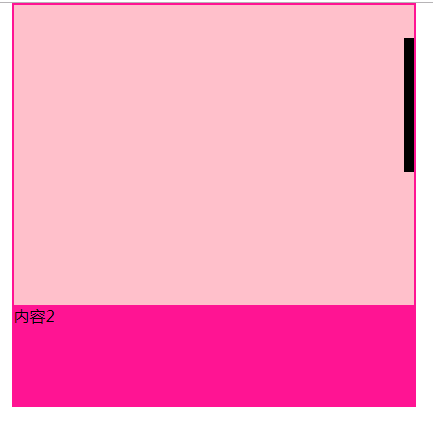
最终实现效果如下:
尽管初始视觉效果可能不够美观,但已具备可控性,可根据需求自行调整样式。
以上为本文全部内容,希望能为读者提供学习参考,欢迎支持本站。