

本文介绍layui动态表头的实现方法,重点解析如何通过原生JavaScript拼接HTML表格。核心思路是将接口返回数据中的动态字段提取至键值对数组,固定字段与动态字段分别处理。通过循环遍历动态数组生成表头(th)与单元格(td),并结合layui的cols数组配置实现动态渲染与重新加载。
这里分享一种实现思路,该方案不仅适用于layui框架。
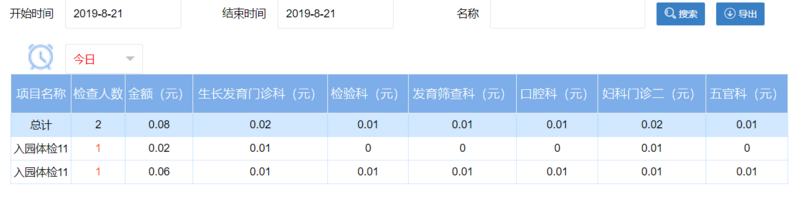
原生JavaScript拼接表格思路
外层表格结构采用原生JavaScript代码直接拼接生成。
@Override
  public List<Map<String, Object>> distribution(String begin,String end,String name,String hospitalCode) {
    HashMap<String, Object> params = new HashMap<String, Object>();
    StringBuffer buf = new StringBuffer();

    List<HRateAllotDepartment> hRateAllotDepartment = rateAllotDepartmentDao.getRateDepartment(hospitalCode);
    String str1 = "";
    String str2 = "";
    for(int i=0;i<hRateAllotDepartment.size();i++) {
      str1 +=",sum(`"+hRateAllotDepartment.get(i).getDepartmentName()+"`)`"+hRateAllotDepartment.get(i).getDepartmentName()+"`";
      str2 +=",max(case when e.`name`='"+hRateAllotDepartment.get(i).getDepartmentName()+"' then f.price else 0 end) `"+hRateAllotDepartment.get(i).getDepartmentName()+"`";

    }

    buf.append("select d.`name`,d.productId_,count(*) renshu,sum(price) total"+str1+" ");
    buf.append(" from ( SELECT b.`name`,b.id productId_ ,d.id,max(b.price) price ");
    buf.append(" "+str2+" FROM ");
    buf.append(" dt_pay_health_order_product a "
        + "JOIN dt_pay_health_order d ON a.orderId = d.id "
        + "JOIN dt_pay_health_product b ON a.productId = b.id ");
    buf.append(" JOIN dt_hospital_health_item c ON b.bizId = c.id "
        + "JOIN dt_hospital_health_order_use g ON g.orderProductId = a.id "
        + "JOIN dt_hospital_rate_allot f ON b.id = f.productId ");
    buf.append(" JOIN dt_hospital_department e ON f.departmentId = e.id where g.createDate>=:begin and g.createDate<=:end and b.name like :name and a.state ='02' group by b.`id`,d.`id` ) d group by d.productId_ WITH ROLLUP ");
    if(begin == null || begin.length() == 0){
      begin = "1970-01-01";
    }
    if(end == null || end.length() == 0){
      end = "2099-01-01";
    }
    params.put("begin",begin);
    params.put("end",end);
    params.put("name","%"+name+"%");
    return this.getMapListByMap(buf.toString(), params);


  }
初始阶段存在一个list列表,用于存储医院医生可配置的科室信息,这些科室构成动态数据源,后台据此获取动态数据。若需使用layui的分页功能,此处直接返回page类型数据即可。接下来分析JavaScript部分。
function toList(begin,end,name){

    console.log(begin);
    console.log(end);

    $.ajax({
      url: basePath + "/biz/hospital/rate/allot/list.do",
      data: {
        begin:begin,
        end:end,
        name:name
      },
      type : 'post',
      dataType : 'json',
      success : function(data) {

        var arrayPrice = new Array();

        for(var i=0;i<data.length;i++){
          var arrayPrice1 = new Array();
        for(var key in data[i]){

          if(key!="name"&&key!="productId_"&&key!="renshu"&&key!="total"){
            arrayPrice1[key]=data[i][key];
          }
        }
        arrayPrice.push(arrayPrice1);
      }

        var title="";
        var sumCols="";
        var partCols=new Array();

        for(var i=0;i<arrayPrice.length;i++){

          var partColsStr = "";

          for(var key in arrayPrice[i]){

            if(i==0&&(arrayPrice[arrayPrice.length-1][key]!=0)){
               title+="<th class='firstTh'>"+key+"(元)</th>";
            }
            if(i==(arrayPrice.length-1)&&(arrayPrice[arrayPrice.length-1][key]!=0)){
              sumCols+="<td class='secondTd'>"+arrayPrice[i][key]+"</td>";
            }
            if(i!=(arrayPrice.length-1)&&(arrayPrice[arrayPrice.length-1][key]!=0)){
              partColsStr += "<td class='thirdTd'>"+arrayPrice[i][key]+"</td>";

            }

          }

          partCols.push(partColsStr);

        }

        var sRenshu = 0;
        var stotal = 0;

        var tablex = "";

        tablex += "<tr class='firstTr'><th class='firstTh'>项目名称</th><th class='firstTh'>检查人数</th><th class='firstTh'>金额(元)</th>"+title+"</tr>";

        if(data!=null && data.length>0){
          for(var i=0;i<data.length-1;i++){
            sRenshu+=data[i].renshu;
            stotal+=data[i].total;
          }

          tablex += "<tr class='secondTr'><td class='secondTd'>总计</td><td class='secondTd'>"+sRenshu+"</td><td class='secondTd'>"+stotal+"</td>"+sumCols+"</tr>";

          for(var i=0;i<data.length-1;i++){
             {
              tablex += "<tr class='thirdTr'><td class='thirdTd'>"+data[i].name+"</td>" +
                  "<td class='thirdTd'>" +
                    "<a style='color:#ff5722' href="+basePath +" rel="external nofollow" rel="external nofollow" /biz/hospital/rate/allot/toPageMx.do?startDate="+$("#startDate").val().toString()
                                              +"&endDate="+$("#endDate").val().toString()
                                              +"&productId_="+data[i].productId_+">"+
                                              data[i].renshu+"</a></td>" +
                  "<td class='thirdTd'>"+data[i].total+ partCols[i] +
                  "</tr>";
            }
          }

        }
        $("#table_status").empty();
        $("#table_status").append(tablex);

        },
      error : function() {
        layer.msg('系统异常,请联系管理员!',{icon:2,time:2000});
      }
    });


  }
如顶部图片所示,部分字段固定,部分字段动态。处理思路是将接口返回的数据中,动态部分存入键值对数组。固定部分仍通过返回的data获取,动态部分则通过遍历处理后的数组进行赋值。动态表头对应动态数组的键,数据对应值。
function toList(begin,end,name){

    console.log(begin);
    console.log(end);

    $.ajax({
      url: basePath + "/biz/hospital/rate/allot/list.do",
      data: {
        begin:begin,
        end:end,
        name:name
      },
      type : 'post',
      dataType : 'json',
      success : function(data) {

        var arrayPrice = new Array();

        for(var i=0;i<data.length;i++){
          var arrayPrice1 = new Array();
        for(var key in data[i]){

          if(key!="name"&&key!="productId_"&&key!="renshu"&&key!="total"){
            arrayPrice1[key]=data[i][key];
          }
        }
        arrayPrice.push(arrayPrice1);
      }

        var title="";
        var sumCols="";
        var partCols=new Array();

        for(var i=0;i<arrayPrice.length;i++){

          var partColsStr = "";

          for(var key in arrayPrice[i]){

            if(i==0&&(arrayPrice[arrayPrice.length-1][key]!=0)){
               title+="<th class='firstTh'>"+key+"(元)</th>";
            }
            if(i==(arrayPrice.length-1)&&(arrayPrice[arrayPrice.length-1][key]!=0)){
              sumCols+="<td class='secondTd'>"+arrayPrice[i][key]+"</td>";
            }
            if(i!=(arrayPrice.length-1)&&(arrayPrice[arrayPrice.length-1][key]!=0)){
              partColsStr += "<td class='thirdTd'>"+arrayPrice[i][key]+"</td>";

            }

          }

          partCols.push(partColsStr);

        }

        var sRenshu = 0;
        var stotal = 0;

        var tablex = "";

        tablex += "<tr class='firstTr'><th class='firstTh'>项目名称</th><th class='firstTh'>检查人数</th><th class='firstTh'>金额(元)</th>"+title+"</tr>";

        if(data!=null && data.length>0){
          for(var i=0;i<data.length-1;i++){
            sRenshu+=data[i].renshu;
            stotal+=data[i].total;
          }

          tablex += "<tr class='secondTr'><td class='secondTd'>总计</td><td class='secondTd'>"+sRenshu+"</td><td class='secondTd'>"+stotal+"</td>"+sumCols+"</tr>";

          for(var i=0;i<data.length-1;i++){
             {
              tablex += "<tr class='thirdTr'><td class='thirdTd'>"+data[i].name+"</td>" +
                  "<td class='thirdTd'>" +
                    "<a style='color:#ff5722' href="+basePath +" rel="external nofollow" rel="external nofollow" /biz/hospital/rate/allot/toPageMx.do?startDate="+$("#startDate").val().toString()
                                              +"&endDate="+$("#endDate").val().toString()
                                              +"&productId_="+data[i].productId_+">"+
                                              data[i].renshu+"</a></td>" +
                  "<td class='thirdTd'>"+data[i].total+ partCols[i] +
                  "</tr>";
            }
          }

        }
        $("#table_status").empty();
        $("#table_status").append(tablex);

        },
      error : function() {
        layer.msg('系统异常,请联系管理员!',{icon:2,time:2000});
      }
    });


  }
此处name等字段为固定项,需排除处理,将数据存入arrayPrice1后push至数组。tablex变量用于存储表格HTML。拼接过程分两步:先构建表头,再构建数据。关于总计功能,后续在SQL语句中增加WITH ROLLUP即可实现。
for(var key in arrayPrice[i]){


        if(i==0&&(arrayPrice[arrayPrice.length-1][key]!=0)){
           title+="<th class='firstTh'>"+key+"(元)</th>";
        }
        if(i==(arrayPrice.length-1)&&(arrayPrice[arrayPrice.length-1][key]!=0)){
          sumCols+="<td class='secondTd'>"+arrayPrice[i][key]+"</td>";
        }
        if(i!=(arrayPrice.length-1)&&(arrayPrice[arrayPrice.length-1][key]!=0)){
          partColsStr += "<td class='thirdTd'>"+arrayPrice[i][key]+"</td>";

        }

      }
此处处理动态数据,包含title表头、sumCols总计、partColsStr具体数据,将其追加至tablex即可。以上为原生JavaScript的实现思路。

layui动态表头实现方案
此处表格使用了layui,当时也是参考layui动态设置的思路编写原生代码。主要思路是:cols是一个数组,通过ajax获取数据后放入该数组,再赋值给cols即可。
$.ajax({
  url: basePath + "/biz/hospital/rate/allot/department/getDepartment.do",
  data: {

  },
  type : 'post',
  dataType : 'json',
  success : function(data) {
    mycols[0] = {field : 'nameTrue', title:"姓名", align:'center',width:'120'};
    mycols[1] = {field : 'telephoneTrue', title:'支付手机号', align:'center',width:'120'};
    mycols[2] = {field : 'orderNO', title:'订单号', align:'center',width:'120'};
    mycols[3] = {field : 'createDate', title:'订单创建时间', align:'center',width:'120'};
    mycols[4] = {field : 'modifyDate', title:'订单使用时间', align:'center',width:'120'};
    mycols[5] = {field : 'price', title:'支付金额(元)', align:'center',width:'120'};

    for (var i = 0;i < data.length; i++){
      var obj = data[i].departmentName;
      if(obj!=0){
        mycols[i+6] = {field : obj, title:obj+"(元)", align:'center',width:'120'};
      }

      }

  console.log(mycols);

  reload();

  },
  error : function() {
    layer.msg('系统异常,请联系管理员!',{icon:2,time:2000});
  }
});
以上是ajax调用后处理的数组结构。下方为表格内容。调用reload()方法即可重新渲染表格。
var options = {
      url: basePath + "/biz/hospital/rate/allot/list_mx.do",
      method: 'post',
      where:{
        begin:$("#startDate").val().toString(),
        end:end,
        productId_:$("#productId_").val().toString(),
        orderNO:$("#qorderNO").val().toString(),
        name:$("#qname").val().toString()
      },
      //分页请求参数
      request:{
        pageName: 'pageIndex', //页码
        limitName: 'limit' //每页多少数据
      },
      //返回的数据格式
      response:{
         statusName: 'status', //数据状态的字段名称,默认:code
         statusCode: 200, //成功的状态码,默认:0
         msgName: 'message', //状态信息的字段名称,默认:msg
         countName: 'total', //数据总数的字段名称,默认:count
         dataName: 'data' //数据列表的字段名称,默认:data
      },
      //每页10条数据
      limit: 10,

      //加载时出现加载条
      loading: true,
      elem: '#data_table',
      cols: [
        mycols
       ],


      id: 'dataTable',
      page: true,
      };

  //方法级渲染
  table.render(options);

function reload(){

    date = new Date($("#endDate").val());

    date=date.setDate(date.getDate()+1);
    date=new Date(date);

    datemonth=date.getMonth()+1;   //获取当前月份(0-11,0代表1月)

    end=date.getFullYear()+"-"+datemonth+"-"+date.getDate();

    //options.where.departmentId = $("#departmentId").val();
    options.where.begin = $("#startDate").val();
    options.where.end = end;
    options.where.orderNO = $("#qorderNO").val();;
    options.where.name = $("#qname").val();;

    table.reload("dataTable",options);

  }
可以看到
cols: [
        mycols
       ],
此处即为动态数据部分。
以上就是本文的全部内容,希望对大家的学习有所帮助,也希望大家多多支持本站。