

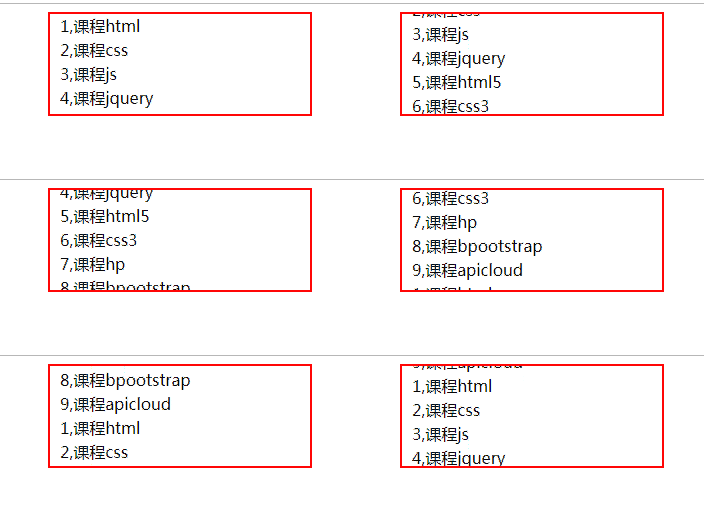
本文介绍了如何使用 JavaScript 实现新闻列表的自动向上滚动效果。通过封装滚动函数与定时器控制,结合 CSS 样式限制容器高度与溢出隐藏,实现平滑的列表滚动展示。
JavaScript 实现新闻列表自动向上滚动效果
本文详细介绍了一种利用 JavaScript 实现的新闻列表自动滚动功能。
<!DOCTYPE html>
<html lang="en">
<head>
  <meta charset="UTF-8">
  <title>Title</title>
  <style type="text/css">
    #box{width:260px;height:100px;margin:0 auto;border:2px solid red;overflow: hidden}
    ul{padding:0;margin:0;list-style: none;overflow: hidden}
    ul li{height:24px;line-height: 24px;padding-left:10px;}
    a{text-decoration: none;color:#000;}
    a:hover{color:#f00}
  </style>
</head>
<body>
<div id="box">
  <ul id="con1" onMouseOut="Up()" onMouseOver="Stop()">
    <li><a href="#" rel="external nofollow" rel="external nofollow" rel="external nofollow" rel="external nofollow" rel="external nofollow" rel="external nofollow" rel="external nofollow" rel="external nofollow" rel="external nofollow" >1,课程html</a> </li>
    <li><a href="#" rel="external nofollow" rel="external nofollow" rel="external nofollow" rel="external nofollow" rel="external nofollow" rel="external nofollow" rel="external nofollow" rel="external nofollow" rel="external nofollow" >2,课程css</a> </li>
    <li><a href="#" rel="external nofollow" rel="external nofollow" rel="external nofollow" rel="external nofollow" rel="external nofollow" rel="external nofollow" rel="external nofollow" rel="external nofollow" rel="external nofollow" >3,课程js</a> </li>
    <li><a href="#" rel="external nofollow" rel="external nofollow" rel="external nofollow" rel="external nofollow" rel="external nofollow" rel="external nofollow" rel="external nofollow" rel="external nofollow" rel="external nofollow" >4,课程jquery</a> </li>
    <li><a href="#" rel="external nofollow" rel="external nofollow" rel="external nofollow" rel="external nofollow" rel="external nofollow" rel="external nofollow" rel="external nofollow" rel="external nofollow" rel="external nofollow" >5,课程html5</a> </li>
    <li><a href="#" rel="external nofollow" rel="external nofollow" rel="external nofollow" rel="external nofollow" rel="external nofollow" rel="external nofollow" rel="external nofollow" rel="external nofollow" rel="external nofollow" >6,课程css3</a> </li>
    <li><a href="#" rel="external nofollow" rel="external nofollow" rel="external nofollow" rel="external nofollow" rel="external nofollow" rel="external nofollow" rel="external nofollow" rel="external nofollow" rel="external nofollow" >7,课程hp</a> </li>
    <li><a href="#" rel="external nofollow" rel="external nofollow" rel="external nofollow" rel="external nofollow" rel="external nofollow" rel="external nofollow" rel="external nofollow" rel="external nofollow" rel="external nofollow" >8,课程bpootstrap</a> </li>
    <li><a href="#" rel="external nofollow" rel="external nofollow" rel="external nofollow" rel="external nofollow" rel="external nofollow" rel="external nofollow" rel="external nofollow" rel="external nofollow" rel="external nofollow" >9,课程apicloud</a> </li>
  </ul>
  <ul id="con2"></ul>
</div>
</body>
<script type="text/javascript">
  var box=document.getElementById("box");
  var con1=document.getElementById("con1");
  var con2=document.getElementById("con2");
  var s=document.getElementsByTagName("a");
  var speed=50;
  con2.innerHTML=con1.innerHTML;
  function ScrollUp(){
    if( box.scrollTop>=con1.scrollHeight){
      box.scrollTop=0;
    }else
      box.scrollTop++;
  }
  var i=setInterval("ScrollUp()",speed);
  function Stop(){
    clearInterval(i);
  }
  function Up(){
    i=setInterval("ScrollUp()",speed);
  }
</script>
</html>
您可以使用在线 HTML/CSS/JavaScript 代码运行工具进行实际测试:http://tools.jb51.net/code/HtmlJsRun。
如果您对 JavaScript 的其他技巧感兴趣,推荐参考本站的《JavaScript切换特效与技巧总结》、《JavaScript查找算法技巧总结》、《JavaScript错误与调试技巧总结》、《JavaScript数据结构与算法技巧总结》、《JavaScript遍历算法与技巧总结》以及《JavaScript数学运算用法总结》等专题内容。
希望本文提供的代码示例能对您的 JavaScript 编程学习与实践有所帮助。