

本文介绍如何利用Vue.js结合Bootstrap框架,在前端实现数据列表的分页显示与排序功能。针对后台未返回分页数据的情况,通过Vue的过滤器(filter)和指令(v-for, v-model等)处理数据。文中包含HTML结构、JavaScript逻辑及关键代码片段,展示了如何在前端完成排序(目前仅支持字符串排序)和分页逻辑,并提供了源码参考。
背景与需求分析
在开始编写代码之前,先分享一些背景。原本专注于.NET开发,但随着项目需求变化,逐渐转向了前端开发。目前许多项目后台采用Java构建,导致.NET开发人员主要承担前端界面工作,无论是使用WPF还是HTML编写Web页面。
作者意识到自身前端技术存在不足。虽然过去使用ASP.NET进行前后端开发,但前端部分多依赖现成的JS库和页面模板,对Vue.js等现代前端框架接触较少。
由于不擅长编写Java后端代码,在近期负责的一个项目中,仅负责前端部分。后端接口返回的数据未进行分页处理,前端需要接收全部数据后自行实现分页逻辑,这带来了一定的挑战。
鉴于近期正在学习Vue.js,决定使用该技术栈来实现此页面功能,并在此过程中进行总结。
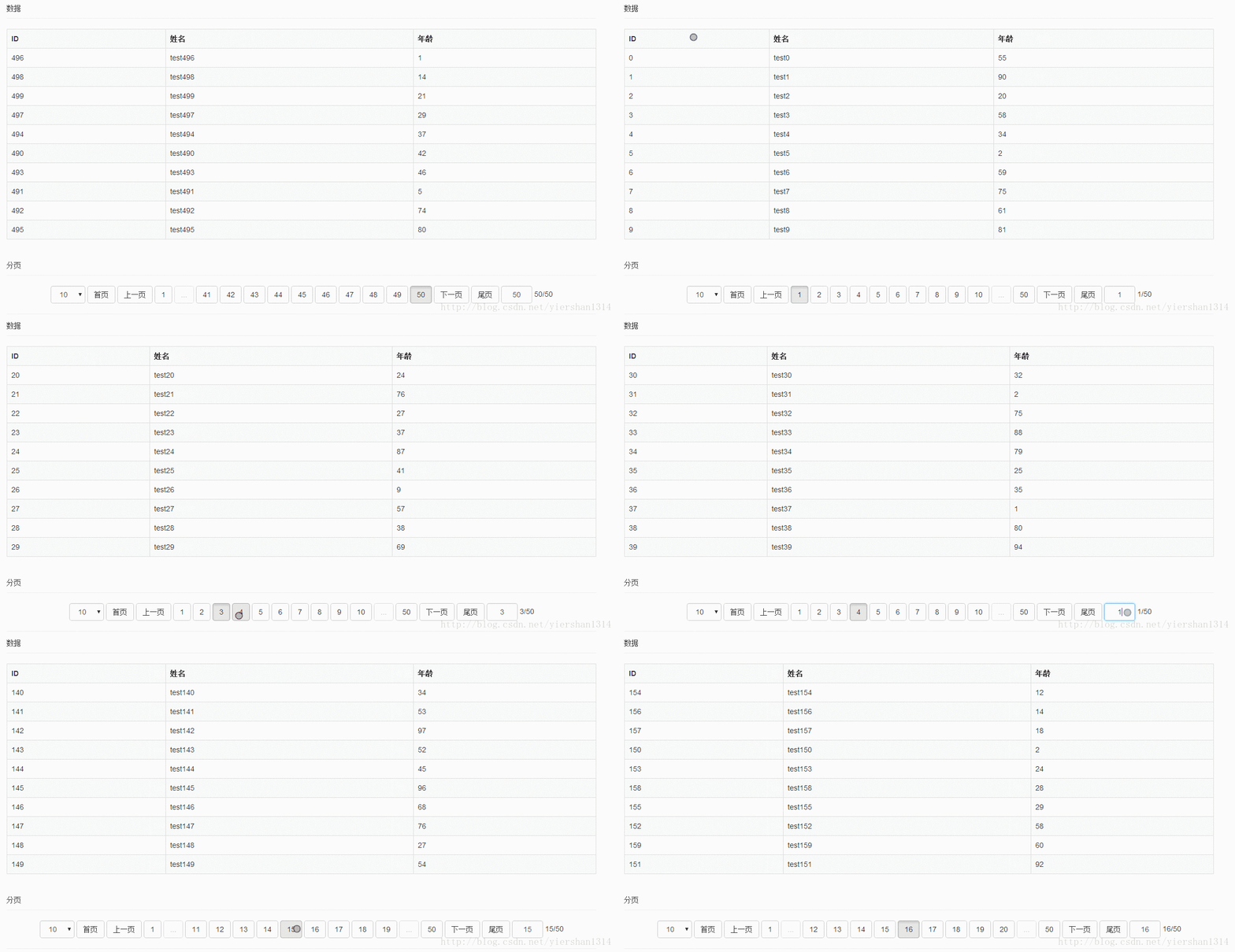
从效果图中可以看出,当前的排序功能仅实现了字符串类型的排序,尚未实现数字类型的排序。若有熟悉Vue.js前端排序实现的朋友,欢迎提供指导。
Vue.js核心语法回顾
语法概述
数据绑定可通过{{...}}表达式或v-model指令实现。
<td >{{dataItem.id}}</td>
<input v-model="message">
事件绑定使用v-on指令。
<th v-on:click="sortBy('id')">ID</th>循环遍历使用v-for指令。
<option v-for="item in arrPageSize" value="{{item}}">{{item}}</option>条件判断使用v-if指令。
<span v-if="item==1" class="btn btn-default" v-on:click="showPage(1,$event)">首页</span>过滤器通过Vue.filter定义。
//定义
Vue.filter( 'name' , function(value) {
  return value * .5 ;
 });
//使用
<td>{{dataItem.age | name}}</td>
<input v-model="message | name">
排序功能使用orderBy过滤器。
<tr v-for="dataItem in arrayData | orderBy sortparam sorttype">
    <td >{{dataItem.id}}</td>
   <td >{{dataItem.name}}</td>
   <td>{{dataItem.age}}</td>
 </tr>
前端实现代码详解
HTML结构部分
<div id="test" class="form-group">
   <div class="form-group">
    <div class="page-header">
     数据
    </div>
    <table class="table table-bordered table-responsive table-striped">
     <tr>
      <th v-on:click="sortBy('id')">ID</th>
      <th>姓名</th>
      <th v-on:click="sortBy('age')">年龄</th>
     </tr>
     <tr v-for="dataItem in arrayData | orderBy sortparam sorttype">
      <td >{{dataItem.id}}</td>
      <td >{{dataItem.name}}</td>
      <td>{{dataItem.age}}</td>
     </tr>
    </table>
    <div class="page-header">分页</div>
    <div class="pager" id="pager">
     <span class="form-inline">
      <select class="form-control" v-model="pagesize" v-on:change="showPage(pageCurrent,$event,true)" number>
       <option v-for="item in arrPageSize" value="{{item}}">{{item}}</option>
      </select>
     </span>
     <template v-for="item in pageCount+1">
      <span v-if="item==1" class="btn btn-default" v-on:click="showPage(1,$event)">
       首页
      </span>
      <span v-if="item==1" class="btn btn-default" v-on:click="showPage(pageCurrent-1,$event)">
       上一页
      </span>
      <span v-if="item==1" class="btn btn-default" v-on:click="showPage(item,$event)">
       {{item}}
      </span>
      <span v-if="item==1&&item<showPagesStart-1" class="btn btn-default disabled">
       ...
      </span>
      <span v-if="item>1&&item<=pageCount-1&&item>=showPagesStart&&item<=showPageEnd&&item<=pageCount" class="btn btn-default" v-on:click="showPage(item,$event)">
       {{item}}
      </span>
      <span v-if="item==pageCount&&item>showPageEnd+1" class="btn btn-default disabled">
       ...
      </span>
      <span v-if="item==pageCount&&item!=1" class="btn btn-default" v-on:click="showPage(item,$event)">
       {{item}}
      </span>
      <span v-if="item==pageCount" class="btn btn-default" v-on:click="showPage(pageCurrent+1,$event)">
       下一页
      </span>
      <span v-if="item==pageCount" class="btn btn-default" v-on:click="showPage(pageCount,$event)">
       尾页
      </span>
     </template>
     <span class="form-inline">
      <input class="pageIndex form-control" style="width:60px;text-align:center" type="text" v-model="pageCurrent | onlyNumeric" v-on:keyup.enter="showPage(pageCurrent,$event,true)" />
     </span>
     <span>{{pageCurrent}}/{{pageCount}}</span>
    </div>
   </div>
  </div>
JavaScript逻辑部分
 //只能输入正整数过滤器
  Vue.filter('onlyNumeric', {
   // model -> view
   // 在更新 `<input>` 元素之前格式化值
   read: function (val) {
    return val;
   },
   // view -> model
   // 在写回数据之前格式化值
   write: function (val, oldVal) {
    var number = +val.replace(/[^\d]/g, '')
    return isNaN(number) ? 1 : parseFloat(number.toFixed(2))
   }
  })
  //模拟获取数据
  var getData=function(){
   var result = [];
   for (var i = 0; i < 500; i++) {
    result[i] ={name:'test'+i,id:i,age:(Math.random()*100).toFixed()};
    }
   return result;
  }

  var vue = new Vue({
   el: "#test",
   //加载完成后执行
   ready:function(){
    this.arrayDataAll = getData();
    this.totalCount = this.arrayDataAll.length;
    this.showPage(this.pageCurrent, null, true);
   },
   data: {
    //总项目数
    totalCount: 200,
    //分页数
    arrPageSize:[10,20,30,40],
    //当前分页数
    pageCount: 20,
    //当前页面
    pageCurrent: 1,
    //分页大小
    pagesize: 10,
    //显示分页按钮数
    showPages: 11,
    //开始显示的分页按钮
    showPagesStart: 1,
    //结束显示的分页按钮
    showPageEnd: 100,
    //所有数据
    arrayDataAll:[],
    //分页数据
    arrayData: [],
    //排序字段
    sortparam:"",
    //排序方式
    sorttype:1,


   },
   methods: {
    //分页方法
    showPage: function (pageIndex, $event, forceRefresh) {

     if (pageIndex > 0) {


      if (pageIndex > this.pageCount) {
       pageIndex = this.pageCount;
      }

      //判断数据是否需要更新
      var currentPageCount = Math.ceil(this.totalCount / this.pagesize);
      if (currentPageCount != this.pageCount) {
       pageIndex = 1;
       this.pageCount = currentPageCount;
      }
      else if (this.pageCurrent == pageIndex && currentPageCount == this.pageCount && typeof (forceRefresh) == "undefined") {
       console.log("not refresh");
       return;
      }

      //处理分页点中样式
      var buttons = $("#pager").find("span");
      for (var i = 0; i < buttons.length; i++) {
       if (buttons.eq(i).html() != pageIndex) {
        buttons.eq(i).removeClass("active");
       }
       else {
        buttons.eq(i).addClass("active");
       }
      }

      //从所有数据中取分页数据
      var newPageInfo = [];
      for (var i = 0; i < this.pagesize; i++) {
      var index =i+(pageIndex-1)*this.pagesize;
      if(index>this.totalCount-1)break;
       newPageInfo[newPageInfo.length] = this.arrayDataAll[index];
      }
      this.pageCurrent = pageIndex;
      this.arrayData = newPageInfo;

      //计算分页按钮数据
      if (this.pageCount > this.showPages) {
       if (pageIndex <= (this.showPages - 1) / 2) {
        this.showPagesStart = 1;
        this.showPageEnd = this.showPages - 1;
        console.log("showPage1")
       }
       else if (pageIndex >= this.pageCount - (this.showPages - 3) / 2) {
        this.showPagesStart = this.pageCount - this.showPages + 2;
        this.showPageEnd = this.pageCount;
        console.log("showPage2")
       }
       else {
        console.log("showPage3")
        this.showPagesStart = pageIndex - (this.showPages - 3) / 2;
        this.showPageEnd = pageIndex + (this.showPages - 3) / 2;
       }
      }
     }
     //排序
    },sortBy: function (sortparam) {
     this.sortparam = sortparam;
     this.sorttype = this.sorttype == -1 ? 1 : -1;
    }
   }
  });
参考网址:Vue.js结合bootstrap实现分页控件
源码下载:vue.js实现分页和排序效果
以上就是本文的全部内容,希望对大家的学习有所帮助,也希望大家多多支持本站。