

本文介绍了在 Vue.js 中实现评价五角星组件的方法。通过传入 size 和 score 属性,组件支持不同大小和评分显示。使用三种类型的图片(实星、半星、空星)并适配不同分辨率,确保在不同设备上显示效果一致。
Vue.js 实现评价五角星组件的实例代码
饿了么的五角星组件包含实星、半星和空星三种形态

该组件需支持不同尺寸及对应的评分显示,例如满分五星、四颗半星等
组件接口需接收大小:size和分数:score两个参数
具体实现代码如下
<template>
   <div class="star" :class="starType">
     <span class="star-item" :class="itemClass" v-for="itemClass in itemClasses"></span>
   </div>
 </template>
 <script type="text/ecmascript-6">
   const LENGTH=5;
   const CLS_ON="on";
   const CLS_OFF="off";
   const CLS_HALF="half";
  export default {
     props:{
       size:{
         type:Number
       },
       score:{
         type:Number
       }
     },
     computed:{
       starType(){
         return "star-"+this.size;
       },
       itemClasses(){
         //计算属性
        let result=[];
         let score=Math.floor(this.score*2)/2;
         let hasDecimal=score%1!==0; //是否有效数
        let integer=Math.floor(score);//取整
        for (var i = 0; i < integer; i++) {
           result.push(CLS_ON);
         }
         if (hasDecimal) {
           //有且最多一个半星
          result.push(CLS_HALF);
         }
         while(result.length<LENGTH){
           result.push(CLS_OFF);
         }
         //数组填充完毕
        return result;
       }
     }
   };
 </script>
 <style lang="stylus" ref="sheetstyle/stylus">
   @import "../../common/stylus/mixin.styl";
   .star
     font-size:0
     .star-item
       display:inline-block
       background-repeat:no-repeat
     &.star-48
       .star-item
         width:20px
         height:20px
         margin-right:22px
         background-size:20px 20px
         &:last-child
           margin-right:0
         &.on
           bg-image('star48_on')
         &.half
           bg-image('star48_half')
         &.off
           bg-image('star48_off')
     &.star-36
       .star-item
         width:15px
         height:15px
         margin-right:6px
         background-size:15px 15px
         &:last-child
           margin-right:0
         &.on
           bg-image('star36_on')
         &.half
           bg-image('star36_half')
         &.off
           bg-image('star36_off')
     &.star-24
       .star-item
         width:10px
         height:10px
         margin-right:3px
         background-size:10px 10px
         &:last-child
           margin-right:0
         &.on
           bg-image('star24_on')
         &.half
           bg-image('star24_half')
         &.off
           bg-image('star24_off')
 </style>
当size设置为48、36或24时,需准备三种对应图片,并适配不同分辨率,提供@2x.png和@3x.png格式
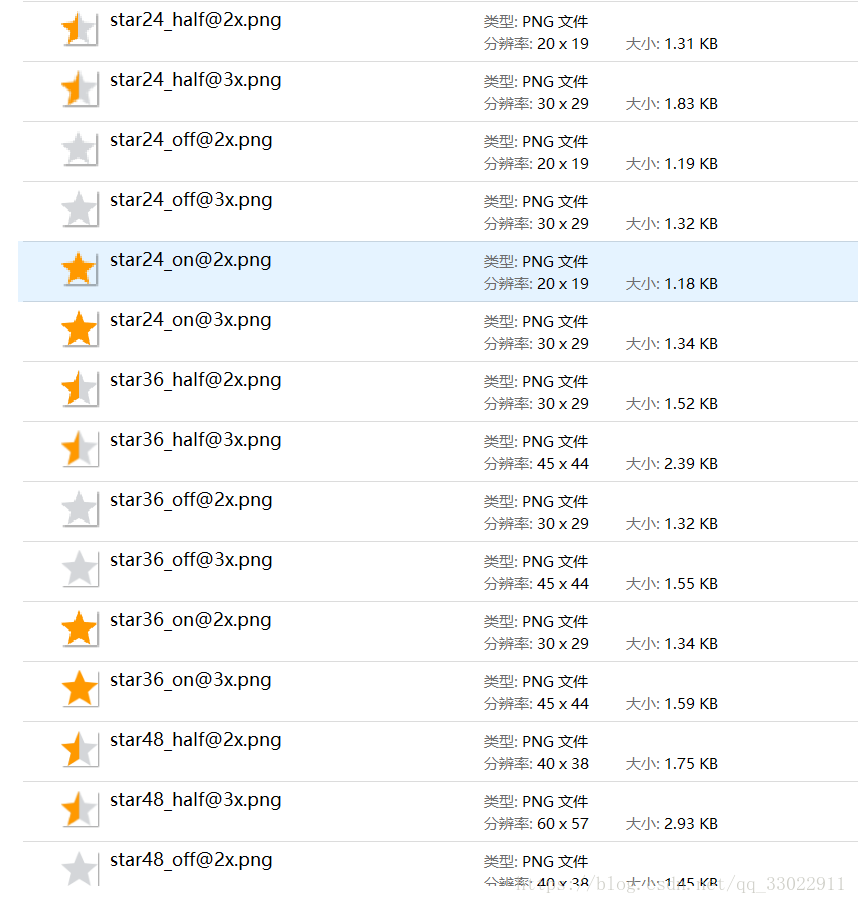
bg-image方法定义在mixin.styl文件中,具体代码如下
bg-image($url)
   background-image:url($url+"@2x.png")
   @media (-webkit-min-device-pixel-ratio:3),(min-device-pixel-ratio:3)
     background-image:url($url+"@3x.png")
组件的使用方式十分简便
<star :size="48" :score="3.5"></star>
总结
以上介绍了vue.js实现评价五角星组件的实例代码,希望对大家有所帮助,如有疑问请留言,小编会及时回复。感谢大家对本站的支持!