

本文介绍如何使用jQuery结合Ajax技术从XML文件中读取数据。通过示例代码展示如何解析XML并动态显示内容,同时提供相关在线工具链接供参考。
jQuery Ajax读取XML数据示例
本文通过一个具体实例,讲解如何利用jQuery和Ajax技术来读取XML文件中的数据。内容旨在为读者提供实用的参考方案。
<%@ Page Language="C#" AutoEventWireup="true" CodeFile="Default.aspx.cs" Inherits="JqueryAjax_Default" %>
<!DOCTYPE html PUBLIC "-//W3C//DTD XHTML 1.0 Transitional//EN" "http://www.w3.org/TR/xhtml1/DTD/xhtml1-transitional.dtd">
<html xmlns="http://www.w3.org/1999/xhtml">
<head runat="server">
  <title>www.jb51.net jQuery使用ajax获取xml</title>
  <style type="text/css">
  </style>
  <script src="http://libs.baidu.com/jquery/2.0.0/jquery.min.js"></script>
  <script type="text/javascript">
    $(document).ready(function () {
      $("#Display").click(function () {
        $("#message").html('');
        $.ajax({
          type: "GET",
          url: "Friend.xml",
          dataType: "xml",
          success: function (ResponseText) {
            var table = "<table border='1px'><tr><td>firstname</td><td>lastname</td><td>city</td></tr>";
            $(ResponseText).find('friend').each(function () {
              var first = $(this).find('firstName').text();
              var last = $(this).find('lastName').text();
              var city = $(this).find('city').text();
              table += "<tr><td>" + first + "</td><td>" + last + "</td><td>" + city + "</td></tr>";
            })
            table += "</table>";
            $("#message").append(table);
          }
        });
      });
    });
  </script>
</head>
<body>
  <form id="form1" runat="server">
  <label>Display My Friends</label><br />
 <input type="button" value="Display" id="Display" />
 <div id="message"></div>
  </form>
</body>
</html>
示例使用的XML文件名为Friend.xml。
<?xml version="1.0" encoding="utf-8" ?>
<friends>
  <friend>
    <name>
      <firstName>Guo</firstName>
      <lastName>Hu</lastName>
    </name>
    <address>
      <province>Shanghai</province>
      <city>PuDong</city>
    </address>
  </friend>
  <friend>
    <name>
      <firstName>Lei</firstName>
      <lastName>Hu</lastName>
  </name>
    <address>
      <province>hubei</province>
      <city>xiantao</city>
    </address>
  </friend>
  <friend>
    <name>
      <firstName>JunWen</firstName>
      <lastName>Li</lastName>
    </name>
    <address>
      <province>hubei</province>
      <city>wuhan</city>
    </address>
  </friend>
  <friend>
    <name>
      <firstName>Jinhao</firstName>
      <lastName>Liu</lastName>
    </name>
    <address>
      <province>ShanXi</province>
      <city>Taiyuan</city>
    </address>
  </friend>
  <friend>
    <name>
      <firstName>Cheng</firstName>
      <lastName>Fang</lastName>
    </name>
    <address>
      <province>GuangDong</province>
      <city>GuangZhou</city>
    </address>
  </friend>
</friends>
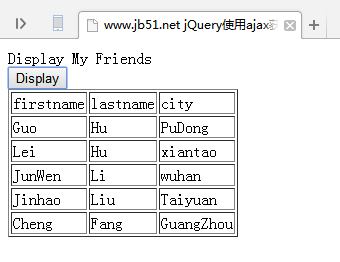
程序运行后的实际显示效果如下。
此外,这里推荐几款用于处理XML的在线工具,供读者在实际开发中参考使用:
在线XML/JSON互相转换工具: http://tools.jb51.net/code/xmljson
在线格式化XML/在线压缩XML: http://tools.jb51.net/code/xmlformat
XML在线压缩/格式化工具: http://tools.jb51.net/code/xml_format_compress
xml代码在线格式化美化工具: http://tools.jb51.net/code/xmlcodeformat
若读者对jQuery的其他应用感兴趣,可进一步查阅本站相关专题,包括《jQuery操作xml技巧总结》、《jquery中Ajax用法总结》、《jQuery扩展技巧总结》、《jQuery常用插件及用法总结》、《jQuery常见经典特效汇总》以及《jquery选择器用法总结》。
希望本文提供的示例和说明能对读者学习jQuery程序设计有所帮助。