

本文提供了一段使用原生JavaScript实现的Tab表单切换代码。通过监听鼠标单击事件,动态修改导航项的样式及内容面板的位置,实现无刷新切换展示效果。代码包含HTML结构、CSS样式及JS逻辑,适合前端初学者参考学习。
JavaScript实现Tab切换功能
本文分享了一段使用JavaScript实现鼠标单击Tab标签页切换展示功能的完整代码,供读者参考学习。
具体实现代码如下:
<!DOCTYPE html>
<html>
 <head>
  <meta charset="utf-8" />
  <title></title>
  <style type="text/css">
   *{
    padding: 0;
    margin: 0;
    border:0;
   }
   body{
    text-align: center;
   }
   ul{
    list-style: none;
   }
   a{
    text-decoration: none;
    color: #ff6666;
    font-family: Arial;
   }
   .tab-container{
    width: 398px;
    height: 200px;
    border:1px #ffcccc solid;
    margin: 0 auto;
    position: relative;
    overflow: hidden;
   }
   /*tab-head begin*/
   .tab-head{
    width: 400px;
    height:30px;
    left:0;
    background: #ffcccc;
    position: absolute;
    left:-1px;//这里设置-1是为了li的border与最外层的border重合
   }
   .tab-head li{
    float:left;
    height: 29px;
    line-height: 29px;
    width: 78px;
    overflow: hidden;
    padding: 0 1px;
    border-bottom: 1px solid #ffcccc;
    background: #ffeeee;
   }

   li.select{
    background: #fff;
    padding: 0;
    border-left: 1px solid #ffcccc;
    border-right: 1px solid #ffcccc;
    border-bottom: 1px solid #fff;
   }
   /*tab-head end tab-panel begin*/
   .tab-panel{
    position: relative;
    width: 100%;
    height: 85%;
    top: 15%;
    -webkit-transition:all 0.01s linear;//切换过渡效果
   }
   .tab-panel section{
    position: absolute;
    display: inline-block;
    width: 100%;
    height: 100%;
   }
   #panel-1{
    left: 0;
   }
   #panel-2{
    left: 100%;
   }
   #panel-3{
    left: 200%;
   }
   #panel-4{
    left: 300%;
   }
   #panel-5{
    left: 400%;
   }
  </style>
 </head>
 <body>
  <div class="tab-container">
    <ul class="tab-head">
     <li id="1" class="select" onmousedown="$(this)"><a href="#" rel="external nofollow" rel="external nofollow" rel="external nofollow" rel="external nofollow" rel="external nofollow" >Tab1</a></li>
     <li id="2" onmousedown="$(this)"><a href="#" rel="external nofollow" rel="external nofollow" rel="external nofollow" rel="external nofollow" rel="external nofollow" >Tab2</a></li>
     <li id="3" onmousedown="$(this)"><a href="#" rel="external nofollow" rel="external nofollow" rel="external nofollow" rel="external nofollow" rel="external nofollow" >Tab3</a></li>
     <li id="4" onmousedown="$(this)"><a href="#" rel="external nofollow" rel="external nofollow" rel="external nofollow" rel="external nofollow" rel="external nofollow" >Tab4</a></li>
     <li id="5" onmousedown="$(this)"><a href="#" rel="external nofollow" rel="external nofollow" rel="external nofollow" rel="external nofollow" rel="external nofollow" >Tab5</a></li>
    </ul>
    <div id="tab-panel" class="tab-panel">
     <section id="panel-1"><p>这是panel-1</p></section>
     <section id="panel-2"><p>这是panel-2</p></section>
     <section id="panel-3"><p>这是panel-3</p></section>
     <section id="panel-4"><p>这是panel-4</p></section>
     <section id="panel-5"><p>这是panel-5</p></section>
    </div>
   </div>
   <script type="text/javascript">
    function $(id){
    var lis = document.getElementsByTagName('li');
    for (var i = 0; i < lis.length; i++) {
     lis[i].setAttribute('class','');
    };
    id.setAttribute('class','select');
    var ele = document.getElementById('tab-panel');
    ele.style.left=-(id.id-1)+'00%';
    }
   </script>
 </body>
</html>
运行后的效果如下图所示:
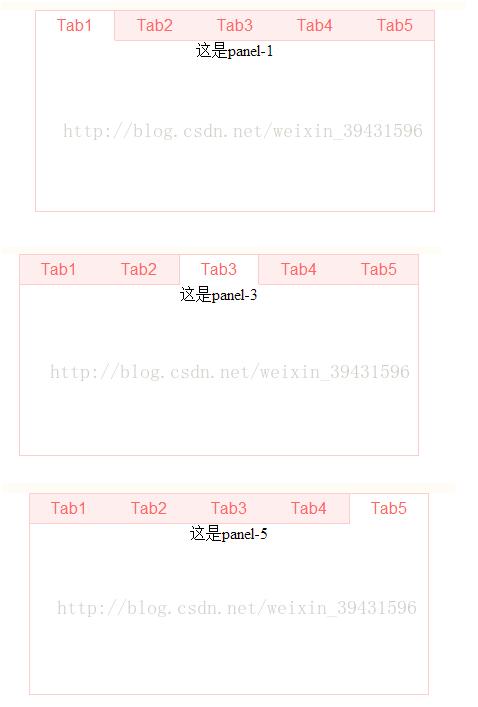
上述内容即为本文介绍的全部代码与说明,希望能为读者的学习提供便利,也欢迎继续支持本站获取更多技术资源。