

本文介绍如何使用jQuery实现评论框的展开与隐藏功能。通过监听回复按钮点击事件,利用索引匹配对应的输入区域并控制其显示状态;点击取消按钮则隐藏输入框。代码包含HTML结构、CSS样式及核心JS逻辑,适用于需要动态交互的评论系统。
评论展开隐藏功能实现概述
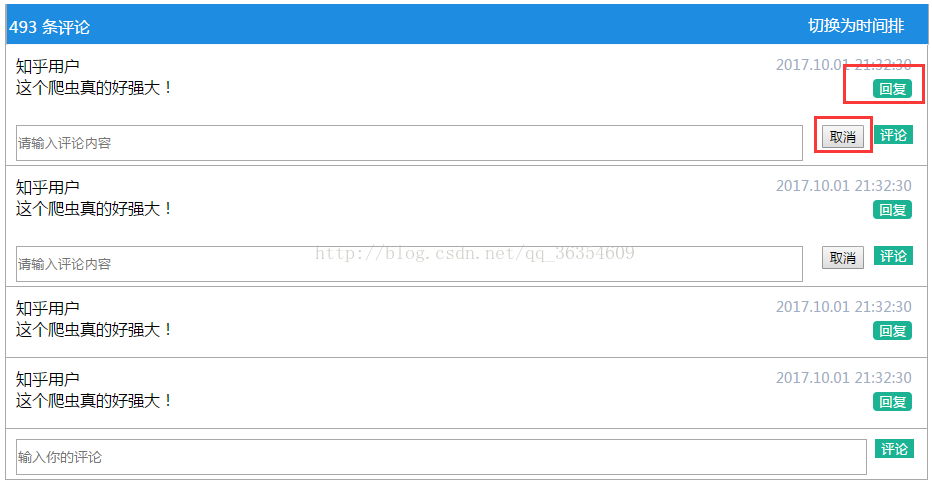
首先展示最终实现的视觉效果,
当用户点击评论按钮时,对应的评论输入区域会展开显示;若点击取消按钮,则隐藏该输入区域。
HTML结构与依赖引入
接下来是HTML结构部分,实现此功能需要引入jQuery.js库。
<div
class="nr-comment">
<div
class="nr-comment-con">
<div
class="nr-comment-nav">
<div
class="comment-number">
<span>493</span>
<span>条评论</span>
</div>
<div
class="comment-sort">
切换为时间排序
</div>
</div>
<div
class="comment-content">
<div
class="com-users">
<div
class="comment-user">
<span>知乎用户</span>
<div
class="comment-user-content">
这个爬虫真的好强大!
</div>
</div>
<div
class="comment-time">
<div>2017.10.01 21:32:30</div>
<button
class="btn btn-primary btn-sm btn-reply">回复</button>
</div>
</div>
<div
class="user-reply">
<duv
class="reply-in">
<input
type="text"
value=""
name=""
placeholder="请输入评论内容" />
</duv>
<div
class="reply-buttons">
<button
type="button"
class="btn btn-primary btn-comment btn-sm">评论</button>
<button
type="button"
class="btn btn-default btn-cancel btn-sm">取消</button>
</div>
</div>
</div>
<div
class="comment-content">
<div
class="com-users">
<div
class="comment-user">
<span>知乎用户</span>
<div
class="comment-user-content">
这个爬虫真的好强大!
</div>
</div>
<div
class="comment-time">
<div>2017.10.01 21:32:30</div>
<button
class="btn btn-primary btn-sm btn-reply">回复</button>
</div>
</div>
<div
class="user-reply">
<duv
class="reply-in">
<input
type="text"
value=""
name=""
placeholder="请输入评论内容" />
</duv>
<div
class="reply-buttons">
<button
type="button"
class="btn btn-primary btn-comment btn-sm">评论</button>
<button
type="button"
class="btn btn-default btn-cancel btn-sm">取消</button>
</div>
</div>
</div>
<div
class="comment-content">
<div
class="com-users">
<div
class="comment-user">
<span>知乎用户</span>
<div
class="comment-user-content">
这个爬虫真的好强大!
</div>
</div>
<div
class="comment-time">
<div>2017.10.01 21:32:30</div>
<button
class="btn btn-primary btn-sm btn-reply">回复</button>
</div>
</div>
<div
class="user-reply">
<duv
class="reply-in">
<input
type="text"
value=""
name=""
placeholder="请输入评论内容" />
</duv>
<div
class="reply-buttons">
<button
type="button"
class="btn btn-primary btn-comment btn-sm">评论</button>
<button
type="button"
class="btn btn-default btn-cancel btn-sm">取消</button>
</div>
</div>
</div>
<div
class="comment-content">
<div
class="com-users">
<div
class="comment-user">
<span>知乎用户</span>
<div
class="comment-user-content">
这个爬虫真的好强大!
</div>
</div>
<div
class="comment-time">
<div>2017.10.01 21:32:30</div>
<button
class="btn btn-primary btn-sm btn-reply">回复</button>
</div>
</div>
<div
class="user-reply">
<duv
class="reply-in">
<input
type="text"
value=""
name=""
placeholder="请输入评论内容" />
</duv>
<div
class="reply-buttons">
<button
type="button"
class="btn btn-primary btn-sm btn-comment">评论</button>
<button
type="button"
class="btn btn-default btn-sm btn-cancel">取消</button>
</div>
</div>
</div>
<div
class="comment-ipt">
<input
type="text"
placeholder="输入你的评论">
<button
type="submit"
class="btn btn-sm btn-primary">评论</button>
</div>
</div>
</div>
CSS样式设计说明
随后是CSS样式代码,具体的样式设计可根据实际需求自行调整,不影响核心逻辑。
.nr-comment {
width:
100%;
border-right:
1px
solid #A9A9A9;
border-left:
1px
solid #A9A9A9;
}
.nr-comment .nr-comment-con {
width:
100%;
}
.nr-comment .nr-comment-con .nr-comment-nav {
width:
100%;
height:
40px;
border-bottom:
1px
solid #F5F5F6;
border-right:
1px
solid #A9A9A9;
border-left:
1px
solid #A9A9A9;
background-color:
#1E8CE0;
}
.nr-comment .nr-comment-con .nr-comment-nav .comment-number {
float:
left;
width:
85px;
height:
30px;
text-align:
center;
margin-top:
5px;
color:
white;
line-height:
2.3em;
}
.nr-comment .nr-comment-con .nr-comment-nav .comment-sort {
float:
right;
width:
110px;
height:
30px;
margin-top:
5px;
margin-right:
10px;
line-height:
2em;
color:
white;
}
.nr-comment .nr-comment-con .comment-content {
width:
100%;
margin-top:
10px;
border-bottom:
1px
solid #a9a9a9;
}
.nr-comment .nr-comment-con .comment-content .com-users {
width:
100%;
min-height:
60px;
}
.nr-comment .nr-comment-con .comment-content .com-users .comment-user {
float:
left;
width:
500px;
height:
60px;
}
.nr-comment .nr-comment-con .comment-content .com-users .comment-user span {
color:
black;
margin-left:
10px;
}
.nr-comment .nr-comment-con .comment-content .com-users .comment-user .comment-user-content {
width:
90%;
height:
60px;
margin-left:
10px;
}
.nr-comment .nr-comment-con .comment-content .com-users .comment-time {
float:
right;
width:
190px;
height:
60px;
text-align:
center;
color:
#9CADC6;
font-size:
0.9em;
text-align:
right;
}
.nr-comment .nr-comment-con .comment-content .com-users .comment-time div {
margin-right:
15px;
}
.nr-comment .nr-comment-con .comment-content .com-users .comment-time .btn-reply {
margin-top:
5px;
border-radius:
4px;
border:
none;
background-color:
#1BB394;
color:
white;
margin-right:
15px;
}
.nr-comment .nr-comment-con .comment-content .user-reply {
display:
none;
width:
100%;
height:
50px;
}
.nr-comment .nr-comment-con .comment-content .user-reply .reply-in {
float:
left;
width:
85%;
height:
50px;
}
.nr-comment .nr-comment-con .comment-content .user-reply .reply-in input {
width:
100%;
height:
30px;
margin-top:
10px;
margin-left:
10px;
}
.nr-comment .nr-comment-con .comment-content .user-reply .reply-buttons {
float:
right;
margin-top:
10px;
}
.nr-comment .nr-comment-con .comment-content .user-reply .reply-buttons .btn-comment {
float:
right;
margin-right:
14px;
background-color:
#1BB394;
border:
none;
color:
white;
}
.nr-comment .nr-comment-con .comment-content .user-reply .reply-buttons .btn-cancel {
float:
right;
margin-right:
10px;
}
.nr-comment .nr-comment-con .comment-ipt {
width:
100%;
height:
40px;
border-bottom:
1px
solid #A9A9A9;
margin-top:
10px;
}
.nr-comment .nr-comment-con .comment-ipt input {
display:
block;
width:
92%;
height:
30px;
float:
left;
font-size:
14px;
margin-left:
10px;
}
.nr-comment .nr-comment-con .comment-ipt button {
display:
block;
float:
right;
background-color:
#1BB394;
color:
white;
margin-right:
13px;
border:
none;
}
JavaScript交互逻辑实现
最后是JavaScript控制逻辑,用于处理评论按钮的点击事件。
<script>
$(document).ready(function()
 {
$('.btn-reply').click(function()
 {
// console.log($(this).index());
// 获取回复按钮集合,getElementByClassName;
var m
= document.getElementsByClassName("btn-reply");
var n
= document.getElementsByClassName("user-reply");
console.log('回复按钮集合'
+ m);
// 获取回复按钮的索引
var index
= $(".btn-reply").index($(this));
console.log(index);
$(".user-reply").eq(index).css("display",
"block");
});
$('.btn-cancel').click(function()
 {
var m
= document.getElementsByClassName("btn-reply");
var n
= document.getElementsByClassName("user-reply");
var index
= $(".btn-cancel").index($(this));
console.log(index);
$(".user-reply").eq(index).css("display",
"none");
});
});
</script>
总结
以上介绍了基于JavaScript和jQuery实现评论框展开与隐藏功能的具体方法,希望能对大家有所帮助。如有疑问欢迎留言,小编会及时回复。感谢支持本站!