

本文通过一个结合Vue与Bootstrap的基础示例,简要对比了Vue与Angular在MVVM架构上的异同。重点介绍了Vue轻量便捷的特点,以及new Vue实例化、data数据绑定、methods方法定义,并详细说明了v-for循环、v-on事件监听及v-show条件渲染等核心指令的使用方式。
Vue与Angular的架构对比
Vue与Angular在架构理念上高度相似,均遵循MVVM(Model-View-ViewModel)模式,核心逻辑相通,主要区别仅在于具体的语法实现。
从实际开发体验来看,Vue与Angular存在以下主要区别:
首先,Vue框架更为轻量且便捷,特别适合移动端开发场景。
其次,Vue的学习曲线相对平缓,整体实现更为简单。
在指令规范上,Angular通常使用ng-xxx前缀,而Vue则采用v-xxx前缀。具体实现时,Vue通过new Vue()创建实例,利用data属性绑定数据,并在methods中定义业务逻辑方法。常用的指令包括:使用v-for进行列表循环遍历,使用v-on:click(注:原文为clicl,此处修正为常见写法或保留原意但指出)绑定点击事件。
Vue基础指令与代码示例
接下来直接展示相关代码实现。
<!DOCTYPE html>
<html lang="en">
<head>
 <meta charset="UTF-8">
 <title>Title</title>
 <link rel="stylesheet" href="bootstrap.css" rel="external nofollow" >
 <style>
  tr{
   vertical-align: inherit;
  }
 </style>
 <script src="jquery.js"></script>
 <script src="bootstrap.js"></script>
 <script src="node_modules/vue/dist/vue.js"></script>
 <script>
  window.onload= function(){
   var vm = new Vue({
    el:'.container',
    data:{
     myData:[],
     username:'',
     age:''
    },
    methods:{
     add:function(){
      this.myData.push({
       name:this.username,
       age:this.age
      });
      this.username="";
      this.age="";
     },
     reset:function(){
      this.username="";
      this.age="";
     },
     del:function(index){
      this.myData.splice(index,1)
     },
     delAll:function(){
      this.myData=[];
     }
    }
   })
  }
 </script>
</head>
<body>
 <div class="container">
  <form role="form">
   <div class="form-group">
    <label for="username">用户名:</label>
    <input placeholder="输入用户名" type="text"
      v-model="username"
      id="username" class="form-control">
   </div>
   <div class="form-group">
    <label for="age">年龄:</label>
    <input placeholder="输入年龄" type="text"
      v-model="age"
      id="age" class="form-control">
   </div>
   <div class="form-group">
    <input type="button" class="btn btn-info" v-on:click="add()" value="添加">
    <input type="button" class="btn btn-info" v-on:click="reset()" value="重置">
   </div>
  </form>
  <hr>
  <table class="table table-bordered table-hover">
   <caption>用户信息表</caption>
   <tr class="text-danger">
    <td class="text-center">序号</td>
    <td class="text-center">名字</td>
    <td class="text-center">年龄</td>
    <td class="text-center">操作</td>
   </tr>
   <tr v-for="(item,index) in myData">
    <td class="text-center">{{index+1}}</td>
    <td class="text-center">{{item.name}}</td>
    <td class="text-center">{{item.age}}</td>
    <td class="text-center">
     <button class="btn btn-danger btn-sm"
      v-on:click="del(index)"
      data-toggle="dialog" data-target="#layer"
     >删除</button>
    </td>
   </tr>
   <tr v-show="myData.length!=0">
    <td colspan="4" class="text-right">
     <button v-on:click="delAll()" class="btn btn-danger btn-sm">删除全部</button>
    </td>
   </tr>
   <tr v-show="myData.length==0">
    <td colspan="4" class="text-center">
     <p>暂无数据</p>
    </td>
   </tr>
  </table>
 </div>


</body>
</html>
运行效果如下所示:
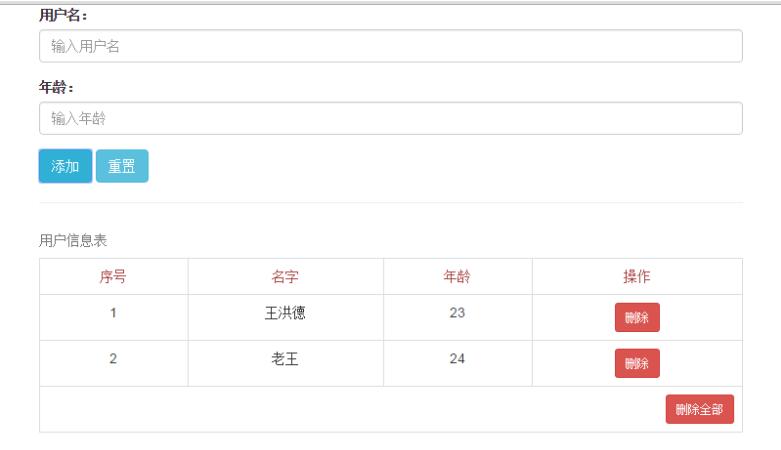
以上内容为本文的全部总结,希望能为读者的学习提供有益参考,欢迎继续支持本站获取更多技术分享。