

针对微信小程序迭代中出现的深层回调嵌套问题,介绍引入ES6 Promise库的解决方案。通过封装wxPromisify函数,将原生异步API转换为Promise对象,并结合finally处理UI状态,有效简化代码逻辑,提升可读性与维护性。
引入Promise解决回调嵌套问题
随着微信小程序项目进入持续迭代阶段,应用复杂度增加,开发者常面临多层回调嵌套导致的代码难以维护问题。为解决这一困境,部分项目选择引入ES6 Promise库。值得注意的是,微信早期内测版本曾内置Promise支持,但后续版本中该功能被移除,因此手动引入成为必要手段。
关于Promise的具体原理与详细用法,已有大量技术文章进行阐述,此处不再赘述。
引入ES6 Promise库后,即可在项目中直接使用其功能。
项目目录与网络请求封装
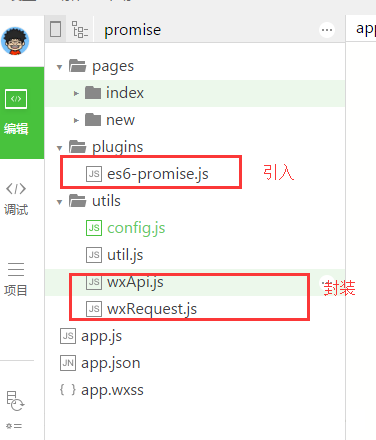
项目目录结构
网络请求模块:wxRequest.js
该模块主要实现了GET和POST两种请求方式。
在实际开发中,网络请求常伴随微信原生的showToast提示。为此,在代码中增加了finally处理逻辑,以便在请求结束时统一调用hideToast,优化用户体验。
var Promise = require('../plugins/es6-promise.js')

function wxPromisify(fn) {
 return function (obj = {}) {
 return new Promise((resolve, reject) => {
 obj.success = function (res) {
 //成功
 resolve(res)
 }
 obj.fail = function (res) {
 //失败
 reject(res)
 }
 fn(obj)
 })
 }
}
//无论promise对象最后状态如何都会执行
Promise.prototype.finally = function (callback) {
 let P = this.constructor;
 return this.then(
 value => P.resolve(callback()).then(() => value),
 reason => P.resolve(callback()).then(() => { throw reason })
 );
};
/**
 * 微信请求get方法
 * url
 * data 以对象的格式传入
 */
function getRequest(url, data) {
 var getRequest = wxPromisify(wx.request)
 return getRequest({
 url: url,
 method: 'GET',
 data: data,
 header: {
 'Content-Type': 'application/json'
 }
 })
}

/**
 * 微信请求post方法封装
 * url
 * data 以对象的格式传入
 */
function postRequest(url, data) {
 var postRequest = wxPromisify(wx.request)
 return postRequest({
 url: url,
 method: 'POST',
 data: data,
 header: {
 "content-type": "application/x-www-form-urlencoded"
 },
 })
}

module.exports = {
 postRequest: postRequest,
 getRequest: getRequest
}
其他API封装与使用示例
其他微信API封装:wxApi.js
var Promise = require('../plugins/es6-promise.js')

function wxPromisify(fn) {
 return function (obj = {}) {
 return new Promise((resolve, reject) => {
 obj.success = function (res) {
 //成功
 resolve(res)
 }
 obj.fail = function (res) {
 //失败
 reject(res)
 }
 fn(obj)
 })
 }
}
//无论promise对象最后状态如何都会执行
Promise.prototype.finally = function (callback) {
 let P = this.constructor;
 return this.then(
 value => P.resolve(callback()).then(() => value),
 reason => P.resolve(callback()).then(() => { throw reason })
 );
};
/**
 * 微信用户登录,获取code
 */
function wxLogin() {
 return wxPromisify(wx.login)
}
/**
 * 获取微信用户信息
 * 注意:须在登录之后调用
 */
function wxGetUserInfo() {
 return wxPromisify(wx.getUserInfo)
}
/**
 * 获取系统信息
 */
function wxGetSystemInfo() {
 return wxPromisify(wx.getSystemInfo)
}
module.exports = {
 wxPromisify: wxPromisify,
 wxLogin: wxLogin,
 wxGetUserInfo: wxGetUserInfo,
 wxGetSystemInfo: wxGetSystemInfo
}
具体使用方式
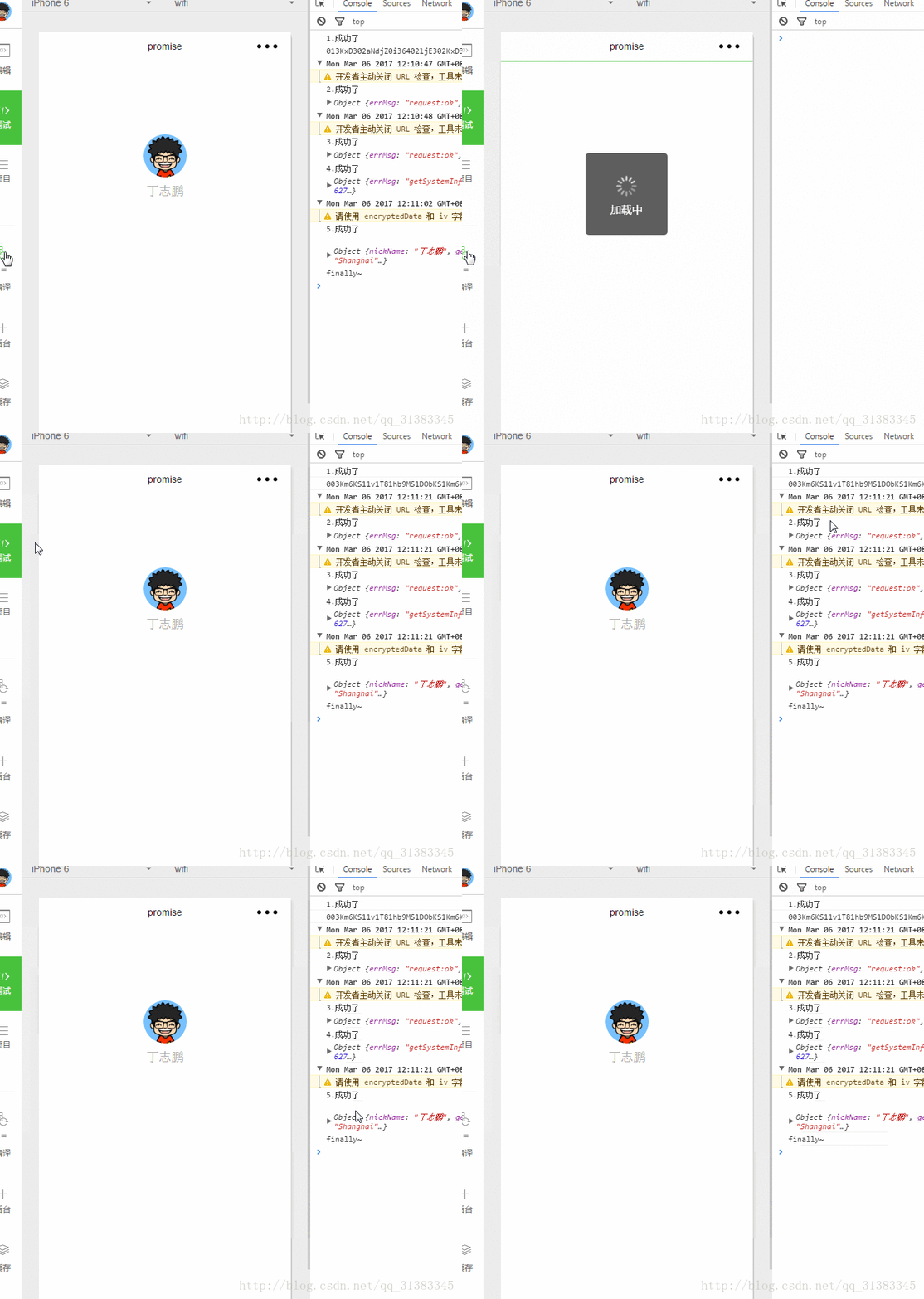
Promise的应用场景广泛,以下展示其基本用法:在then回调中返回Promise对象,以实现链式调用。
这种方式有效解决了回调地狱问题,使代码结构更加清晰优雅,显著提升了可读性。
var util = require('../../utils/util')
var wxApi = require('../../utils/wxApi')
var wxRequest = require('../../utils/wxRequest')
import config from '../../utils/config'
//获取应用实例
var app = getApp()
Page({
 data: {
 userInfo: {}
 },
 onLoad: function () {
 var that = this;
 wx.showToast({
 title: '加载中',
 icon: 'loading',
 duration: 10000
 })
 //1.获取code
 var wxLogin = wxApi.wxLogin()
 wxLogin().then(res => {
 console.log('1.成功了')
 console.log(res.code)
 var url = config.getOpenidUrl;
 var params = {
 appid: "wxed7******2d465",
 secret: "e9c5e4c******09ecc5ebd811",
 js_code: res.code,
 grant_type: "authorization_code"
 }
 //2.获取openid
 return wxRequest.getRequest(url, params)
 }).
 then(res => {
 console.log('2.成功了')
 console.log(res)
 var url = app.globalData.ip + config.searchDgUrl
 var data = util.json2Form({ phoneNumber: '15971908021' })
 //3.获取绑定手机号码
 return wxRequest.postRequest(url, data)
 }).
 then(res => {
 console.log('3.成功了')
 console.log(res)
 //4.获取系统信息
 var wxGetSystemInfo = wxApi.wxGetSystemInfo()
 return wxGetSystemInfo()
 }).
 then(res => {
 console.log('4.成功了')
 console.log(res)
 //5.获取用户信息
 var wxGetUserInfo = wxApi.wxGetUserInfo()
 return wxGetUserInfo()
 }).
 then(res => {
 console.log('5.成功了')
 console.log(res.userInfo)
 that.setData({
  userInfo: res.userInfo
 })
 })
 .finally(function (res) {
 console.log('finally~')
 wx.hideToast()
 })
 }
})
本文介绍了在微信小程序中通过引入ES6 Promise优化异步代码的方法,希望能为相关开发者提供有益参考。