

本文详细演示如何在 Node.js 环境中从零开始搭建一个 TypeScript 项目。涵盖使用 pnpm 初始化项目、安装 typescript 及 @types/node 依赖、配置 tsconfig.json 编译选项(如 ES2023 目标、sourceMap、输出目录)、定义 package.json 中的构建与运行脚本,以及验证多模块导入与执行的全过程。
前言
设想这样一个场景:你需要对一批数据或文件进行批量处理,而你熟悉或工作环境中主要使用的是 TypeScript 或 JavaScript,因此希望利用 TypeScript 来完成这些任务。
虽然使用 Python 或 Shell 脚本也能轻松实现此类功能,但本文仅聚焦于使用 TypeScript 的方案。
当前的具体需求是:构建一个基于 Node.js 的 TypeScript 项目,该项目需具备编译代码的能力,并能执行编译后的代码,最终输出期望的结果。
一、明确需求
既然目标已定,首先需要梳理清楚具体的需求细节。
回顾前文提到的场景:我们需要一个基于 Node.js 的 TypeScript 项目,核心功能包括编译源码以及执行编译后的代码以获取结果。
基于上述描述,我们可以提炼出以下关键需求点:
- 项目基于 Node.js 环境,开发语言为 TypeScript。
- 项目必须支持 TypeScript 代码的编译过程。
- 项目需能执行编译后的代码,并输出预期的结果。
粗略设计
- 首先,定义构建输出目录,遵循常规项目规范,使用
./dist作为输出路径。 - 其次,定义入口文件。由于 TypeScript 编译后生成 JavaScript,因此入口文件指定为
./dist/index.js。 - 接着,设计命令行操作指令。需要两个命令:
build用于执行编译操作,dev用于同时执行编译和运行操作。 - 源码的入口文件路径设定为
src/index.ts。
二、创建项目
使用你熟悉的包管理工具(本文以 pnpm 为例,若你使用 npm、yarn 或其他工具,操作步骤类似)来初始化项目。
1. 新建文件夹
mkdir my_project
cd my_project
2. 初始化项目
pnpm init
随后,根据提示输入各项项目信息。项目创建完成后,当前目录下会生成一个 package.json 文件,其初始内容如下所示。
{
  "name": "my_project",
  "version": "1.0.0",
  "description": "",
  "main": "index.js",
  "scripts": {
    "test": "echo \"Error: no test specified\" && exit 1"
  },
  "keywords": [],
  "author": "",
  "license": "ISC"
}
3. 安装依赖
此步骤主要安装 TypeScript 的编译依赖以及支持 Node.js 运行库的类型定义依赖。
pnpm install typescript @types/node
接着,使用 npx 命令初始化 TypeScript 的配置文件。
npx tsc --init
此时,当前目录下会新增一个 tsconfig.json 文件,这是 TypeScript 的全局配置文件,具体内容如下。
{
  "compilerOptions": {
    /* Visit https://aka.ms/tsconfig to read more about this file */

    /* Projects */
    // "incremental": true,                              /* Save .tsbuildinfo files to allow for incremental compilation of projects. */
    // "composite": true,                                /* Enable constraints that allow a TypeScript project to be used with project references. */
    // "tsBuildInfoFile": "./.tsbuildinfo",              /* Specify the path to .tsbuildinfo incremental compilation file. */
    // "disableSourceOfProjectReferenceRedirect": true,  /* Disable preferring source files instead of declaration files when referencing composite projects. */
    // "disableSolutionSearching": true,                 /* Opt a project out of multi-project reference checking when editing. */
    // "disableReferencedProjectLoad": true,             /* Reduce the number of projects loaded automatically by TypeScript. */

    /* Language and Environment */
    "target": "es2016",                                  /* Set the JavaScript language version for emitted JavaScript and include compatible library declarations. */
    // "lib": [],                                        /* Specify a set of bundled library declaration files that describe the target runtime environment. */
    // "jsx": "preserve",                                /* Specify what JSX code is generated. */
    // "experimentalDecorators": true,                   /* Enable experimental support for legacy experimental decorators. */
    // "emitDecoratorMetadata": true,                    /* Emit design-type metadata for decorated declarations in source files. */
    // "jsxFactory": "",                                 /* Specify the JSX factory function used when targeting React JSX emit, e.g. 'React.createElement' or 'h'. */
    // "jsxFragmentFactory": "",                         /* Specify the JSX Fragment reference used for fragments when targeting React JSX emit e.g. 'React.Fragment' or 'Fragment'. */
    // "jsxImportSource": "",                            /* Specify module specifier used to import the JSX factory functions when using 'jsx: react-jsx*'. */
    // "reactNamespace": "",                             /* Specify the object invoked for 'createElement'. This only applies when targeting 'react' JSX emit. */
    // "noLib": true,                                    /* Disable including any library files, including the default lib.d.ts. */
    // "useDefineForClassFields": true,                  /* Emit ECMAScript-standard-compliant class fields. */
    // "moduleDetection": "auto",                        /* Control what method is used to detect module-format JS files. */

    /* Modules */
    "module": "commonjs",                                /* Specify what module code is generated. */
    // "rootDir": "./",                                  /* Specify the root folder within your source files. */
    // "moduleResolution": "node10",                     /* Specify how TypeScript looks up a file from a given module specifier. */
    // "baseUrl": "./",                                  /* Specify the base directory to resolve non-relative module names. */
    // "paths": {},                                      /* Specify a set of entries that re-map imports to additional lookup locations. */
    // "rootDirs": [],                                   /* Allow multiple folders to be treated as one when resolving modules. */
    // "typeRoots": [],                                  /* Specify multiple folders that act like './node_modules/@types'. */
    // "types": [],                                      /* Specify type package names to be included without being referenced in a source file. */
    // "allowUmdGlobalAccess": true,                     /* Allow accessing UMD globals from modules. */
    // "moduleSuffixes": [],                             /* List of file name suffixes to search when resolving a module. */
    // "allowImportingTsExtensions": true,               /* Allow imports to include TypeScript file extensions. Requires '--moduleResolution bundler' and either '--noEmit' or '--emitDeclarationOnly' to be set. */
    // "resolvePackageJsonExports": true,                /* Use the package.json 'exports' field when resolving package imports. */
    // "resolvePackageJsonImports": true,                /* Use the package.json 'imports' field when resolving imports. */
    // "customConditions": [],                           /* Conditions to set in addition to the resolver-specific defaults when resolving imports. */
    // "noUncheckedSideEffectImports": true,             /* Check side effect imports. */
    // "resolveJsonModule": true,                        /* Enable importing .json files. */
    // "allowArbitraryExtensions": true,                 /* Enable importing files with any extension, provided a declaration file is present. */
    // "noResolve": true,                                /* Disallow 'import's, 'require's or '<reference>'s from expanding the number of files TypeScript should add to a project. */

    /* JavaScript Support */
    // "allowJs": true,                                  /* Allow JavaScript files to be a part of your program. Use the 'checkJS' option to get errors from these files. */
    // "checkJs": true,                                  /* Enable error reporting in type-checked JavaScript files. */
    // "maxNodeModuleJsDepth": 1,                        /* Specify the maximum folder depth used for checking JavaScript files from 'node_modules'. Only applicable with 'allowJs'. */

    /* Emit */
    // "declaration": true,                              /* Generate .d.ts files from TypeScript and JavaScript files in your project. */
    // "declarationMap": true,                           /* Create sourcemaps for d.ts files. */
    // "emitDeclarationOnly": true,                      /* Only output d.ts files and not JavaScript files. */
    // "sourceMap": true,                                /* Create source map files for emitted JavaScript files. */
    // "inlineSourceMap": true,                          /* Include sourcemap files inside the emitted JavaScript. */
    // "noEmit": true,                                   /* Disable emitting files from a compilation. */
    // "outFile": "./",                                  /* Specify a file that bundles all outputs into one JavaScript file. If 'declaration' is true, also designates a file that bundles all .d.ts output. */
    // "outDir": "./",                                   /* Specify an output folder for all emitted files. */
    // "removeComments": true,                           /* Disable emitting comments. */
    // "importHelpers": true,                            /* Allow importing helper functions from tslib once per project, instead of including them per-file. */
    // "downlevelIteration": true,                       /* Emit more compliant, but verbose and less performant JavaScript for iteration. */
    // "sourceRoot": "",                                 /* Specify the root path for debuggers to find the reference source code. */
    // "mapRoot": "",                                    /* Specify the location where debugger should locate map files instead of generated locations. */
    // "inlineSources": true,                            /* Include source code in the sourcemaps inside the emitted JavaScript. */
    // "emitBOM": true,                                  /* Emit a UTF-8 Byte Order Mark (BOM) in the beginning of output files. */
    // "newLine": "crlf",                                /* Set the newline character for emitting files. */
    // "stripInternal": true,                            /* Disable emitting declarations that have '@internal' in their JSDoc comments. */
    // "noEmitHelpers": true,                            /* Disable generating custom helper functions like '__extends' in compiled output. */
    // "noEmitOnError": true,                            /* Disable emitting files if any type checking errors are reported. */
    // "preserveConstEnums": true,                       /* Disable erasing 'const enum' declarations in generated code. */
    // "declarationDir": "./",                           /* Specify the output directory for generated declaration files. */

    /* Interop Constraints */
    // "isolatedModules": true,                          /* Ensure that each file can be safely transpiled without relying on other imports. */
    // "verbatimModuleSyntax": true,                     /* Do not transform or elide any imports or exports not marked as type-only, ensuring they are written in the output file's format based on the 'module' setting. */
    // "isolatedDeclarations": true,                     /* Require sufficient annotation on exports so other tools can trivially generate declaration files. */
    // "allowSyntheticDefaultImports": true,             /* Allow 'import x from y' when a module doesn't have a default export. */
    "esModuleInterop": true,                             /* Emit additional JavaScript to ease support for importing CommonJS modules. This enables 'allowSyntheticDefaultImports' for type compatibility. */
    // "preserveSymlinks": true,                         /* Disable resolving symlinks to their realpath. This correlates to the same flag in node. */
    "forceConsistentCasingInFileNames": true,            /* Ensure that casing is correct in imports. */

    /* Type Checking */
    "strict": true,                                      /* Enable all strict type-checking options. */
    // "noImplicitAny": true,                            /* Enable error reporting for expressions and declarations with an implied 'any' type. */
    // "strictNullChecks": true,                         /* When type checking, take into account 'null' and 'undefined'. */
    // "strictFunctionTypes": true,                      /* When assigning functions, check to ensure parameters and the return values are subtype-compatible. */
    // "strictBindCallApply": true,                      /* Check that the arguments for 'bind', 'call', and 'apply' methods match the original function. */
    // "strictPropertyInitialization": true,             /* Check for class properties that are declared but not set in the constructor. */
    // "strictBuiltinIteratorReturn": true,              /* Built-in iterators are instantiated with a 'TReturn' type of 'undefined' instead of 'any'. */
    // "noImplicitThis": true,                           /* Enable error reporting when 'this' is given the type 'any'. */
    // "useUnknownInCatchVariables": true,               /* Default catch clause variables as 'unknown' instead of 'any'. */
    // "alwaysStrict": true,                             /* Ensure 'use strict' is always emitted. */
    // "noUnusedLocals": true,                           /* Enable error reporting when local variables aren't read. */
    // "noUnusedParameters": true,                       /* Raise an error when a function parameter isn't read. */
    // "exactOptionalPropertyTypes": true,               /* Interpret optional property types as written, rather than adding 'undefined'. */
    // "noImplicitReturns": true,                        /* Enable error reporting for codepaths that do not explicitly return in a function. */
    // "noFallthroughCasesInSwitch": true,               /* Enable error reporting for fallthrough cases in switch statements. */
    // "noUncheckedIndexedAccess": true,                 /* Add 'undefined' to a type when accessed using an index. */
    // "noImplicitOverride": true,                       /* Ensure overriding members in derived classes are marked with an override modifier. */
    // "noPropertyAccessFromIndexSignature": true,       /* Enforces using indexed accessors for keys declared using an indexed type. */
    // "allowUnusedLabels": true,                        /* Disable error reporting for unused labels. */
    // "allowUnreachableCode": true,                     /* Disable error reporting for unreachable code. */

    /* Completeness */
    // "skipDefaultLibCheck": true,                      /* Skip type checking .d.ts files that are included with TypeScript. */
    "skipLibCheck": true                                 /* Skip type checking all .d.ts files. */
  }
}
配置文件中包含大量注释说明,读者可自行查阅。本文仅关注实现核心功能所需的配置。
4. 创建项目结构
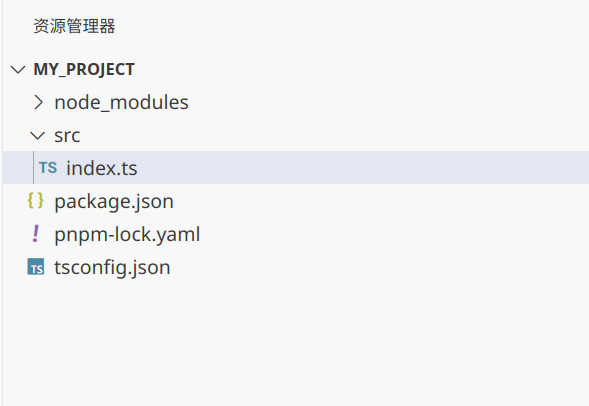
接下来构建项目的目录结构。核心操作是创建 src 目录,并在该目录下新建 index.ts 文件。其他目录可通过代码脚本创建。目录结构完成后,如下图所示。
5. 配置ts
TypeScript 的配置主要涉及以下关键设置:
- 启用保存时编译。
- 使用最新的语法标准。
- 开启 sourceMap,便于调试。
- 指定输出目录。
- 指定源码根目录。
- 指定包含的 TypeScript 文件范围。
- 指定排除的文件或目录。
如有兴趣,可参考官方文档深入学习配置细节。此处提供完整的配置代码。
{
  "compileOnSave": true,
  "compilerOptions": {
    "module": "ES2022",
    "noImplicitAny": true,
    "removeComments": true,
    "preserveConstEnums": true,
    "sourceMap": true,
    "declaration": false,
    "emitDecoratorMetadata": true,
    "experimentalDecorators": true,
    "target": "ES2023",
    "moduleResolution": "Node",
    "outDir": "./dist",
    "lib": ["ESNext"],
    "esModuleInterop": true,
    "rootDir": "./src"
  },
  "files": ["./src/index.ts"],
  "include": ["src/**/*.ts"],
  "exclude": ["node_modules", "tmp"]
}
6. 配置项目启动命令
根据前述需求,编写项目的启动命令。
{
  "name": "schemas",
  "version": "1.0.0",
  "description": "",
  "main": "index.js",
  "type": "module",
  "scripts": {
    "test": "echo \"Error: no test specified\" && exit 1",
    "dev": "tsc && node dist/index.js"
  },
  "keywords": [],
  "type": "module",
  "author": "",
  "license": "ISC",
  "dependencies": {
    "typescript": "^5.6.3"
  },
  "devDependencies": {
    "@types/node": "^22.7.5"
  }
}
在工程的 package.json 文件中,scripts 字段用于定义执行的命令。后续的命令字符串包含两层含义:
tsc负责编译当前项目。node dist/index.js负责执行 dist/index.js 文件(因为编译后输出的即为该路径下的index.js文件,具体配置详见package.json和tsconfig.json,若不理解可回顾前文)。
7. 运行项目
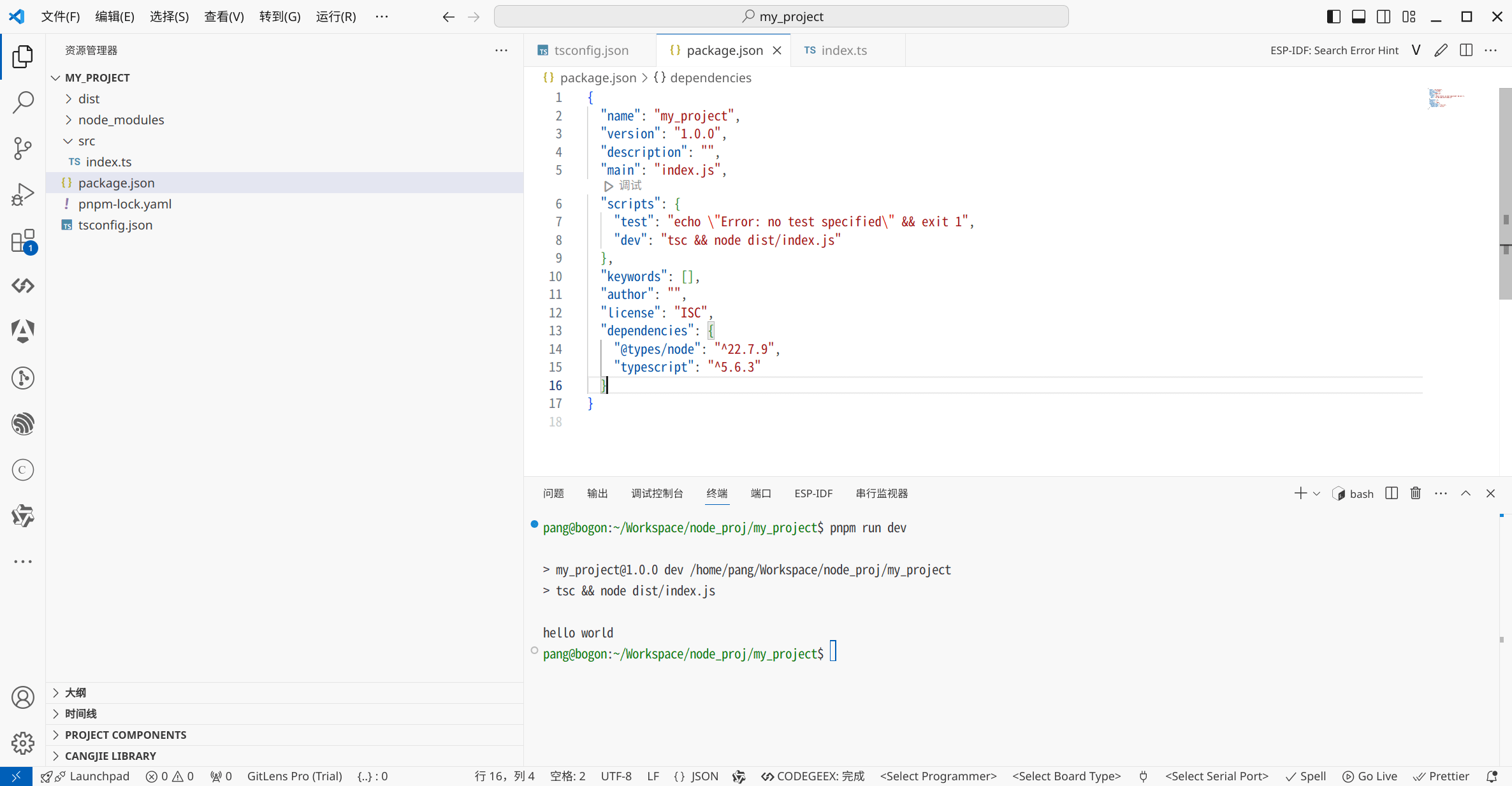
完成上述配置后,运行以下命令即可看到 TypeScript 代码被编译并执行。
pnpm run dev
8. 测试多模块
对于 TypeScript 项目而言,支持创建多个 TypeScript 文件至关重要,这也是简化开发流程的关键。
此时,创建一个 test.ts 文件,并在其中导出一个 test 方法。
const test_hello = (data: string) => {
    return `hello ${data}`;
}

export default test_hello;
随后在 index.ts 中进行测试调用。
目前仅支持以 js 后缀导入模块,体验略显不便,但这需要集成打包工具来解决,会增加复杂度。
总结
至此,关于在 Node.js 中构建 TypeScript 项目的完整流程介绍完毕。如需了解更多相关内容,请搜索本站过往文章或继续浏览后续系列文章。感谢大家的支持!