

本文详细解析JavaScript中数组排序的核心方法。涵盖Array.prototype.sort()的默认行为与自定义比较函数,演示针对对象数组的单属性及多属性排序技巧。此外,介绍利用localeCompare实现汉字拼音排序及第三方库的应用,并附带VS Code调试注意事项,提供完整代码示例。
一、Array.prototype.sort()方法概述
1. 默认排序机制
sort() 方法会就地修改原数组的元素顺序,并返回对该数组的引用。其默认排序逻辑是将所有元素转换为字符串,随后依据它们的 UTF-16 码元值进行升序排列。
需要注意的是,由于排序算法的具体实现依赖于浏览器或运行环境,标准并未规定排序的时间复杂度和空间复杂度,因此不同环境下的性能表现可能有所差异。
若需保留原数组不变并生成一个新的已排序数组,可改用 toSorted() 方法。
关键点总结:第一,sort() 会直接修改原始数组;第二,默认情况下,元素会被强制转换为字符串后进行字典序排序。
const months = ['March', 'Jan', 'Feb', 'Dec'];
months.sort();
console.log(months);
// Expected output: Array ["Dec", "Feb", "Jan", "March"]

const array1 = [1, 30, 4, 21, 100000];
array1.sort();
console.log(array1);
// Expected output: Array [1, 100000, 21, 30, 4]
2. 自定义比较函数 sort(compareFn)
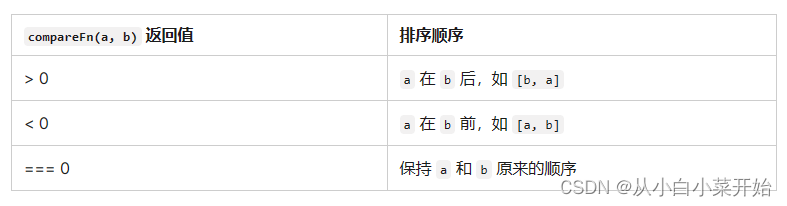
定义排序顺序的函数。返回值应该是一个数字,其符号表示两个元素的相对顺序:如果 a 小于 b,返回值为负数,如果 a 大于 b,返回值为正数,如果两个元素相等,返回值为 0。NaN 被视为 0。
说明:自定义比较函数的核心在于返回一个数值,通常期望的结果是 1、-1 或 0,以明确元素间的相对顺序。
function compareFn(a, b) {
  if (根据排序标准,a 小于 b) {
    return -1;
  }
  if (根据排序标准,a 大于 b) {
    return 1;
  }
  // a 一定等于 b
  return 0;
}
const stringArray = ["Blue", "Humpback", "Beluga"];
const numberArray = [40, 1, 5, 200];
const numericStringArray = ["80", "9", "700"];
const mixedNumericArray = ["80", "9", "700", 40, 1, 5, 200];

function compareNumbers(a, b) {
  return a - b;
}

stringArray.sort(); // ['Beluga', 'Blue', 'Humpback']

numberArray.sort(compareNumbers); // [1, 5, 40, 200]

numericStringArray.sort(); // ['700', '80', '9']
numericStringArray.sort(compareNumbers); // ['9', '80', '700']

mixedNumericArray.sort(compareNumbers); // [1, 5, '9', 40, '80', 200, '700']
二、对象数组排序基础
let arr = [
  { name: 'Zhang', age: 25, score: 85 },
  { name: 'Li', age: 20, score: 90 },
  { name: 'Wang', age: 22, score: 80 },
  { name: 'Zhao', age: 22, score: 92 }
];

// 按 age 升序排序,如果 age 相同则按 score 降序排序
arr.sort((a, b) => {
  if (a.age !== b.age) {
    return a.age - b.age; // 按 age 升序排序
  } else {
    return b.score - a.score; // 如果 age 相同,按 score 降序排序
  }
});

console.log(arr);
[
{ name: 'Li', age: 20, score: 90 },
{ name: 'Wang', age: 22, score: 80 },
{ name: 'Zhao', age: 22, score: 92 },
{ name: 'Zhang', age: 25, score: 85 }
]三、通用排序策略
1. 指定单一对象属性排序
function sortObjectsByProperty(array, property) {
    return array.sort(function(a, b) {
        if (a[property] < b[property]) {
            return -1;
        } else if (a[property] > b[property]) {
            return 1;
        } else {
            return 0;
        }
    });
}
var objects = [
    { name: 'Apple', price: 15 },
    { name: 'Banana', price: 10 },
    { name: 'Cherry', price: 20 }
];

var sortedObjects = sortObjectsByProperty(objects, 'price');
console.log(sortedObjects);
输出结果示例:
[
  { name: 'Banana', price: 10 },
  { name: 'Apple', price: 15 },
  { name: 'Cherry', price: 20 }
]
2. 指定对象多属性排序
function sortObjectsByProperties(array, ...properties) {
    return array.sort((a, b) => {
        for (const property of properties) {
            if (a[property] < b[property]) {
                return -1;
            } else if (a[property] > b[property]) {
                return 1;
            }
            // 如果属性相等,则继续比较下一个属性
        }
        // 所有属性都相等
        return 0;
    });
}

// 示例对象数组
const employees = [
    { name: 'Alice', age: 30, salary: 50000 },
    { name: 'Bob', age: 25, salary: 60000 },
    { name: 'Charlie', age: 35, salary: 55000 },
];

// 使用剩余参数传入多个属性进行排序
const sortedEmployees = sortObjectsByProperties(employees, 'age', 'salary');

console.log(sortedEmployees);
输出结果示例:
[
    { name: 'Bob', age: 25, salary: 60000 }, // 年龄最小
    { name: 'Alice', age: 30, salary: 50000 }, // 年龄次小,但薪水低于Charlie
    { name: 'Charlie', age: 35, salary: 55000 } // 年龄最大,薪水也最高(在同龄人中)
]
四、对象数组按汉字拼音排序
1. 使用 stringObject.localeCompare(target)
const chinesePeople = [
    { name: '张三', age: 30 },
    { name: '李四', age: 25 },
    { name: '王五', age: 35 },
    { name: '赵六', age: 40 },
];

// 使用 localeCompare 对名字属性进行排序
chinesePeople.sort((a, b) => a.name.localeCompare(b.name, 'zh-CN'));

console.log(chinesePeople);
输出结果示例:
[
  { name: '李四', age: 25 },
  { name: '王五', age: 35 },
  { name: '张三', age: 30 },
  { name: '赵六', age: 40 }
]
2. 使用第三方库处理
若需根据汉字拼音对对象数组进行排序,首先需将汉字转换为拼音,再基于拼音进行排序。这通常依赖第三方库完成汉字到拼音的转换,例如使用 pinyin 库。
npm install pinyinconst pinyin = require('pinyin');
function sortObjectsByChinesePinyin(array, propertyName) {
return array.sort((a, b) => {
const aPinyin = pinyin(a[propertyName], { style: pinyin.STYLE_NORMAL, heteronym: false }).join('');
const bPinyin = pinyin(b[propertyName], { style: pinyin.STYLE_NORMAL, heteronym: false }).join('');
return aPinyin.localeCompare(bPinyin);
});
}
// 示例对象数组
const chineseNames = [
{ name: '张三', age: 30 },
{ name: '李四', age: 25 },
{ name: '王五', age: 35 },
];
// 使用汉字拼音对名字进行排序
const sortedChineseNames = sortObjectsByChinesePinyin(chineseNames, 'name');
console.log(sortedChineseNames);输出结果示例:
[
  { name: '李四', age: 25 }, // 'lǐ sì'
  { name: '王五', age: 35 }, // 'wáng wǔ'
  { name: '张三', age: 30 }  // 'zhāng sān'
]
强调:若使用 VS Code 进行调试,务必在 launch.json 文件中添加 "console": "integratedTerminal" 配置,否则可能导致报错且无法查看运行结果。
总结
本文介绍了 JavaScript 中对象数组排序的多种测试方法。如需了解更多 JS 对象数组排序相关内容,建议搜索本站往期文章或继续阅读后续系列教程,感谢支持!