

本文介绍在Electron应用中通过Node.js内置os模块的networkInterfaces方法获取设备Mac地址的实现方案。代码遍历网络接口,过滤虚拟接口及全零地址,提取真实物理网卡地址,适用于基于设备标识的单点登录场景。
引言
为了实现单点登录功能,通常需要使用唯一的设备标识来区分客户端。Mac地址作为一种硬件标识符,是一个较为理想的选择。
实现思路
可以利用Node.js内置的os模块,调用其提供的networkInterfaces方法。该方法返回包含网络接口信息的对象数组。通过遍历该结构,即可提取出Mac地址。首先查看该方法返回的数据格式。
import { networkInterfaces } from "os";
console.log(JSON.stringify(networkInterfaces()));
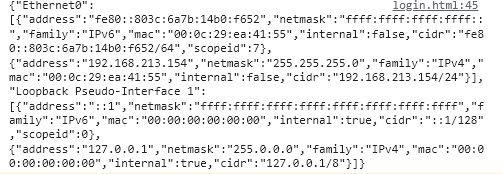
{
        "Ethernet0": [{
                "address": "fe80::803c:6a7b:14b0:f652",
                "netmask": "ffff:ffff:ffff:ffff::",
                "family": "IPv6",
                "mac": "00:0c:29:ea:41:55",
                "internal": false,
                "cidr": "fe80::803c:6a7b:14b0:f652/64",
                "scopeid": 7
        }, {
                "address": "192.168.213.154",
                "netmask": "255.255.255.0",
                "family": "IPv4",
                "mac": "00:0c:29:ea:41:55",
                "internal": false,
                "cidr": "192.168.213.154/24"
        }],
        "Loopback Pseudo-Interface 1": [{
                "address": "::1",
                "netmask": "ffff:ffff:ffff:ffff:ffff:ffff:ffff:ffff",
                "family": "IPv6",
                "mac": "00:00:00:00:00:00",
                "internal": true,
                "cidr": "::1/128",
                "scopeid": 0
        }, {
                "address": "127.0.0.1",
                "netmask": "255.0.0.0",
                "family": "IPv4",
                "mac": "00:00:00:00:00:00",
                "internal": true,
                "cidr": "127.0.0.1/8"
        }]
}
代码封装
返回的数据结构为键值对形式。因此,可以直接获取键名进行遍历,从对应的对象中提取Mac地址字段。具体实现如下:
/**获取mac地址信息 */
export const getMacAddress = function (): string {
  const interfaces = networkInterfaces();
  let macAddress = "";
  for (const interfaceName of Object.keys(interfaces)) {
    const interfaceInfos = interfaces[interfaceName];

    if (interfaceInfos) {
      for (const interfaceInfo of interfaceInfos) {
        if (interfaceInfo.mac && interfaceInfo.mac !== "00:00:00:00:00:00") {
          macAddress = interfaceInfo.mac;
          break;
        }
      }
    }

    if (macAddress.length > 0) break;
  }

  return macAddress;
};
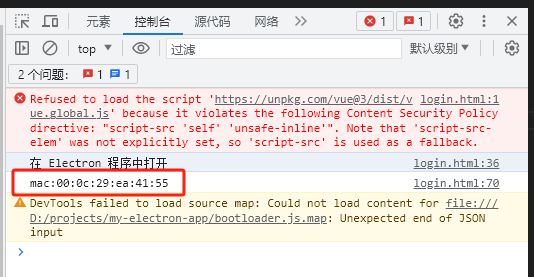
以上就是关于在Electron中获取Mac地址的实现方法,更多相关内容请查阅本站过往文章或继续浏览后续内容。感谢大家的支持!