

本文详解如何在业务中基于sockjs-client和stompjs库对WebSocket进行二次封装,以实现稳定的前端长连接通信。文章提供了具体的依赖版本、核心连接管理类代码以及React环境下的使用示例,并针对常见的后端contentType错误提供了排查与解决思路,帮助开发者快速集成可靠的即时通讯功能。
业务需求
由于实际业务场景需要与后端保持WebSocket长连接进行通信,经过技术调研与评估,最终选定使用sockjs-client和stompjs这两个库,并在此基础上进行了二次封装开发。
项目中相关依赖的package.json版本配置如下:
"sockjs-client": "^1.5.1",
"stompjs": "^2.3.3",
socketManager.js
import SockJS from 'sockjs-client';
import Stomp from 'stompjs';
import lodash from 'lodash';
function subscribeCallBack(data, subscribes) {
    if (data) {
        let topic = data.headers.destination;
        let funces = subscribes.get(topic);
        funces.forEach((func) => {
            func(data);
        });
    }
}
let clientManager = {
    client: null,
    connecting: false,//是否正在连接
    subscribes: new Map(),//订阅列表
    subscribe(topic, onMessage) {
        if (this.client != null && this.client.connected == true) {
            //已连接状态
            console.log('增加订阅 已连接状态');
            if (!this.subscribes.has(topic)) {
                this.client.subscribe(topic, (data) => subscribeCallBack(data, this.subscribes));
                this.subscribes.set(topic, [onMessage]);
            } else {
                let funces = this.subscribes.get(topic);
                funces.push(onMessage);
            }
        } else {
            //未连接状态
            console.log('增加订阅 未连接状态');
            if (!this.subscribes.has(topic)) {
                this.subscribes.set(topic, [onMessage]);
            } else {
                let funces = this.subscribes.get(topic);
                funces.push(onMessage);
            }
        }
    },
    subscribesAll() {
        console.log('订阅全部');
        if (lodash.isEmpty(this.client) || this.client.connected != true) {
            return;
        }
        let subscribes = this.subscribes;
        for (let topic of subscribes.keys()) {
            this.client.subscribe(topic, (data) => subscribeCallBack(data, subscribes));
        }
    },
    disconnect() {
        console.log('断开连接');
        if (lodash.isEmpty(this.client) || this.client.connected != true) {
            return;
        }
        this.client.disconnect();
        this.subscribes = new Map();
    },
    connect(onSuccess, onDisconnect) {
        try {
            if (this.connecting == true) {
                console.log('正在连接中');
                return;
            }
            this.connecting = true;
            if (lodash.isEmpty(this.client) || this.client.connected != true) {//未连接状态
                let socket = new SockJS('/bond/notification', null, { timeout: 6000 });
                let stompClient = Stomp.over(socket);
                stompClient.debug = null;
                console.log('开始连接');
                stompClient.connect
                    ({},
                        () => {
                            this.client = stompClient;
                            console.log('连接成功');
                            this.subscribesAll();//连接成功后开始订阅所有内容
                            if (onSuccess != null && onSuccess != undefined) {
                                onSuccess();
                            };
                        },
                        (error) => this.errorCallBack(error, onSuccess, onDisconnect)
                    );
            } else if (this.client != null && this.client.connected == true) {//已连接状态直接调用回调
                onSuccess();
            }
        }
        catch (err) {
            console.log('连接异常', err);
        }
        finally {
            this.connecting = false;
        }
    },
    errorCallBack(error, onSuccess, onDisconnect) {
        console.log('连接失败');
        if (onDisconnect != null && onDisconnect != undefined) {
            onDisconnect();
        }
        setTimeout(() => {//自动重连
            console.log('重新连接中');
            this.connect(onSuccess, onDisconnect);
        }, 10000);
    },
};
export default clientManager;
连接方式
useEffect(()=>{
    socketmanager.connect();
    return () => {
         socketmanager.disconnect();
    };
})
订阅方式
useEffect(() => {
        let topic = `/topic/notification`;
        socketmanager.subscribe(topic, (data) => {
            if (data) {
                //do something
            }
        })
    }, [])
如果在程序启动阶段遇到报错,请留意以下情况:
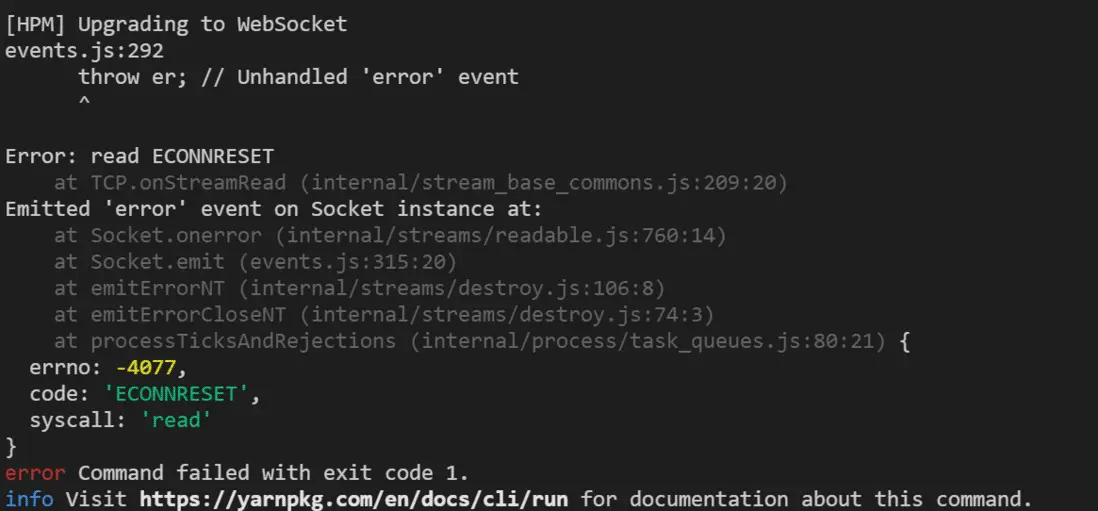
该问题通常由后端返回的contentType不正确,导致Stream流写入异常所引起。修正后端的Content-Type设置后,该问题即可解决。
以上即为sockjs前端WebSocket二次封装示例的详细内容,更多关于sockjs前端WebSocket二次封装的资料请关注本站其它相关文章!