

本文详细介绍如何使用JavaScript实现一个简易计算器。核心在于利用栈结构将中缀表达式转换为后缀表达式,并通过逆波兰算法进行运算。文章涵盖了页面结构搭建、事件委托监听、以及处理连续运算符、正负数等复杂状态逻辑,旨在帮助开发者理解表达式求值的基本原理。
简易JS计算器实现:基于后缀表达式的核心逻辑与状态管理
观察市面上的计算器应用,通常分为普通型与科学型两类。
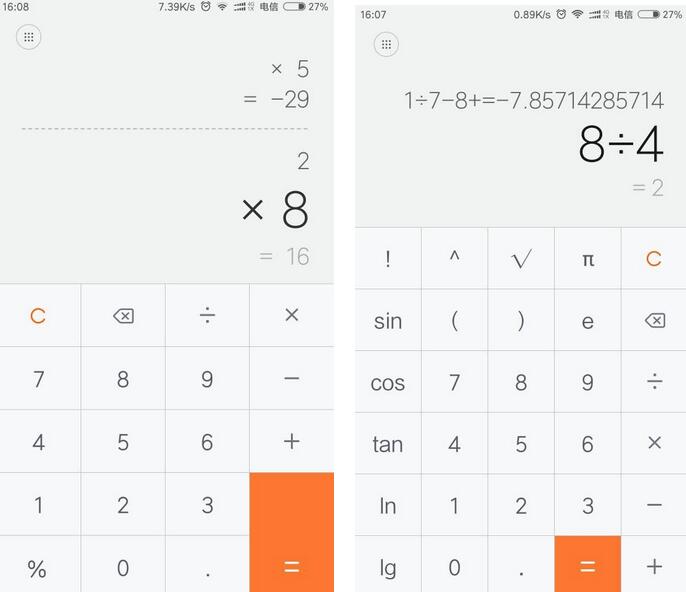
鉴于功能复杂度,本文仅实现基础版本,支持正负数的连续加减乘除运算,暂不包含括号功能。
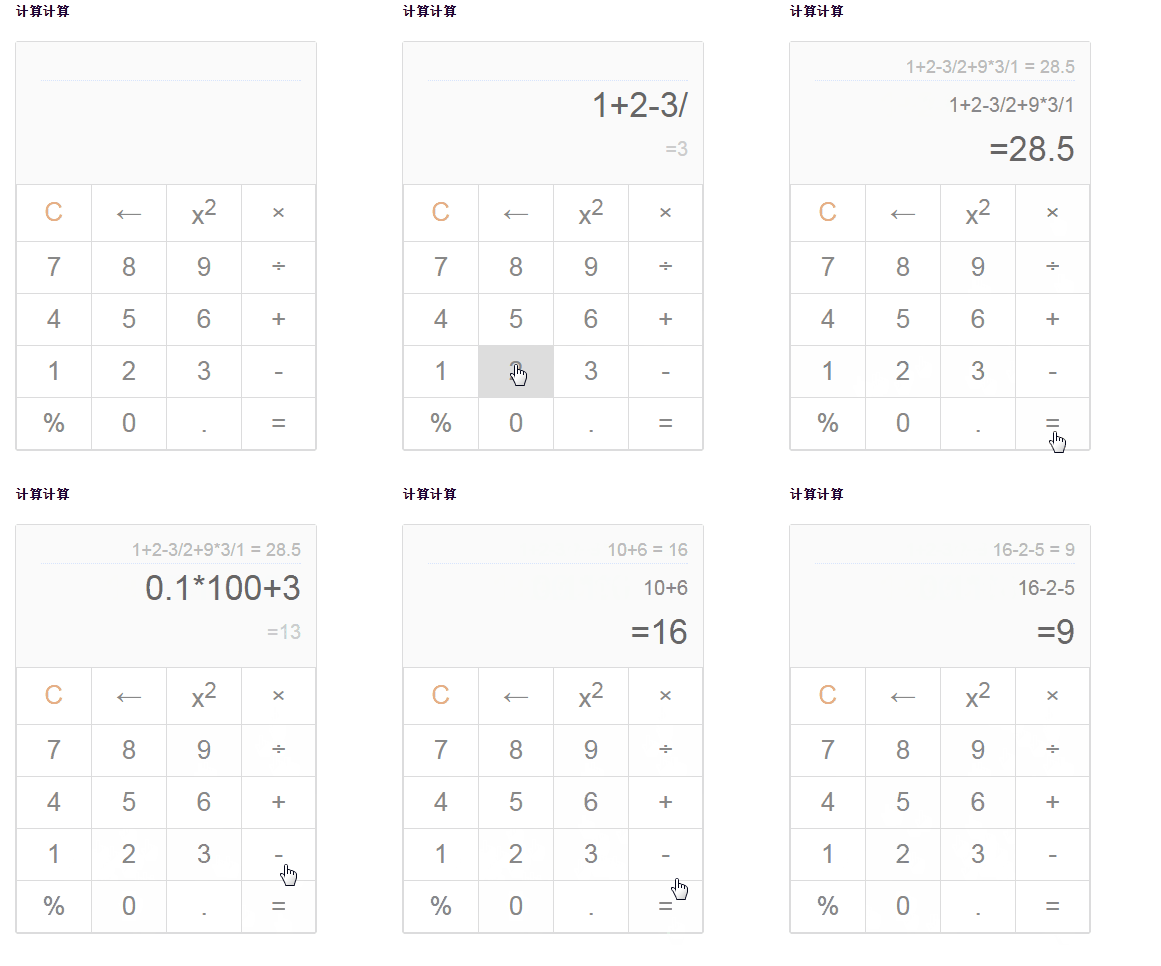
具体运行效果如下图所示:
理论基础:表达式转换原理
一、理论基础
以算式 1+1 = ? 为例。
人类可以直观识别并计算该表达式,但计算机无法直接理解这种自然书写格式。
计算机仅能识别特定规则的表达式,如前缀表达式(+ 1 1)或后缀表达式(1 1 +)。
举例说明。
以 (3 + 4) × 5 - 6 为例: - 中缀表达式:(3 + 4) × 5 - 6 - 前缀表达式:- × + 3 4 5 6 - 后缀表达式:3 4 + 5 × 6 -
因此,程序自动运算的关键步骤是将用户输入的中缀表达式转换为前缀或后缀表达式。
关于前缀、中缀、后缀表达式的定义及相互转换方法,此处不再赘述,可参考相关技术文章获取更清晰的解释。
本计算器采用后缀表达式方案,重点实现以下两个核心算法:
与转换为前缀表达式类似,中缀转后缀的步骤如下: (1) 初始化两个栈:运算符栈S1和用于存储中间结果的栈S2; (2) 从左至右扫描中缀表达式; (3) 遇到操作数时,将其压入S2; (4) 遇到运算符时,比较其与S1栈顶运算符的优先级: (4-1) 如果S1为空,或栈顶运算符为左括号“(”,则直接将此运算符入栈; (4-2) 否则,若当前运算符优先级比栈顶运算符高,则将其压入S1(注意:此处不包括优先级相同的情况,这与前缀转换不同); (4-3) 否则,将S1栈顶的运算符弹出并压入S2,然后回到步骤(4-1)与新栈顶比较; (5) 遇到括号时: (5-1) 如果是左括号“(”,直接压入S1; (5-2) 如果是右括号“)”,则依次弹出S1栈顶运算符压入S2,直到遇到左括号,此时丢弃这对括号; (6) 重复步骤(2)至(5),直到表达式扫描完毕; (7) 将S1中剩余的运算符依次弹出并压入S2; (8) 依次弹出S2中的元素并输出,结果的逆序即为对应的后缀表达式(前缀转换无需逆序)。
后缀表达式的计算过程从左至右进行: 扫描表达式,遇到数字压入栈;遇到运算符时,弹出栈顶两个数进行计算(次顶元素 op 栈顶元素),结果重新入栈。重复此过程直至表达式结束,栈中剩余值即为结果。 例如后缀表达式“3 4 + 5 × 6 -”的计算过程: (1) 从左至右扫描,将3和4压入堆栈; (2) 遇到+运算符,弹出4和3(4为栈顶,3为次顶),计算3+4=7,将7入栈; (3) 将5入栈; (4) 遇到×运算符,弹出5和7,计算7×5=35,将35入栈; (5) 将6入栈; (6) 遇到-运算符,计算35-6=29,得出最终结果。
代码实现:从界面到逻辑
二、代码实现
首先构建计算器页面。虽非科学计算器,但需提供基本运算功能,支持即时运算显示完整中缀表达式,并在运算后保存上一条记录。
需特别说明:原计划支持小数点,但因小数点导致数据存储与显示逻辑复杂,实现难度较大,故暂时取消该功能。
1. 页面结构:
页面结构与样式搭建
<h5>计算计算</h5>
<!-- 计算器 -->
<div class="calc-wrap">
<div class="calc-in-out">
<!-- 上一条运算记录 -->
<p class="calc-history" title=""></p>
<!-- 输入的数据 -->
<p class="calc-in"></p>
<!-- 输出的运算结果 -->
<p class="calc-out active"></p>
</div>
<table class="calc-operation">
<thead></thead>
<tbody>
<tr>
<td data-ac="cls" class="cls">C</td>
<td data-ac="del">←</td>
<td data-ac="sq">x<sup>2</sup></td>
<td data-ac="mul">×</td>
</tr>
<tr>
<td data-val="7">7</td>
<td data-val="8">8</td>
<td data-val="9">9</td>
<td data-ac="div">÷</td>
</tr>
<tr>
<td data-val="4">4</td>
<td data-val="5">5</td>
<td data-val="6">6</td>
<td data-ac="plus">+</td>
</tr>
<tr>
<td data-val="1">1</td>
<td data-val="2">2</td>
<td data-val="3">3</td>
<td data-ac="minus">-</td>
</tr>
<td data-ac="per">%</td>
<td data-val="0">0</td>
<td data-ac="dot">.</td>
<td data-ac="eq" class="eq">=</td>
</tbody>
</table>
</div>
2. 添加样式:
body {
  padding: 20px;
  font-family: Arial;
}

.calc-wrap {
  width: 300px;
  border: 1px solid #ddd;
  border-radius: 3px;
}


.calc-operation {
  width: 100%;
  border-collapse: collapse;
}

.calc-in-out {
  width: 100%;
  padding: 10px 20px;
  text-align: right;
  box-sizing: border-box;
  background-color: rgba(250, 250, 250, .9);
}
.calc-in-out p {
  overflow: hidden;
  margin: 5px;
  width: 100%;
}
.calc-history {
  margin-left: -20px;
  font-size: 18px;
  color: #bbb;
  border-bottom: 1px dotted #ddf;
  min-height: 23px;
}

.calc-in,
.calc-out {
  font-size: 20px;
  color: #888;
  line-height: 39px;
  min-height: 39px;
}

.calc-in {
  color: #888;
}
.calc-out {
  color: #ccc;
}

.calc-in.active,
.calc-out.active {
  font-size: 34px;
  color: #666;
}

.calc-operation td {
  padding: 10px;
  width: 25%;
  text-align: center;
  border: 1px solid #ddd;
  font-size: 26px;
  color: #888;
  cursor: pointer;
}

.calc-operation td:active {
  background-color: #ddd;
}

.calc-operation .cls {
  color: #ee8956;
}
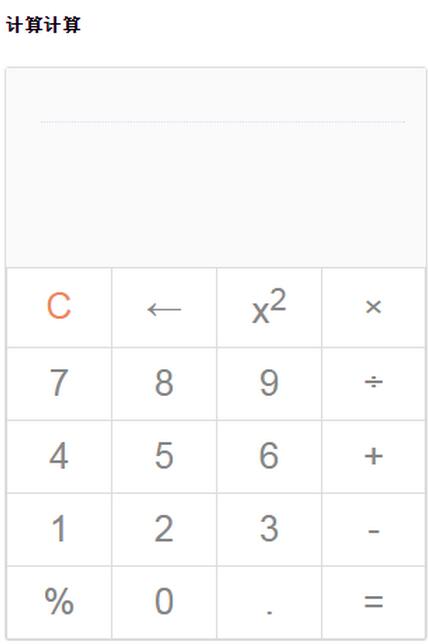
至此,静态计算器界面完成。
3. JS逻辑实现
这是核心部分,逐步解析。
首先处理计算器界面的事件监听。针对表格结构,建议使用事件委托,在父级节点上统一监听处理点击事件。
JavaScript核心逻辑解析
    // 绑定事件
    bindEvent: function() {
      var that = this;

      that.$operation.on('click', function(e) {
        e = e || window.event;
        var elem = e.target || e.srcElement,
          val,
          action;

        if (elem.tagName === 'TD') {
          val = elem.getAttribute('data-val') || elem.getAttribute('data-ac');
监听获取到的仅是页面元素的值或操作符,需将其存储为数组形成中缀表达式,随后转换为后缀表达式,最后通过后缀表达式进行计算。
    // 中缀表达式
    this.infix = [];
    // 后缀表达式
    this.suffix = [];
    // 后缀表达式运算结果集
    this.result = [];
按上述算法步骤编码实现。本例未使用括号,若需支持,可在相应判断逻辑中修改条件。
    // 中缀表达式转后缀
    infix2Suffix: function() {
      var temp = [];
      this.suffix = [];

      for (var i = 0; i < this.infix.length; i++) {
        // 数值,直接压入
        if (!this.isOp(this.infix[i])) {
          this.suffix.push(this.infix[i]);
        }
        else {
          if (!temp.length) {
            temp.push(this.infix[i]);
          }
          else {
            var opTop = temp[temp.length - 1];
            // 循环判断运算符优先级,将运算符较高的压入后缀表达式
            if (!this.priorHigher(opTop, this.infix[i])) {
              while (temp.length && !this.priorHigher(opTop, this.infix[i])) {
                this.suffix.push(temp.pop());
                opTop = temp[temp.length - 1];
              }
            }
              // 将当前运算符也压入后缀表达式
            temp.push(this.infix[i]);
          }
        }
      }
      // 将剩余运算符号压入
      while (temp.length) {
        this.suffix.push(temp.pop());
      }
    },
 // 后缀表达式计算
    calcSuffix: function() {
      this.result = [];

      for (var i = 0; i < this.suffix.length; i++) {
        // 数值,直接压入结果集
        if (!this.isOp(this.suffix[i])) {
          this.result.push(this.suffix[i]);
        }
        // 运算符,从结果集中取出两项进行运算,并将运算结果置入结果集合
        else {
          this.result.push(this.opCalc(this.result.pop(), this.suffix[i], this.result.pop()));
        }
      }
      // 此时结果集中只有一个值,即为结果
       return this.result[0];
    }
实现过程中会发现,中缀与后缀转换仅是难点之一,更复杂的是计算器整体状态(数据)的管理。
该简易计算器涉及多种数据及操作:数字(0-9)、运算符(+ - * /)、功能键(清除、删除)、预运算(百分号、平方)、小数点及即时运算。
若实现科学计算器,复杂度将更高。因此,理清控制逻辑至关重要,核心在于中缀表达式的构建与存储机制。
为防止连续点击运算符导致逻辑错误,需引入变量 lastVal 记录上一个值并随操作更新,通过判断拦截非法操作。
点击“=”后,用户可继续使用当前结果进行后续运算,或清空重新开始。
    // 构建中缀表达式
    buildInfix: function(val, type) {
      // 直接的点击等于运算之后,
      if (this.calcDone) {
        this.calcDone = false;
        // 再点击数字,则进行新的运算
        if (!this.isOp(val)) {
          this.resetData();
        }
        // 再点击运算符,则使用当前的结果值继续进行运算
        else {
          var re = this.result[0];
          this.resetData();
          this.infix.push(re);
        }

      }

      var newVal;
       ...
“删除”键的功能是退格删除一位数字,而非删除整个数值,需同步更新中缀表达式的值。
      // 删除操作
      if (type === 'del') {
        newVal = this.infix.pop();
        // 删除末尾一位数
        newVal = Math.floor(newVal / 10);
        if (newVal) {
          this.infix.push(newVal);
        }

        this.lastVal = this.infix[this.infix.length - 1];
        return this.infix;
      }
“添加”操作的逻辑更为复杂,需处理连续运算符、连续数字、运算符后接数字表示正负数、以及小数点的连接与存储等情况。
      // 添加操作,首先得判断运算符是否重复
      else if (type === 'add') {
        // 两个连续的运算符
        if (this.isOp(val) && this.isOp(this.lastVal)) {
          return this.infix;
        }
        // 两个连续的数字
        else if (!this.isOp(val) && !this.isOp(this.lastVal)) {
          newVal = this.lastVal * 10 + val;
          this.infix.pop();
          this.infix.push(this.lastVal = newVal);

          return this.infix;
        }
        // 首个数字正负数
        if (!this.isOp(val) && this.infix.length === 1 && (this.lastVal === '+' || this.lastVal === '-')) {
          newVal = this.lastVal === '+' ? val : 0 - val;
          this.infix.pop();
          this.infix.push(this.lastVal = newVal);

          return this.infix;
        }


        this.infix.push(this.lastVal = val);
        return this.infix;
      }
在多次操作中,计算器需即时运算以简化代码,可将相关逻辑封装为独立方法,在相应位置调用。
    // 即时得进行运算
    calculate: function(type) {
      this.infix2Suffix();
      var suffixRe = this.calcSuffix();

      if (suffixRe) {
        this.$out.text('=' + suffixRe)
          .attr('title', suffixRe)
          .removeClass('active');

        // 如果是直接显示地进行等于运算
        if (type === 'eq') {
          this.$in.removeClass('active');
          this.$out.addClass('active');
          // 设置标记:当前已经显示地进行计算
          this.calcDone = true;
          this.lastVal = suffixRe;
          // 设置历史记录
          var history = this.infix.join('') + ' = ' + suffixRe;
          this.$history.text(history).attr('title', history);
        }

      }
    },
其余部分为点击后的处理流程,即:传递数据 -> 构建中缀 -> 中缀转后缀 -> 后缀运算并显示结果。
以点击数字为例:
          // 数字:0-9
          if (!isNaN(parseInt(val, 10))) {
            // 构建中缀表达式并显示
            var infixRe = that.buildInfix(parseInt(val, 10), 'add');
            that.$in.text(infixRe.join('')).addClass('active');

            that.calculate();

            return;
          }
预运算键的处理逻辑类似:
       // 预运算:百分比、小数点、平方
          else if (['per', 'dot', 'sq'].indexOf(action) !== -1) {
            if (!that.infix.length || that.isOp(that.lastVal)) {
              return;
            }

            if (action === 'per') {
              that.lastVal /= 100;
            } else if (action === 'sq') {
              that.lastVal *= that.lastVal;
            } else if (action === 'dot') {
              // that.curDot = true;
            }

            // 重新构建中缀表达式
            var infixRe = that.buildInfix(that.lastVal, 'change');
            that.$in.text(infixRe.join('')).addClass('active');

            that.calculate();
          }
以上即为简易计算器的实现步骤。由于状态变化繁多,代码尚不能保证完全无错。
基本逻辑已阐述完毕。若需增加小数点、括号或正余弦等科学计算功能,需自行实现,复杂度较高。
$(function() {

  function Calculator($dom) {
    this.$dom = $($dom);
    // 历史运算
    this.$history = this.$dom.find('.calc-history');
    // 输入区
    this.$in = this.$dom.find('.calc-in');
    // 输出区
    this.$out = this.$dom.find('.calc-out');
    this.$operation = this.$dom.find('.calc-operation');

    // 运算符映射
    this.op = {
      'plus': '+',
      'minus': '-',
      'mul': '*',
      'div': '/'
    };
    this.opArr = ['+', '-', '*', '/'];

    // 中缀表达式
    this.infix = [];
    // 后缀表达式
    this.suffix = [];
    // 后缀表达式运算结果集
    this.result = [];
    // 存储最近的值
    this.lastVal = 0;
    // 当前已经计算等于完成
    this.calcDone = false;
    // 当前正在进行小数点点(.)相关值的修正
    this.curDot = false;

    this.init();
  }

  Calculator.prototype = {
    constructor: Calculator,
    // 初始化
    init: function() {
      this.bindEvent();
    },
    // 绑定事件
    bindEvent: function() {
      var that = this;

      that.$operation.on('click', function(e) {
        e = e || window.event;
        var elem = e.target || e.srcElement,
          val,
          action;

        if (elem.tagName === 'TD') {
          val = elem.getAttribute('data-val') || elem.getAttribute('data-ac');
          // 数字:0-9
          if (!isNaN(parseInt(val, 10))) {
            // 构建中缀表达式并显示
            var infixRe = that.buildInfix(parseInt(val, 10), 'add');
            that.$in.text(infixRe.join('')).addClass('active');

            that.calculate();

            return;
          }

          action = val;

          // 操作:清除、删除、计算等于
          if (['cls', 'del', 'eq'].indexOf(action) !== -1) {
            if (!that.infix.length) {
              return;
            }

            // 清空数据
            if (action === 'cls' || (action === 'del' && that.calcDone)) {
              that.$in.text('');
              that.$out.text('');

              that.resetData();
            }
            // 清除
            else if (action === 'del') {
              // 重新构建中缀表达式
              var infixRe = that.buildInfix(that.op[action], 'del');
              that.$in.text(infixRe.join('')).addClass('active');

              that.calculate();

            }
            // 等于
            else if (action === 'eq') {
              that.calculate('eq');

            }
          }
          // 预运算:百分比、小数点、平方
          else if (['per', 'dot', 'sq'].indexOf(action) !== -1) {
            if (!that.infix.length || that.isOp(that.lastVal)) {
              return;
            }

            if (action === 'per') {
              that.lastVal /= 100;
            } else if (action === 'sq') {
              that.lastVal *= that.lastVal;
            } else if (action === 'dot') {
              // that.curDot = true;
            }

            // 重新构建中缀表达式
            var infixRe = that.buildInfix(that.lastVal, 'change');
            that.$in.text(infixRe.join('')).addClass('active');

            that.calculate();
          }
          // 运算符:+ - * /
          else if (that.isOp(that.op[action])) {
            if (!that.infix.length && (that.op[action] === '*' || that.op[action] === '/')) {
              return;
            }

            var infixRe = that.buildInfix(that.op[action], 'add');
            that.$in.text(infixRe.join('')).addClass('active');
          }
        }
      });
    },

    resetData: function() {
      this.infix = [];
      this.suffix = [];
      this.result = [];
      this.lastVal = 0;
      this.curDot = false;
    },

    // 构建中缀表达式
    buildInfix: function(val, type) {
      // 直接的点击等于运算之后,
      if (this.calcDone) {
        this.calcDone = false;
        // 再点击数字,则进行新的运算
        if (!this.isOp(val)) {
          this.resetData();
        }
        // 再点击运算符,则使用当前的结果值继续进行运算
        else {
          var re = this.result[0];
          this.resetData();
          this.infix.push(re);
        }

      }

      var newVal;

      // 删除操作
      if (type === 'del') {
        newVal = this.infix.pop();
        // 删除末尾一位数
        newVal = Math.floor(newVal / 10);
        if (newVal) {
          this.infix.push(newVal);
        }

        this.lastVal = this.infix[this.infix.length - 1];
        return this.infix;
      }
      // 添加操作,首先得判断运算符是否重复
      else if (type === 'add') {
        // 两个连续的运算符
        if (this.isOp(val) && this.isOp(this.lastVal)) {
          return this.infix;
        }
        // 两个连续的数字
        else if (!this.isOp(val) && !this.isOp(this.lastVal)) {
          newVal = this.lastVal * 10 + val;
          this.infix.pop();
          this.infix.push(this.lastVal = newVal);

          return this.infix;
        }
        // 首个数字正负数
        if (!this.isOp(val) && this.infix.length === 1 && (this.lastVal === '+' || this.lastVal === '-')) {
          newVal = this.lastVal === '+' ? val : 0 - val;
          this.infix.pop();
          this.infix.push(this.lastVal = newVal);

          return this.infix;
        }

      // TODO: 小数点运算
      //   if (this.isOp(val)) {
      //     this.curDot = false;
      //   }

      //   // 小数点
      //   if (this.curDot) {
      //     var dotLen = 0;
      //     newVal = this.infix.pop();
      //     dotLen = newVal.toString().split('.');
      //     dotLen = dotLen[1] ? dotLen[1].length : 0;

      //     newVal += val / Math.pow(10, dotLen + 1);
      //     // 修正小数点运算精确值
      //     newVal = parseFloat(newVal.toFixed(dotLen + 1));

      //     this.infix.push(this.lastVal = newVal);
      //     return this.infix;
      //   }

        this.infix.push(this.lastVal = val);
        return this.infix;
      }

      // 更改操作,比如%的预运算
      else if (type === 'change') {
        this.infix.pop();
        this.infix.push(this.lastVal = val);

        return this.infix;
      }

    },
    // 判断是否为运算符
    isOp: function(op) {
      return op && this.opArr.indexOf(op) !== -1;
    },
    // 判断运算符优先级
    priorHigher: function(a, b) {
      return (a === '+' || a === '-') && (b === '*' || b === '/');
    },
    // 进行运算符的运算
    opCalc: function(b, op, a) {
      return op === '+'
        ? a + b
        : op === '-'
        ? a - b
        : op === '*'
        ? a * b
        : op === '/'
        ? a / b
        : 0;
    },
    // 即时得进行运算
    calculate: function(type) {
      this.infix2Suffix();
      var suffixRe = this.calcSuffix();

      if (suffixRe) {
        this.$out.text('=' + suffixRe)
          .attr('title', suffixRe)
          .removeClass('active');

        // 如果是直接显示地进行等于运算
        if (type === 'eq') {
          this.$in.removeClass('active');
          this.$out.addClass('active');
          // 设置标记:当前已经显示地进行计算
          this.calcDone = true;
          this.lastVal = suffixRe;
          // 设置历史记录
          var history = this.infix.join('') + ' = ' + suffixRe;
          this.$history.text(history).attr('title', history);
        }

      }
    },

    // 中缀表达式转后缀
    infix2Suffix: function() {
      var temp = [];
      this.suffix = [];

      for (var i = 0; i < this.infix.length; i++) {
        // 数值,直接压入
        if (!this.isOp(this.infix[i])) {
          this.suffix.push(this.infix[i]);
        }
        else {
          if (!temp.length) {
            temp.push(this.infix[i]);
          }
          else {
            var opTop = temp[temp.length - 1];
            // 循环判断运算符优先级,将运算符较高的压入后缀表达式
            if (!this.priorHigher(opTop, this.infix[i])) {
              while (temp.length && !this.priorHigher(opTop, this.infix[i])) {
                this.suffix.push(temp.pop());
                opTop = temp[temp.length - 1];
              }
            }
              // 将当前运算符也压入后缀表达式
            temp.push(this.infix[i]);
          }
        }
      }
      // 将剩余运算符号压入
      while (temp.length) {
        this.suffix.push(temp.pop());
      }
    },

    // 后缀表达式计算
    calcSuffix: function() {
      this.result = [];

      for (var i = 0; i < this.suffix.length; i++) {
        // 数值,直接压入结果集
        if (!this.isOp(this.suffix[i])) {
          this.result.push(this.suffix[i]);
        }
        // 运算符,从结果集中取出两项进行运算,并将运算结果置入结果集合
        else {
          this.result.push(this.opCalc(this.result.pop(), this.suffix[i], this.result.pop()));
        }
      }
      // 此时结果集中只有一个值,即为结果
       return this.result[0];
    }
  };

  new Calculator('.calc-wrap');
});
以上就是本文的全部内容,希望对大家的学习有所帮助,也希望大家多多支持本站。