

本文深入解析 JavaScript 中 Function.prototype.bind() 方法,涵盖其语法定义、底层实现原理及常见应用场景。通过对比 call 和 apply,阐述 bind 在事件处理、定时器及对象继承中的独特作用,并提供完整的浏览器兼容性兼容方案,帮助开发者掌握函数上下文绑定的核心技巧。
前言
前言
在 JavaScript 开发中,函数绑定(Function binding)往往容易被忽视。然而,当面临需要在另一个函数内部保持原有 this 上下文的需求时,Function.prototype.bind() 往往是最佳的解决方案,尽管开发者可能并未明确意识到这一点。
初次遇到此类问题时,常见的做法是将 this 赋值给一个局部变量,以便在上下文切换后仍能引用该对象。
bind的语法
一. bind的语法
bind() 方法的核心功能是将函数绑定到特定对象上。调用 bind() 会生成一个新的函数,该新函数内部的 this 关键字将被固定为传入 bind() 的第一个参数值。
1.1 定义
bind() 的定义如下:
The bind() method creates a new function that, when called, has its this keyword set to the provided value, with a given sequence of arguments preceding any provided when the new function is called.
bind() 函数会创建一个新的函数(称为绑定函数),该新函数与被调用的目标函数拥有相同的函数体。当调用目标函数时,this 的值会被绑定到 bind() 的第一个参数上,且该参数无法被后续调用重写。
1.2 原理
可以通过以下代码模拟 bind() 的基本原理:
Function.prototype.bind = function(context) {
 var self = this; // 保存原函数
 return function() { // 返回一个新函数
  return self.apply(context, arguments); // 执行新函数时,将传入的上下文context作为新函数的this
 }
}
1.3 语法
Function.prototype.bind(thisArg[, arg1[, arg2[, ...]]])bind的应用场景
二. bind的应用场景
2.1 实现对象继承
var A = function(name) {
 this.name = name;
}

var B = function() {
 A.bind(this, arguments);
}

B.prototype.getName = function() {
 return this.name;
}

var b = new B("hello");
console.log(b.getName()); // "hello"
2.2 事件处理
var paint = {
 color: "red",
 count: 0,
 updateCount: function() {
  this.count++;
  console.log(this.count);
 }
};

// 事件处理函数绑定的错误方法:
document.querySelector('button')
 .addEventListener('click', paint.updateCount); // paint.updateCount函数的this指向变成了该DOM对象

// 事件处理函数绑定的正确方法:
document.querySelector('button')
 .addEventListener('click', paint.updateCount.bind(paint)); // paint.updateCount函数的this指向变成了paint
2.3 时间间隔函数
var notify = {
 text: "Hello World!",
 beforeRender: function() {
  alert(this.text);
 },
 render: function() {

  // 错误方法:
  setTimeout(this.beforeRender, 0); // undefined

  // 正确方法:
  setTimeout(this.beforeRender.bind(this), 0); // "Hello World!"
 }
};

notify.render();
2.4 借用Array的原生方法
var a = {};
Array.prototype.push.bind(a, "hello", "world")();

console.log(a); // "hello", "world"
浏览器兼容性
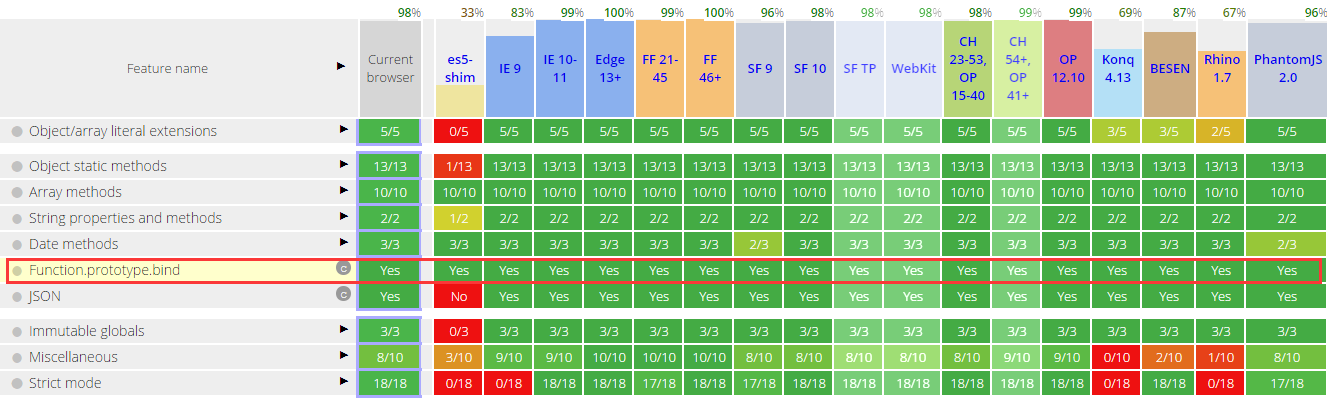
三. bind()方法的浏览器兼容性
四. bind()的兼容性写法
if (!Function.prototype.bind) {
 Function.prototype.bind = function() {
  var self = this, // 保存原函数
   context = [].shift.call(arguments), // 需要绑定的this上下文
   args = [].slice.call(arguments); // 剩余的参数转成数组
  return function() { // 返回一个新函数
   // 执行新函数时,将传入的上下文context作为新函数的this
   // 并且组合两次分别传入的参数,作为新函数的参数
   return self.apply(context, [].concat.call(args, [].slice.call(arguments)));
  }
 };
}
bind与 call/apply方法的区别
五. bind与 call/apply方法的区别
共同点:
三者均可改变函数执行时的上下文环境;
不同点:
bind 不会立即执行函数,通常用于异步调用或事件监听;而 call 和 apply 会立即执行函数。
总结
总结
以上即为关于本文的全部内容,希望这些内容能对大家学习或使用 JavaScript 有所帮助。如有任何疑问,欢迎留言交流。