

本文介绍如何使用AngularJS实现一个具备交互功能的按钮组件。通过自定义指令封装HTML与JS逻辑,实现点击按钮时切换CSS样式以改变颜色,以及鼠标悬停时显示由CSS3实现的三角形提示框。文章提供了完整的HTML结构、CSS样式及AngularJS指令代码,并强调需引入jQuery和AngularJS库文件。
AngularJS按钮交互实现概述
本文演示如何利用AngularJS构建一个简易的交互按钮,该按钮在点击后会发生颜色变化。需要注意的是,在HTML文件中必须正确引入jquery.js和angular.js这两个核心库文件。
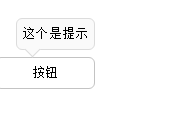
运行效果截图如下:
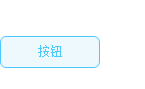
当用户点击按钮时,按钮的视觉样式会随之改变:
CSS样式与HTML结构
相关的CSS样式代码如下:
<style type="text/css">
  *{margin: 0px;padding: 0px;}
  .bucSelectedButton{width: 100px;line-height: 30px;text-align: center;position: relative;}
  .bucSelected {border:1px solid rgb(195,195,195);color:#000;cursor: pointer;border-radius: 6px;background-color: rgb(255,255,255);}
  .bucSelectedHover{border: 1px solid rgb(74,201,255);color: rgb(74,201,255);cursor: pointer;border-radius: 6px;background-color: rgb(238,249,254);}
  .bucSelectedHover .tip {color: rgb(0,0,0);background-color: rgb(255,255,255);}
 </style>
HTML结构代码如下:
<div ng-controller="bucTipController">
 <!-- 指令 -->
 <buc-button id="numberType" my-title="按钮" tip-title = "这个是提示" style="margin-top:60px;"></buc-button>
</div>
AngularJS指令与逻辑实现
JavaScript逻辑代码如下:
<script type="text/javascript">
var app = angular.module("tip",[]);
app.controller("bucTipController",function(){

})
.directive("bucButton",function(){
 return {
  restrict : 'E',
  replace : true,
  scope : {
   myTitle : "@",
   id : "@",
   tipTitle : "@"
  },
  template : "<button class='bucSelectedButton bucSelected' ng-click='clicked()' ng-mouseover = 'mouseover()' ng-mouseout = 'mouseout()'>{{myTitle}}\
    <div style='border:1px solid #dcdcdc;border-radius:6px;width:auto;height:20px;line-height:20px;position:absolute;top:-40px;padding:5px;white-space:nowrap;background-color:#fafafa;display:none;color:#000;left:20px;' class='tip'>{{tipTitle}}\
     <span style='position:absolute;top:25px;left:10px;background-color:#fafafa;border:1px solid #dcdcdc;width:10px;height:10px;transform:rotate(45deg);border-left:none;border-top:none;'>\
     </span>\
    </div>\
    </button>",
  link : function(scope,elem,attrs) {
   scope.mouseover = function(){
    $(".tip").show();
   }

   scope.mouseout = function(){
    $(".tip").hide();
   }

   scope.clicked = function(){
    elem.toggleClass("bucSelectedHover");
    $(".tip").hide();
   }
  }
 }
})
</script>
当鼠标移入按钮区域时,会显示tip提示框;鼠标移出时,提示框隐藏。tip下方的三角形箭头是通过CSS3属性绘制实现的。
总结
以上就是本文关于AngularJS实现按钮提示与点击变色效果的完整内容,希望能为学习AngularJS的读者提供帮助。如有任何疑问,欢迎留言交流。