

本文针对新浪搜索框场景中onclick与onblur事件冲突导致下拉框无法正确隐藏的问题,提供两种快速解决方法。第一种利用setTimeout延迟onblur执行,确保点击事件优先处理;第二种使用document.onmousedown替代onblur。文章包含完整HTML/CSS/JS示例代码,帮助开发者解决此类交互难题。
问题背景:下拉框交互需求
以新浪首页搜索框为例,其中包含一个基于Ajax的下拉推荐列表。我们需要实现这样的交互效果:当用户点击下拉列表中的某一项时,搜索框的值应更新为该选项,同时下拉列表自动隐藏;此外,当用户点击页面其他区域时,下拉列表也应随之消失。具体效果如图所示:
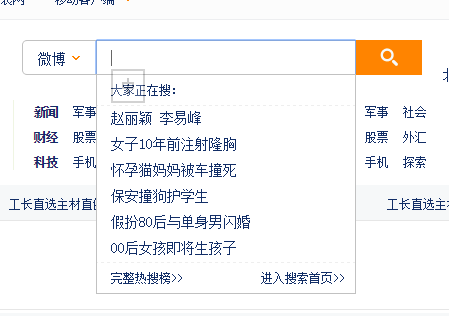
冲突原因分析
若同时绑定onblur和onclick事件来触发下拉框隐藏,往往会出现逻辑冲突。由于onblur事件的触发优先级较高或机制特殊,它可能会在onclick事件执行前就触发,导致点击选项后无法获取目标内容,搜索框值未被更新。这就是典型的onclick与onblur冲突问题。针对该问题,本文介绍两种解决方案: 1. 利用setTimeout延迟onblur的执行时机,使其在onclick事件处理完毕后再执行。注意,setTimeout的延时时间需设置为100毫秒以上,否则冲突仍可能发生。示例代码如下:
解决方案一:使用setTimeout延迟处理
<!DOCTYPE html>
<html>
<head lang="en">
  <meta charset="UTF-8">
  <title></title>
  <style>
    *{ margin: 0; padding: 0; list-style: none; }
    form{
      width:500px;
      margin:0 auto;
      position:relative;
      zoom:1;
    }
    form:after{
      clear:both;
      content:"";
      display:block;
    }
    .text{
      float:left;
      border:1px solid #cccccc;
      padding-left:14px;
      width:300px;
      height:34px;
      line-height:34px;
      font-size:14px;
    }
    .button{
      width:50px;
      height:34px;
      border:1px solid #cccccc;
      line-height:34px;
      font-size:14px;
      color:#ffffff;
      background:#ff8400;
    }
    ul{
      position:absolute;
      top:36px;
      left:0;
      width:300px;
      border-right:1px solid #cccccc;
      border-left:1px solid #cccccc;
      background:green;
      display:none;
    }
    li{
      font-size:14px;
      line-height:34px;
      height:34px;
      color:#000000;
      border-bottom:1px solid #cccccc;
    }
    li:hover{
      background:yellow;
      color:red;
      cursor:pointer;
    }
  </style>
  <script>
    window.onload=function(){
      var oText=document.getElementById('text');
      var oUl=document.getElementById('ul');
      var aLi=oUl.getElementsByTagName('li');
      var timer=null;
      oText.onfocus=function(){
        this.value='';
        oUl.style.display='block';
        for(var i=0;i<aLi.length;i++){
          aLi[i].onclick=function(){
            clearTimeout(timer);
            oText.value=this.innerHTML;
            oUl.style.display='none';
          };
        }
      };
      oText.onblur=function(){
        timer=setTimeout(function(){
          oUl.style.display='none';
          if(!oText.value){
            oText.value='请输入关键字';
          }
        },120);
      };
    };
  </script>
</head>
<body>
<form>
  <input type="text" value="请输入关键字" id="text" class="text"/>
  <input type="button" value="搜索" class="button"/>
  <ul id="ul">
    <li>返回窗口是否已被关闭</li>
    <li>返回窗口的文档显示区的高度</li>
    <li>返回窗口的文档显示区的宽度。</li>
    <li>设置或返回窗口的名称。</li>
    <li>返回窗口的外部高度。</li>
  </ul>
</form>

</body>
</html>
2. 使用document.onmousedown事件替代onblur来实现下拉框的隐藏逻辑。
解决方案二:使用document.onmousedown替代
<!DOCTYPE html>
<html>
<head lang="en">
  <meta charset="UTF-8">
  <title></title>
  <style>
    *{ margin: 0; padding: 0; list-style: none; }
    form{
      width:500px;
      margin:0 auto;
      position:relative;
      zoom:1;
    }
    form:after{
      clear:both;
      content:"";
      display:block;
    }
    .text{
      float:left;
      border:1px solid #cccccc;
      padding-left:14px;
      width:300px;
      height:34px;
      line-height:34px;
      font-size:14px;
    }
    .button{
      width:50px;
      height:34px;
      border:1px solid #cccccc;
      line-height:34px;
      font-size:14px;
      color:#ffffff;
      background:#ff8400;
    }
    ul{
      position:absolute;
      top:36px;
      left:0;
      width:300px;
      border-right:1px solid #cccccc;
      border-left:1px solid #cccccc;
      background:green;
      display:none;
    }
    li{
      font-size:14px;
      line-height:34px;
      height:34px;
      color:#000000;
      border-bottom:1px solid #cccccc;
    }
    li:hover{
      background:yellow;
      color:red;
      cursor:pointer;
    }
  </style>
  <script>
    window.onload=function(){
      var oText=document.getElementById('text');
      var oUl=document.getElementById('ul');
      var aLi=oUl.getElementsByTagName('li');
      var timer=null;
      oText.onfocus=function(){
        this.value='';
        oUl.style.display='block';
        for(var i=0;i<aLi.length;i++){
          aLi[i].onclick=function(){
            clearTimeout(timer);
            oText.value=this.innerHTML;
            oUl.style.display='none';
          };
        }
      };

      document.onmousedown=function(ev){
        var oEvent=ev||event;
        var target=oEvent.target||oEvent.srcElement;
          if(target.parentNode!==oUl&&target!==oText){
            oUl.style.display='none';
          }

      };
      oText.onblur=function(){
        if(!oText.value){
          oText.value='请输入关键字';
        }
      };
    };
  </script>
</head>
<body>
<form>
  <input type="text" value="请输入关键字" id="text" class="text"/>
  <input type="button" value="搜索" class="button"/>
  <ul id="ul">
    <li>返回窗口是否已被关闭</li>
    <li>返回窗口的文档显示区的高度</li>
    <li>返回窗口的文档显示区的宽度。</li>
    <li>设置或返回窗口的名称。</li>
    <li>返回窗口的外部高度。</li>
  </ul>
</form>

</body>
</html>
以上关于解决onclick与onblur冲突的方法就是本文的全部内容,希望对读者有所帮助,欢迎参考与实践。