

本文分享一个基于纯JavaScript实现的文本比较工具源码,无需后端支持即可在浏览器中运行。文章提供了完整的HTML与CSS代码结构,包含界面样式与核心逻辑,用户保存为HTML文件即可直接使用,旨在为前端开发提供参考示例。
纯JavaScript文本比较工具介绍
此前项目曾要求开发一个纯JavaScript编写的文本比较工具,现将相关代码整理分享,供开发者参考。该算法仍有优化空间,内容如有不足敬请谅解。
首先展示工具的实际运行效果。
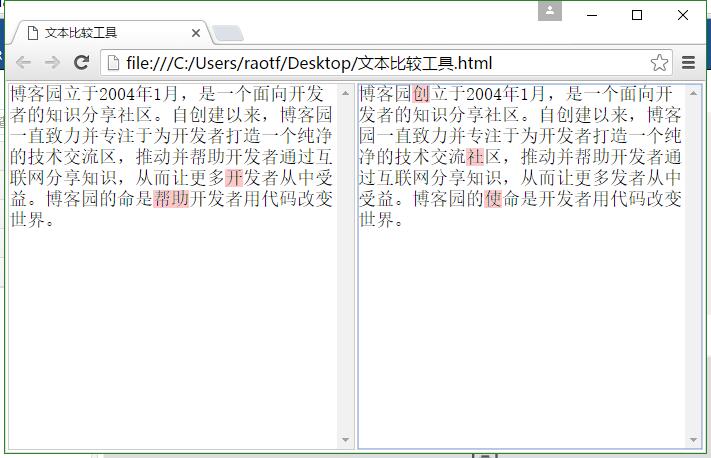
具体实现代码见下方。
将上述源码保存为HTML格式文件后,即可直接在浏览器中运行使用。
工具源码与实现细节
<!doctype html>
<html>
<head>
<title>文本比较工具</title>
<style type="text/css">
*{padding:px;margin:px;}
html,body{
overflow-y: hidden;
}
.edit_div{
border: px solid #CCCCCC;
overflow: auto;
position: relative;
}
.edit_div textarea{
resize:none;
background: none repeat scroll transparent;
border: none;
width: %;
height:px;
overflow-y: scroll;
position: absolute;
left: px;
top: px;
z-index: ;
font-size: px;
white-space: pre-wrap;
word-wrap: break-word;
word-break:break-all;
}
.edit_div pre{
overflow-y: scroll;
white-space: pre-wrap;
word-wrap: break-word;
word-break:break-all;
width: %;
height:px;
text-align: left;
color: #ffffff;
z-index: ;
font-size: px;
}
</style>
</head>
<body>
<table style="width:%">
<tr>
<td style="width:%">
<div class="edit_div">
<pre id="edit_pre_"></pre>
<textarea id="edit_textarea_" onscroll="test_scroll()" oninput="textchange()" onpropertychange="textchange()"></textarea>
</div>
</td>
<td style="width:%">
<div class="edit_div">
<pre id="edit_pre_"></pre>
<textarea id="edit_textarea_" onscroll="test_scroll()" oninput="textchange()" onpropertychange="textchange()"></textarea>
</div>
</td>
</tr>
</table>
<script type="text/javascript">
function test_scroll(){
document.getElementById("edit_pre_").scrollTop=document.getElementById("edit_textarea_").scrollTop;
document.getElementById("edit_pre_").scrollTop=document.getElementById("edit_pre_").scrollTop;
document.getElementById("edit_textarea_").scrollTop=document.getElementById("edit_textarea_").scrollTop;
}
function test_scroll(){
document.getElementById("edit_pre_").scrollTop=document.getElementById("edit_textarea_").scrollTop;
document.getElementById("edit_pre_").scrollTop=document.getElementById("edit_pre_").scrollTop;
document.getElementById("edit_textarea_").scrollTop=document.getElementById("edit_textarea_").scrollTop;
}
function textchange(){
var op = eq({ value: document.getElementById("edit_textarea_").value, value: document.getElementById("edit_textarea_").value });
document.getElementById("edit_pre_").innerHTML=op.value+"\r\n";
document.getElementById("edit_pre_").innerHTML=op.value+"\r\n";
}
function eq(op) {
if(!op){
return op;
}
if(!op.value_style){
op.value_style="background-color:#FECC;";
}
if(!op.value_style){
op.value_style="background-color:#FECC;";
}
if(!op.eq_min){
op.eq_min=;
}
if(!op.eq_index){
op.eq_index=;
}
if (!op.value || !op.value) {
return op;
}
var ps = {
v_i: ,
v_new_value: "",
v_i: ,
v_new_value: ""
};
while (ps.v_i < op.value.length && ps.v_i < op.value.length) {
if (op.value[ps.v_i] == op.value[ps.v_i]) {
ps.v_new_value += op.value[ps.v_i].replace(/</g,"<").replace(">",">");
ps.v_new_value += op.value[ps.v_i].replace(/</g,"<").replace(">",">");
ps.v_i += ;
ps.v_i += ;
if (ps.v_i >= op.value.length) {
ps.v_new_value += "<span style='" + op.value_style + "'>" + op.value.substr(ps.v_i).replace(/</g,"<").replace(">",">") + "</span>";
break;
}
if (ps.v_i >= op.value.length) {
ps.v_new_value += "<span style='" + op.value_style + "'>" + op.value.substr(ps.v_i).replace(/</g,"<").replace(">",">") + "</span>";
break;
}
} else {
ps.v_index = ps.v_i + ;
ps.v_eq_length = ;
ps.v_eq_max = ;
ps.v_start = ps.v_i + ;
while (ps.v_index < op.value.length) {
if (op.value[ps.v_index] == op.value[ps.v_i + ps.v_eq_length]) {
ps.v_eq_length += ;
} else if (ps.v_eq_length > ) {
if (ps.v_eq_max < ps.v_eq_length) {
ps.v_eq_max = ps.v_eq_length;
ps.v_start = ps.v_index - ps.v_eq_length;
}
ps.v_eq_length = ;
break;//只寻找最近的
}
ps.v_index += ;
}
if (ps.v_eq_max < ps.v_eq_length) {
ps.v_eq_max = ps.v_eq_length;
ps.v_start = ps.v_index - ps.v_eq_length;
}
ps.v_index = ps.v_i + ;
ps.v_eq_length = ;
ps.v_eq_max = ;
ps.v_start = ps.v_i + ;
while (ps.v_index < op.value.length) {
if (op.value[ps.v_index] == op.value[ps.v_i + ps.v_eq_length]) {
ps.v_eq_length += ;
} else if (ps.v_eq_length > ) {
if (ps.v_eq_max < ps.v_eq_length) {
ps.v_eq_max = ps.v_eq_length;
ps.v_start = ps.v_index - ps.v_eq_length;
}
ps.v_eq_length = ;
break;//只寻找最近的
}
ps.v_index += ;
}
if (ps.v_eq_max < ps.v_eq_length) {
ps.v_eq_max = ps.v_eq_length;
ps.v_start = ps.v_index - ps.v_eq_length;
}
if (ps.v_eq_max < op.eq_min && ps.v_start - ps.v_i > op.eq_index) {
ps.v_eq_max = ;
}
if (ps.v_eq_max < op.eq_min && ps.v_start - ps.v_i > op.eq_index) {
ps.v_eq_max = ;
}
if ((ps.v_eq_max == && ps.v_eq_max == )) {
ps.v_new_value += "<span style='" + op.value_style + "'>" + op.value[ps.v_i].replace(/</g,"<").replace(">",">") + "</span>";
ps.v_new_value += "<span style='" + op.value_style + "'>" + op.value[ps.v_i].replace(/</g,"<").replace(">",">") + "</span>";
ps.v_i += ;
ps.v_i += ;
if (ps.v_i >= op.value.length) {
ps.v_new_value += "<span style='" + op.value_style + "'>" + op.value.substr(ps.v_i).replace(/</g,"<").replace(">",">") + "</span>";
break;
}
if (ps.v_i >= op.value.length) {
ps.v_new_value += "<span style='" + op.value_style + "'>" + op.value.substr(ps.v_i).replace(/</g,"<").replace(">",">") + "</span>";
break;
}
} else if (ps.v_eq_max > ps.v_eq_max) {
ps.v_new_value += "<span style='" + op.value_style + "'>" + op.value.substr(ps.v_i, ps.v_start - ps.v_i).replace(/</g,"<").replace(">",">") + "</span>";
ps.v_i = ps.v_start;
} else {
ps.v_new_value += "<span style='" + op.value_style + "'>" + op.value.substr(ps.v_i, ps.v_start - ps.v_i).replace(/</g,"<").replace(">",">") + "</span>";
ps.v_i = ps.v_start;
}
}
}
op.value = ps.v_new_value;
op.value = ps.v_new_value;
return op;
}
function settextheight(){
var heigth=(document.documentElement.clientHeight-)+"px"
document.getElementById("edit_pre_").style.height=heigth;
document.getElementById("edit_textarea_").style.height=heigth;
document.getElementById("edit_pre_").style.height=heigth;
document.getElementById("edit_textarea_").style.height=heigth;
}
window.onload=function(){
settextheight();
window.onresize=function(){
settextheight();
}
}
</script>
</body>
</html>以上即为利用纯JavaScript实现的文本比较工具完整代码,希望能为相关开发工作提供帮助。