

本文详细介绍BootstrapValidator插件的使用方法,涵盖从基础配置到高级验证规则的完整流程。通过jQuery和Bootstrap环境搭建,演示非空、长度、正则及邮箱等常见验证类型,并展示submitHandler提交处理及多场景实例,帮助开发者快速实现友好的前端表单验证功能。
本文分享了一款用于JavaScript开发的Form表单验证工具BootstrapValidator,供读者参考具体实现细节。
BootstrapValidator基础配置与引入
首先查看BootstrapValidator的官方描述:A jQuery form validator for Bootstrap 3。从描述可知,该插件至少依赖jQuery和Bootstrap库。我们需要在项目中引入必要的JS组件:
 <script src="~/Scripts/jquery-1.10.2.js"></script>

 <script src="~/Content/bootstrap/js/bootstrap.min.js"></script>
 <link href="~/Content/bootstrap/css/bootstrap.min.css" rel="stylesheet" />

 <script src="~/Content/bootstrapValidator/js/bootstrapValidator.min.js"></script>
 <link href="~/Content/bootstrapValidator/css/bootstrapValidator.min.css" rel="stylesheet" />
既然涉及表单验证,在cshtml页面中必须包含一个Form元素。由于Form内部获取元素主要依赖name属性,因此表单内的所有输入元素都必须设置name属性值。
 <form>
  <div class="form-group">
  <label>Username</label>
  <input type="text" class="form-control" name="username" />
  </div>
  <div class="form-group">
  <label>Email address</label>
  <input type="text" class="form-control" name="email" />
  </div>
  <div class="form-group">
  <button type="submit" name="submit" class="btn btn-primary">Submit</button>
  </div>
 </form>
完成表单元素的定义后,接下来进行JavaScript的初始化配置。
 $(function () {
 $('form').bootstrapValidator({
        message: 'This value is not valid',
   feedbackIcons: {
          valid: 'glyphicon glyphicon-ok',
          invalid: 'glyphicon glyphicon-remove',
          validating: 'glyphicon glyphicon-refresh'
           },
  fields: {
  username: {
   message: '用户名验证失败',
   validators: {
   notEmpty: {
    message: '用户名不能为空'
   }
   }
  },
  email: {
   validators: {
   notEmpty: {
    message: '邮箱地址不能为空'
   }
   }
  }
  }
 });
 });
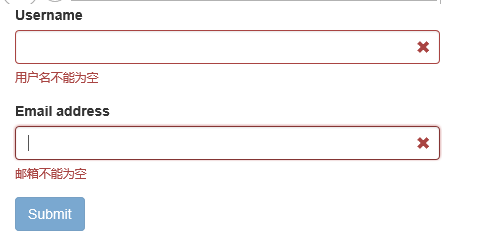
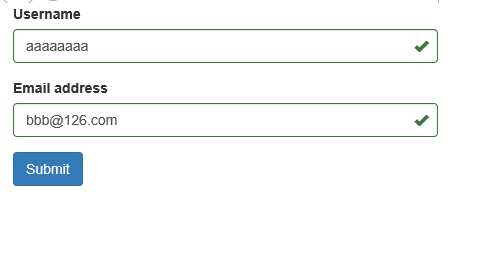
代码逻辑直观易懂。以下是实际运行效果:
当验证未通过时,提交按钮会被禁用并显示为灰色,无法点击。
当所有验证通过时,提交按钮恢复正常状态,允许点击。
通过上述效果可以直观感受其优势:使用简便且界面友好。接下来我们将探讨更复杂的验证场景。
中级用法与多重验证规则
2、中级用法 上文介绍了非空验证的基本写法,实际上该插件支持多种其他验证方式。保持cshtml部分的HTML结构不变,对JavaScript代码进行如下调整:
 $(function () {
 $('form').bootstrapValidator({
  message: 'This value is not valid',
  feedbackIcons: {
  valid: 'glyphicon glyphicon-ok',
  invalid: 'glyphicon glyphicon-remove',
  validating: 'glyphicon glyphicon-refresh'
  },
  fields: {
  username: {
   message: '用户名验证失败',
   validators: {
   notEmpty: {
    message: '用户名不能为空'
   },
   stringLength: {
    min: 6,
    max: 18,
    message: '用户名长度必须在6到18位之间'
   },
   regexp: {
    regexp: /^[a-zA-Z0-9_]+$/,
    message: '用户名只能包含大写、小写、数字和下划线'
   }
   }
  },
  email: {
   validators: {
   notEmpty: {
    message: '邮箱不能为空'
   },
   emailAddress: {
    message: '邮箱地址格式有误'
   }
   }
  }
  }
 });
 });
添加重叠验证规则后,观察实际运行效果:
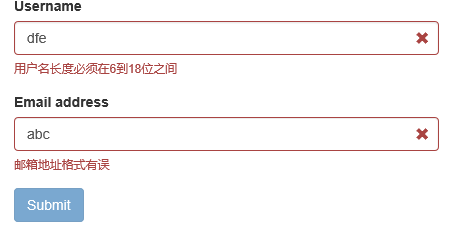
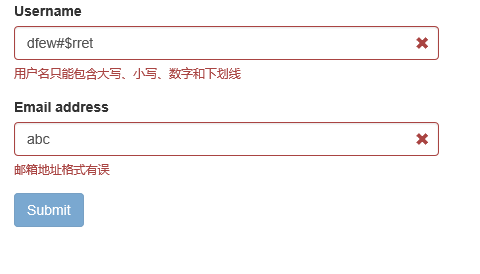
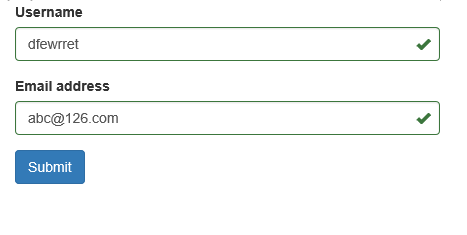
从上述代码可以看出,validators属性对应一个JSON对象,其中可以配置多种验证类型:
- notEmpty:非空验证;
- stringLength:字符串长度验证;
- regexp:正则表达式验证;
- emailAddress:邮箱地址验证(无需手动编写邮箱正则表达式)
常用验证类型详解
此外,查阅文档可知该插件总共提供46种验证类型,我们选取其中几种常用类型进行说明:
- base64:Base64编码验证;
- between:验证输入值是否在指定范围内,例如大于10且小于100;
- creditCard:身份证号码验证;
- date:日期格式验证;
- ip:IP地址格式验证;
- numeric:数值类型验证;
- phone:电话号码验证;
- uri:URL链接验证;
提交处理与高级实例
另一个常用配置是submitHandler属性,它用于定义提交按钮触发的事件处理方法。具体用法如下:
$(function () {
 $('form').bootstrapValidator({
  message: 'This value is not valid',
  feedbackIcons: {
  valid: 'glyphicon glyphicon-ok',
  invalid: 'glyphicon glyphicon-remove',
  validating: 'glyphicon glyphicon-refresh'
  },
  fields: {
  username: {
   message: '用户名验证失败',
   validators: {
   notEmpty: {
    message: '用户名不能为空'
   },
   stringLength: {
    min: 6,
    max: 18,
    message: '用户名长度必须在6到18位之间'
   },
   regexp: {
    regexp: /^[a-zA-Z0-9_]+$/,
    message: '用户名只能包含大写、小写、数字和下划线'
   }
   }
  },
  email: {
   validators: {
   notEmpty: {
    message: '邮箱不能为空'
   },
   emailAddress: {
    message: '邮箱地址格式有误'
   }
   }
  }
  },
  submitHandler: function (validator, form, submitButton) {
  alert("submit");
  }
 });
 });
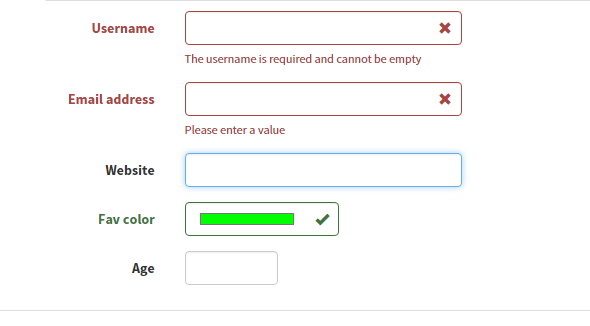
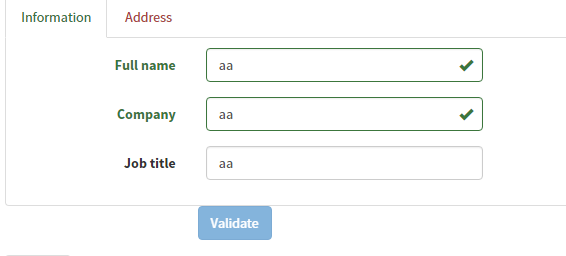
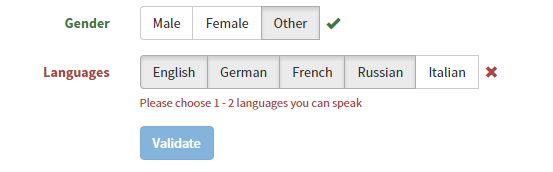
在其官方Demo中提供了丰富的验证实例。我们可以简单查看其效果,实现代码相对简单,有兴趣的读者可直接查阅API文档。
颜色格式验证
Tab页签表单验证
按钮点击验证
若希望深入学习,可参考相关学习资源,并附两个精彩专题:Bootstrap学习教程 Bootstrap实战教程。
以上就是本文的全部内容,希望对读者的学习有所帮助。