

本文详解JavaScript的事件驱动编程机制,涵盖事件源、事件对象及处理程序原理。系统梳理鼠标、键盘及HTML事件分类,并通过获取点击坐标、动态修改CSS样式、浏览器内核识别及多监听器绑定等实例,展示事件在Web开发中的实际应用。
事件驱动机制概述
JavaScript采用事件驱动机制来响应用户操作。当用户对HTML元素执行特定动作时,会触发相应事件,进而驱动相关函数执行处理逻辑。这与Java GUI中的事件监听机制类似,均需先注册监听器再进行处理,但具体实现方式存在差异。
事件驱动核心原理
事件驱动原理
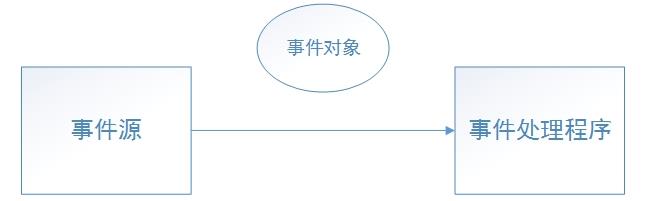
- 事件源:产生事件的地方(html元素)
- 事件:点击/鼠标操作/键盘操作等等
- 事件对象:当某个事件发生时,可能会产生一个事件对象,该时间对象会封装好该时间的信息,传递给事件处理程序
- 事件处理程序:响应用户事件的代码
JavaScript事件分类
案例:
<html>
  <head>
    <script type="text/javascript">
      function test1(e){
        window.alert("x=" + e.clientX + " y=" + e.clientY);
      }
      function test2(e){
        window.alert("x=" + e.clientX + " y=" + e.clientY);
      }
      function test3(e){
        window.alert(new Date().toLocaleString());
      }
      function test4(e){
        if(e.value == "red"){
          div1.style.backgroundColor = "red";
        } else if (e.value == "black"){
          div1.style.backgroundColor = "black";
        }
      }
    </script>
  </head>
  <body>
    <input type="button" onclick="test1(event)" value="button1">
    <input type="button" onmouseover="test2(event)" value="button2">
    <input type="button" onclick="test3(event)" value="button3">
    <div id="div1" style="width: 400px; height: 300px; background-color: red"></div>
    <input type="button" onclick="test4(this)" value="red">
    <input type="button" onclick="test4(this)" value="black">
  </body>
</html> - JS事件分类
- 鼠标事件
- click dblclick mousedown mouseout mouseover mouseup mousemove等
- 键盘事件
- keydown keypress keyup等
- HTML事件
- window的onload unload error abort 文本框的select change等
- 其他事件
- 页面中有些特殊对象运行过程中产生的事件
常见事件处理案例
案例1:监听鼠标点击事件,并能够显示鼠标点击的位置x,y
<html>
   <head>
   <script>
   function test1(e){
     window.alert("x="+e.clientX+"y="+e.clientY);
   }
   </script>
   </head>
   <body onmousedown="test1(event)">
   </body>
</html>
点击浏览器之后,显示坐标(有些浏览器可能无效)
案例2:点击按钮,图片变成红色,黑色 方法:JS访问内部css
//js如何访问css属性,来改变外观
<html>
  <head>
  <script>
    function test3(e){
      var pic=document.getElementById("pic");
      if(e.value=="红色"){
        pic.style.backgroundColor="red";
      }
      else if(e.value=="黑色"){
        pic.style.backgroundColor="black";
      }
   }
  </script>
  </head>
  <body >
    <div id="pic" style="border:1;background-color:red;width:300px;height:300px"></div>
    <input type="button" onclick="test3(this)" value="红色">
    <input type="button" onclick="test3(this)" value="黑色">
  </body>
</html>
方法:JS访问外部css(这方法不一定适用于所有浏览器)
event2.css
.style {
  border:1;
  background-color:red;
  width:300px;
  height:300px;
}
event2.html
<html>
  <head>
  <script>
    function test3(e){
      //取连接的第一个css文件的内容用0
      var ocssRules=document.styleSheets[0].rules;
      //从ocssRules取出你希望的样式
      var style=ocssRules[0];//这里面的0表示event2.css文件中第一个规则
      if(e.value=="黑色"){
        style.style.backgroundColor="black";
       }
       else if(e.value=="红色"){
         style.style.backgroundColor="red";
       }
    }
  </script>
  </head>
  <body>
    <div class="style"></div>
    <input type="button" onclick="test3(this)" value="红色">
    <input type="button" onclick="test3(this)" value="黑色">
   </body>
</html>
案例3:区分当前浏览器的内核是什么?(区分出ie6/7/8/ 火狐等)
<script language="javascript">
   if(window.XMLHttpRequest)
   { //Mozilla, Safari, IE7,IE8
      if(!window.ActiveXObject)
    {  // Mozilla, Safari,
      alert('Mozilla, Safari');
    }
     else
     {
      alert('IE7 .8');
    }
   }
   else
   {
     alert('IE6');
   }
</script>
案例4:一个事件可以被多个函数监听
<html>
  <head>
  function test(e){
    window.alert("fss");
  }
  function test1(e){
    window.alert("sfdsdf");
  }
  </script>
  </head>
  <body>
    <div class="style"></div>
    <input type="button" onclick="test(this),test1(this)" value="红色">
  </body>
</html>
案例5:防止用户通过点击鼠标右键菜单拷贝网页内容,选择网页内容
<html>
  <script type="text/javascript">
    function test(){
      //window.alert("没有菜单");
      return false;
    }
    function test2(){
      //window.alert("全选不行");
      return false;
    }
  </script>
  </head>
  <!--body元素响应oncontextmenu,onselectstart事件 -->
  <body oncontextmenu="return test()" onselectstart="return test2()">
    内容
  </body>
</html>
下篇文章为大家分享一个简单综合案例:简单的计算器,希望大家不要错过。
关于Javascript事件驱动编程远不止这些,希望本文所述对大家学习javascript程序设计有所帮助。