

本文介绍了如何使用JavaScript实现点击按钮后出现60秒倒计时的功能,常用于短信验证码发送场景。通过禁用按钮并动态更新按钮文本显示剩余秒数,防止用户重复点击。文中提供了多种实现方式,包括原生JS和jQuery方案,并讨论了结合后台校验或Cookie存储时间的必要性。
JavaScript实现60秒倒计时发送验证码
在许多网站中,手机短信认证功能通常包含一个交互效果:点击发送按钮后,按钮进入60秒的倒计时状态,期间无法再次点击发送。
以下示例展示了如何使用JavaScript实现这一功能:用户点击按钮后,按钮被禁用,并开始60秒倒计时,倒计时结束后按钮恢复可用状态。
示例1:使用JavaScript实现点击按钮后60秒倒计时,倒计时期间按钮不可点击,倒计时结束后恢复发送功能。
<input type="button" id="btn" value="免费获取验证码" />
<script type="text/javascript">
var wait=60;
function time(o) {
 if (wait == 0) {
 o.removeAttribute("disabled");
 o.value="免费获取验证码";
 wait = 60;
 } else {

 o.setAttribute("disabled", true);
 o.value="重新发送(" + wait + ")";
 wait--;
 setTimeout(function() {
 time(o)
 },
 1000)
 }
 }
document.getElementById("btn").onclick=function(){time(this);}
</script>
示例2:点击按钮后显示60秒倒计时的JavaScript代码实现。
<html>
<head>
<meta http-equiv="Content-Type" content="text/html; charset=utf-8" />
<title>无标题文档</title>
<script type="text/javascript" src="js/jquery.js"></script>
</head>

<body>
<input type="button" id="btn" value="免费获取验证码" onclick="settime(this)" />
<script type="text/javascript">
var countdown=60;
function settime(val) {
if (countdown == 0) {
val.removeAttribute("disabled");
val.value="免费获取验证码";
countdown = 60;
} else {
val.setAttribute("disabled", true);
val.value="重新发送(" + countdown + ")";
countdown--;
}
setTimeout(function() {
settime(val)
},1000)
}
</script>
</body>
</html>
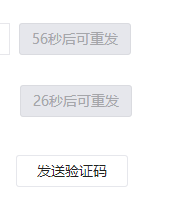
示例3:点击按钮后,进入60秒倒计时,期间按钮不可用,且按钮文本显示剩余倒计时时间。
预期效果如图所示。
该代码来源于微信公众平台。
function E() {
var e = $("#mobile"), t = (new Date).getTime(), n = Math.floor((t - b) / 1e3);
g && clearTimeout(g), n >= 60 ? (e.prop("readonly", !1), y = !0, $("#sendmobile").html("发送验证码").attr("disabled", !1).removeClass("btn_disabled")) : (e.prop("readonly", !0), y = !1, $("#sendmobile").attr("disabled", !0).addClass("btn_disabled").html("%s秒后可重发".sprintf(60 - n)), g = setTimeout(E, 1e3));
}
function S() {
function e() {
if (!y) return;
var e = $.trim(n.val());
l.mobile(e) ? t.attr("disabled", !1).removeClass("btn_disabled") : t.attr("disabled", !0).addClass("btn_disabled");
}
var t = $("#sendmobile"), n = $("#mobile");
n.keyup(e).blur(e), e(), t.click(function() {
var e;
t.attr("disabled") !== "disabled" && (e = "+86" + $.trim(n.val()), b = (new Date).getTime(), E(), o.post({
url: w ? "/cgi-bin/formbyskey" : "/acct/formbyticket",
data: {
form: "mobile",
action: "set",
f: "json",
mobile: e
},
mask: !1
}, function(e) {
var t = e.BaseResp.Ret;
if (t == 0) u.suc("验证码已经发送"); else {
switch (t) {
case -13:
u.err("登录超时,请重新登录");
break;
case -35:
u.err("该手机已经登记过2次,请使用别的手机号进行用户信息登记");
break;
default:
u.err("验证码发送失败");
}
b = 0;
}
}));
});
}
起初不清楚如何将此代码集成到自己的项目中,后经他人指点,有了初步思路。
专业人士的解题思路指出:若要求严格,该功能需结合后台获取时间,否则用户刷新页面即可重置倒计时。若不严格要求,使用Cookie存储时间也可实现类似效果。
<script src="http://lib.sinaapp.com/js/jquery/1.7.2/jquery.min.js"></script>
<script src="http://yukon12345.com/yukon12345.com/js/jquery.cookie.js"></script>
<script>
 time1=$.cookie("time1")||60;
 time2=$.cookie("time2")||60;
 dis1=$.cookie("dis1")
 dis2=$.cookie("dis2")
 function countDown($obj){

 var time;
 if($obj.attr("id")=="b1")
 {
 time=--time1;
 $.cookie("time1",time,{"expires":1});
 if(time<=0){
 time1=60;
 $obj[0].disabled=!$obj[0].disabled
 clearInterval(inter1)
 $obj.text("点击发送")
 $.cookie("dis1","")
 return
 }
 }
 if($obj.attr("id")=="b2")
 { time=--time2;
 $.cookie("time2",time,{"expires":1});
 if(time<=0){
 time1=60;
 $obj[0].disabled=!$obj[0].disabled
 clearInterval(inter2)
 $obj.text("点击发送")
 $.cookie("dis2","")
 return
 }
 }

 $obj.text(time+"秒后重新发送")

 }

 $(function(){
 if(dis1="dis"){
 $("#b1")[0].disabled='disabled'
 inter1=setInterval(function(){countDown($("#b1"))},1000)
 }
 if(dis2="dis"){
 $("#b2")[0].disabled='disabled'
 inter2=setInterval(function(){countDown($("#b2"))},1000)
 }
$(".cd").bind("click",function(){
 $this=$(this);
 //没有被禁用时禁用并执行倒计时
 if(!$this[0].disabled){
 $this[0].disabled='disabled';
 if($this.attr("id")=="b1"){
 $.cookie("dis1","dis",{"expires":1})
 inter1=setInterval(function(){countDown($this)},1000)
 }
 if($this.attr("id")=="b2"){
 $.cookie("dis2","dis",{"expires":1})
 inter2=setInterval(function(){countDown($this)},1000)
 }

 }
})

})
</script>

<button id="b1" class="cd" >点击发送</button><br>
<button id="b2" class="cd" >点击发送</button><br>
更多关于倒计时功能的文章,请查看专题:《倒计时功能》。
通过上述三个示例的讲解,是否已有所启发?建议动手实践,希望对学习JavaScript程序设计有所帮助。