

本文介绍一种基于 JavaScript 的下拉列表菜单实现方案。该组件在标准表单下拉框基础上增加了说明功能,当用户点击选项时,页面会浮动显示该选项的详细介绍,同时文本框内容同步更新。代码包含完整的 HTML 结构与 JS 逻辑,适合需要增强表单交互体验的场景参考。
JavaScript 实现带说明信息的下拉菜单
本文通过一个具体实例,展示如何使用 JavaScript 开发带有说明信息的下拉列表菜单。
该特效并非导航菜单,而是应用于表单的下拉列表组件。其菜单名称和链接均可自定义修改。与普通下拉框不同,此组件增加了说明功能:当鼠标点击列表中的某项时,会浮动显示该项的介绍内容,且文本框内的文字也会随之同步更新。
运行效果如下图所示:
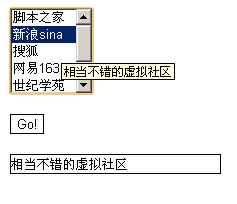
在线演示地址如下:
http://demo.jb51.net/js/2015/js-info-select-menu-codes/
具体代码如下:
<html>
<head>
<title>带有说明的导航栏</title>
</head>
<body>
<script language="JavaScript">
<!--
function herfto(){
  if (document.stationform.refsel.options[0].selected){ //根据用户选定的项目
    window.location.href = "https://www.jb51.net";} //改变本窗口的地址
  else if (document.stationform.refsel.options[1].selected)
  {  window.location.href = "http://www.sina.com.cn";}
  else if (document.stationform.refsel.options[2].selected)
  {  window.location.href = "http://www.sohu.com";}
  else if (document.stationform.refsel.options[3].selected)
  {  window.location.href = "http://www.163.com";}
  else if (document.stationform.refsel.options[4].selected)
  {  window.location.href = "http://www.5dcentury.com";}
  else if (document.stationform.refsel.options[5].selected)
  {  window.location.href = "http://www.chinaren.com";}
  else if (document.stationform.refsel.options[6].selected)
  {  window.location.href = "http://cn.yahoo.com";}
 //根据可选条目,这里应该相应的增减。
  return true;
  }
function textValue(){
  var stationInteger, stationString
  stationInteger=document.stationform.refsel.selectedIndex //取得选定项目的编号
  stationString=document.stationform.refsel.options[stationInteger].title //根据编号取得相应说明
  document.stationform.stationtext.value = stationString } //将说明显示出来
//-->
</script>
<form name="stationform">
<select name="refsel" onChange="textValue()" multiple size="5">
<option title="一个提供优质脚本代码的网站">本站
<option title="相当不错的虚拟社区">新浪sina
<option title="不用说,要搜索来这里就对了">搜狐
<option title="提供免费个人主页空间">网易163
<option title="一个优秀的学生网站">世纪学苑
<option title="首创同学录,中国学生的聚会场所">中国人
<option title="世界闻名的搜索巨头">雅虎yahoo
</select>
<p>
<input type="button" name="stationbutton" value="Go!" onClick="herfto()"
style="background-color: #FFFFFF; border: 1 solid #000000">
<p><input type="text" name="stationtext" value="" size="30" maxlength="35" style="border: 1 solid #000000">
</form>
</body>
</html>
希望本文所述对大家的javascript程序设计有所帮助。