

本文介绍利用JavaScript在IE浏览器中读取Windows注册表,判断当前域名或IP是否位于可信任站点列表的方法。通过WScript.Shell对象访问HKCU路径下的ZoneMap配置,结合正则表达式验证IP格式,实现可信站点检测功能。
JavaScript判断并获取注册表中可信任站点的方法
本文详细介绍了一种通过JavaScript脚本判断并获取Windows注册表中可信任站点信息的技术方案,供相关开发者参考借鉴。
要判断当前站点是否为可信任站点,关键在于定位该站点信息在Windows注册表中的具体存储路径。
若以域名为标识的可信任站点,其在注册表中的存储路径结构如下所示:
HKCU\\Software\\Microsoft\\Windows\\CurrentVersion\\InternetSettings\\ZoneMap\\Domains\\
若以IP地址作为标识的可信任站点,其在注册表中的存储路径结构如下所示:
HKCU\\Software\\Microsoft\\Windows\\CurrentVersion\\InternetSettings\\ZoneMap\\Ranges
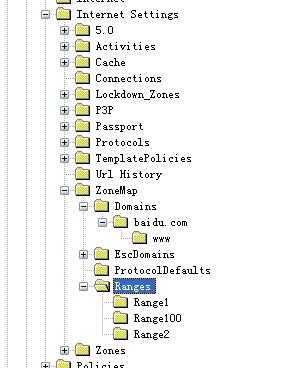
以下是具体的测试代码实现示例:
前端页面index.jsp的主要结构如下:
<!DOCTYPE html>
<html>
<head>
<meta http-equiv="Content-Type" content="text/html; charset=UTF-8">
<title>获取并判断可信任站点(域名和IP)</title>
<style type="text/css">
.mainContent{
 margin: 0 auto;
 margin-top: 100px;
 margin-left: 100px;
}
</style>
<script type="text/javascript" src="js/testRegister.js"></script>
</head>
<body>
<div class="mainContent">
  <input type="button" value="是否是可信站点" id="testRegister" />
</div>
</body>
</html>
核心JavaScript逻辑代码如下:
/*
 * 判断可信任站点(可信任站点可以为IP地址也可以为域名)
 */
window.onload = function(){
  var btnObj = document.getElementById("testRegister");
  btnObj.onclick = function(){
    if(navigator.userAgent.indexOf("MSIE") == -1){
      alert("只支持IE浏览器!");
      return;
    }
    var hostname = window.location.hostname;
    var WshShell = new ActiveXObject("WScript.Shell");
    //IP的正则表达式
    var reg = /^(\d{1,2}|1\d\d|2[0-4]\d|25[0-5])(\.(\d{1,2}|1\d\d|2[0-4]\d|25[0-5])){3}$/;
    //根据域名判断是否存在可信站点
    if(hostname != "localhost" && !reg.test(hostname)){
      var domainSFlag = false,domainEFlag = false,domainSEFlag = false,domainSSEFlag = true;
      var hostnamePrefix = "",hostnameSuffix = "";
      var indexOf = hostname.indexOf(".");
      if(indexOf != -1){
        hostnamePrefix = hostname.substring(0, indexOf);
        hostnameSuffix = hostname.substring(indexOf+1, hostname.length);
        try{
          WshShell.RegRead("HKCU\\Software\\Microsoft\\Windows\\CurrentVersion\\Internet Settings\\ZoneMap\\Domains\\" + hostname + "\\http");
        }catch(e){
          domainEFlag = true;
        }
        if(domainEFlag){
          try{
            WshShell.RegRead("HKCU\\Software\\Microsoft\\Windows\\CurrentVersion\\Internet Settings\\ZoneMap\\Domains\\" + hostnameSuffix + "\\" + hostnamePrefix + "\\http");
          }catch(e){
            domainSFlag = true;
          }
        }
        //判断其合法性
        if(domainEFlag && domainSFlag){
          try{
            WshShell.RegRead("HKCU\\Software\\Microsoft\\Windows\\CurrentVersion\\Internet Settings\\ZoneMap\\Domains\\" + hostnameSuffix + "\\" + hostnamePrefix + "\\*");
            var tipInfo = "<div>您加入的可信站点不是合法的可信站点,请以<span style='color:red;'>http://</span>开头!</div>";
            alert(tipInfo);
            return;
          }catch(e){}
        }
      }else{
        try{
          WshShell.RegRead("HKCU\\Software\\Microsoft\\Windows\\CurrentVersion\\Internet Settings\\ZoneMap\\Domains\\" + hostname + "\\http");
        }catch(e){
          domainSEFlag = true;
        }
        //判断其合法性
        if(domainSEFlag){
          try{
            WshShell.RegRead("HKCU\\Software\\Microsoft\\Windows\\CurrentVersion\\Internet Settings\\ZoneMap\\Domains\\" + hostname + "\\*");
            var tipInfo = "<div>您加入的可信站点不是合法的可信站点,请以<span style='color:red;'>http://</span>开头!</div>";
            alert(tipInfo);
            return;
          }catch(e){}
        }
      }
      if((domainSFlag && domainEFlag) || domainSEFlag){
        var tipInfo = "域名为" + hostname + "的可信任站点不存在!";
        alert(tipInfo);
        alert(tipInfo);
        return;
      }
    }else{
      //获取可信任站点IP,数字2000没法解释,主要涉及到注册表的问题
      var str = [];
      for(var i = 1;i < 2000;i++){
        try{
          str[i] = WshShell.RegRead("HKCU\\Software\\Microsoft\\Windows\\CurrentVersion\\Internet Settings\\ZoneMap\\Ranges\\Range" + i + "\\:Range");
        }catch(e){
        }
      }
      var count = true;
      for(var i = 1;i < str.length;i++){
        if(str[i] == undefined){
          continue;
        }else{
          if(str[i] == hostname){
            count = false;
            break;
          }
        }
      }
      if(count){
        var tipInfo = "IP为" + hostname+"可信任站点不存在!";
        alert(tipInfo);
        return
      }
    }
    alert("存在可信任站点!");
  }
}
希望上述关于JavaScript程序设计的分享内容,能对各位开发者在实际项目中处理注册表相关逻辑有所帮助。