

本文详细解析JSONP跨域请求的原理。首先说明Ajax因同源策略无法直接跨域,而通过script标签加载外部脚本可绕过此限制。接着展示如何利用回调函数接收JSON数据,并介绍jQuery如何封装JSONP实现跨域请求,核心机制仍是动态创建script标签。
跨域请求定义与背景
1. 什么是跨域请求:
当服务器A上的页面尝试请求服务器B上的处理程序时,这种行为被称为跨域请求。
本次测试所使用的页面如下:
处理程序 kimhandler.ashx 的代码如下:
%@ WebHandler Language="C#" Class="KimHandler" %>

using System;
using System.Web;

public class KimHandler : IHttpHandler {

  public void ProcessRequest (HttpContext context)
  {
    string msg = "{\"name\":\"kim\",\"gender\":\"男\",\"age\":24}";
    context.Response.Write(msg);
  }

  public bool IsReusable {
    get {
      return false;
    }
  }
}
另一个处理程序 handler.ashx 的代码如下:
<%@ WebHandler Language="C#" Class="Handler" %>

using System;
using System.Web;

public class Handler : IHttpHandler {

  public void ProcessRequest (HttpContext context)
  {
    string callbackName = context.Request.Params["callbackFun"];
    string msg = callbackName+ "({\"name\":\"kim\",\"age\":\"18\"});";
    context.Response.Write(msg);
  }

  public bool IsReusable {
    get {
      return false;
    }
  }

}
Ajax跨域限制
2. Ajax无法实现跨域请求
<meta http-equiv="Content-Type" content="text/html; charset=utf-8"/>
  <title></title>
  <script>
    var requestUrl = "http://qxw1192430265.my3w.com/kimhandler.ashx";
    window.onload = function () {
      document.getElementById("btnAjax").onclick = function() {
        var xhr = new XMLHttpRequest();
        xhr.open("get", requestUrl, true);
        xhr.setRequestHeader("If-Modified-Since", 0);
        xhr.onreadystatechange = function () {
          if (xhr.readyState == 4 && xhr.status == 200) {
            var res = xhr.responseText;
            alert(res);
          }
        }
        xhr.send(null);
      }
    }
  </script>
</head>
<body>
  <input type="button" id="btnAjax" value="点击" />
</body>
</html>
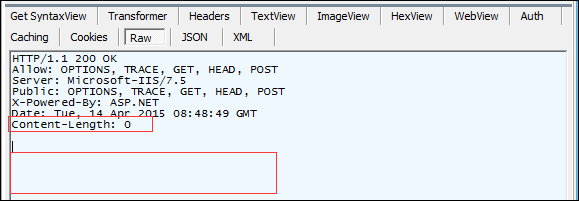
查看浏览器监视器,可以发现没有返回任何请求报文体。
Script标签实现跨域
3. 使用script标签,可以实现跨域请求
测试代码如下:
<!DOCTYPE html>
<html xmlns="http://www.w3.org/1999/xhtml">
<head>
<meta http-equiv="Content-Type" content="text/html; charset=utf-8"/>
  <title></title>
  <script src="http://qxw1192430265.my3w.com/kimhandler.ashx"></script>
</head>
<body>

</body>
</html>
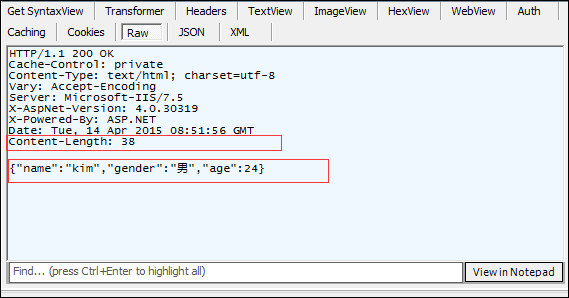
查看监视器,可以看到有返回请求报文体。
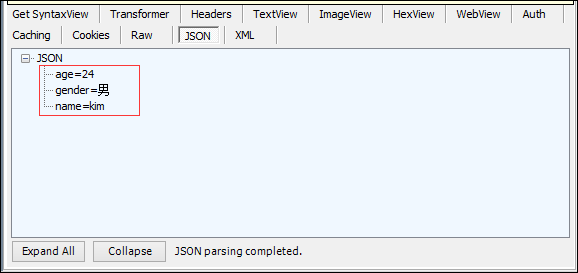
接下来使用json格式进行查看。
JS读取响应数据
4. 使用js方式,在浏览器端,读取响应是数据
测试代码如下,注意这里更换了一个处理程序。
<!DOCTYPE html>
<html xmlns="http://www.w3.org/1999/xhtml">
<head>
<meta http-equiv="Content-Type" content="text/html; charset=utf-8"/>
  <title></title>
  <script>
    function getData(data) {
      for (var key in data) {
        alert(data[key]);
      }
    }
  </script>
  <script src="http://qxw1192430265.my3w.com/handler.ashx?callbackFun=getData"></script>
 </head>
<body>

</body>
</html>
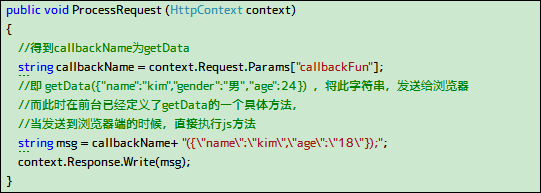
通过后台代码可知:
然后在监视器上看看。
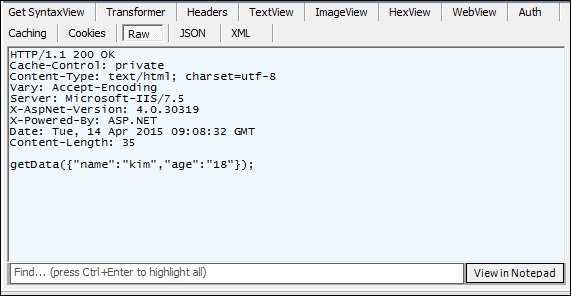
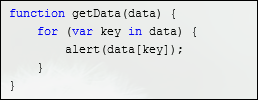
发现在浏览器端,弹出了kim还有18。
jQuery实现跨域
5. 使用Jq来实现跨域请求(内部原理就是为我们创建了一个script标签)
代码如下
<!DOCTYPE html>
<html xmlns="http://www.w3.org/1999/xhtml">
<head>
<meta http-equiv="Content-Type" content="text/html; charset=utf-8"/>
  <title></title>
  <script src="jquery-1.9.0.js"></script>
  <script>
    var requestUrl = "http://qxw1192430265.my3w.com/handler.ashx";
    window.onload = function () {
      document.getElementById("btnJq").onclick = function() {
        $.ajax(requestUrl, {
          type: "get", //请求方式
          dataType: "jsonp", //数据发送类型
          jsonp: "callbackFun", //服务器端接收的参数
          jsonpCallback: "fun", //js处理方法
          success: function () {
            alert("成功");
          }
        });
      }
    }

    function fun(data) {
      for (var key in data) {
        alert(data[key]);
      }
    }
  </script>
</head>
<body>
  <input type="button" id="btnJq" value="Jq按钮" />
</body>
</html>
点击按钮后,可以看到效果,再看下监视器。
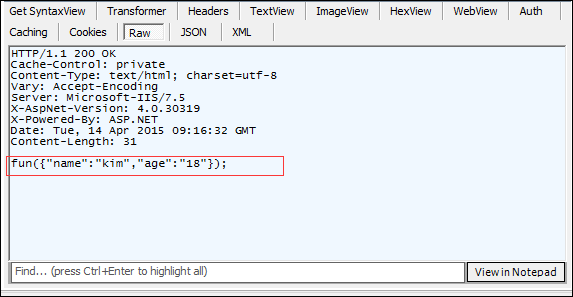
以上所述就是本文的全部内容了,希望大家能够喜欢。