

本文详细介绍 ECMAScript 中的三种基本包装类型:Boolean、Number 和 String。解析自动创建机制、字面量与 new 运算符的区别,以及各类型的静态属性、常用方法(如 String 的截取、查找、大小写转换等)和注意事项,帮助开发者深入理解基本类型与引用类型的交互。
基本包装类型概述
为实现基本类型值的便捷操作,ECMAScript 定义了 Boolean、Number 和 String 三个特殊引用类型。它们兼具引用类型的特性与对应基本类型的行为特征。在读取基本类型值时,系统会在后台自动创建对应的基本包装对象,以便调用相关方法处理数据。
一、基本包装类型概述
var box = 'Mr. Lee';//定义一个字符串
var box2 = box.substring(2);//截掉字符串前两位
alert(box2);//输出新字符串
变量 box 被赋值为字符串,而 box.substring(2) 表明其具备对象特征(仅对象可调用方法),最终结果赋值给 box2。'Mr. Lee' 作为字符串值,理论上不应具备方法,例如:
alert('Mr. Lee'.substring(2)); // 直接通过值调用方法
1. 字面量写法:
var box = 'Mr. Lee';//字面量
box.name = 'Lee';//无效属性
box.age = function () {//无效方法
return 100;
};
alert(box);//Mr. Lee
alert(box.substring(2));//. Lee
alert(typeof box);//string
alert(box.name);//undefined
alert(box.age());//错误
2. new 运算符写法:
var box = new String('Mr. Lee');//new 运算符
box.name = 'Lee';//有效属性
box.age = function () {//有效方法
return 100;
};
alert(box);//Mr. Lee
alert(box.substring(2));//. Lee
alert(typeof box);//object
alert(box.name);//Lee
alert(box.age());//100
上述字面量与 new 运算符的声明方式清晰展示了二者差异。但无论采用何种形式,均可使用其内置方法。Boolean 和 Number 的特性与 String 一致,三者统称为基本包装类型。
PS:使用 new 运算符创建这三种类型的对象时,虽可自定义属性和方法,但建议避免此操作,以免混淆基本类型值与引用类型值的界限。
Boolean 类型
二、Boolean 类型
Boolean 类型未提供特定的属性或方法。
Number 类型
三、Number 类型
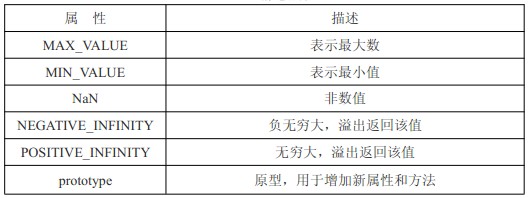
Number 类型包含若干静态属性(可直接通过 Number 调用,无需 new 运算符)及方法。
Number 静态属性
Number 对象的方法
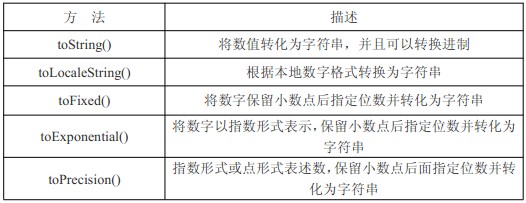
var box = 1000.789;
alert(box.toString());//转换为字符串,传参可以转换进制
alert(box.toLocaleString());//本地形式,1,000.789
alert(box.toFixed(2));//小数点保留,1000.78
alert(box.toExponential());//指数形式,传参会保留小数点
alert(box.toPrecision(3));//指数或点形式,传参保留小数点
String 类型
四、String 类型
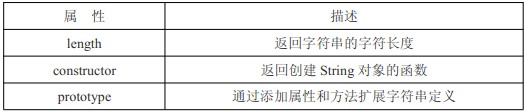
String 类型包含三个属性及大量内置方法。
String 对象属性
String 继承对象的通用方法,如 valueOf()、toLocaleString() 和 toString(),但这些方法均返回字符串的基本值。
字符方法

var box = 'Mr.Lee';
alert(box.charAt(1));//r
alert(box.charCodeAt(1));//114
alert(box[1]);//r,通过数组方式截取
PS:box[1] 在 IE 浏览器中可能返回 undefined,使用时需谨慎。
字符串操作方法
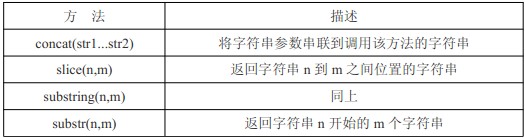
var box = 'Mr.Lee';
alert(box.concat(' is ', ' Teacher ', '!'));//Mr.Lee is Teacher !
alert(box.slice(3));//Lee
alert(box.slice(3,5));//Le
alert(box.substring(3));//Lee
alert(box.substring(3,5));//Le
alert(box.substr(3));//Lee
alert(box.substr(3,5));//Lee


var box = 'Mr.Lee';
alert(box.slice(-3));//Lee,6+(-3)=3 位开始
alert(box.substring(-3));//Mr.Lee 负数返回全部
alert(box.substr(-3));//Lee,6+(-3)=3 位开始


var box = 'Mr.Lee';
alert(box.slice(3, -1));//Le 6+(-1)=5, (3,5)
alert(box.substring(3, -1));//Mr. 第二参为负,直接转 0,并且方法会把较小的数字提前,(0,3)
alert(box.substr(3, -1));//'' 第二参数为负,直接转 0 ,(3,0)
PS:IE 的 JavaScript 实现在 substr() 方法处理负值参数时存在缺陷,会返回原始字符串,使用时务必注意。
字符串位置方法

var box = 'Mr.Lee is Lee';
alert(box.indexOf('L'));//3
alert(box.indexOf('L', 5));//10
alert(box.lastIndexOf('L'));//10
alert(box.lastIndexOf('L', 5));//3,从指定的位置向前搜索
PS:若未找到目标字符串,该方法将返回 -1。
示例:查找所有出现的 L。
var box = 'Mr.Lee is Lee';//包含两个 L 的字符串
var boxarr = [];//存放 L 位置的数组
var pos = box.indexOf('L');//先获取第一个 L 的位置
while (pos > -1) {//如果位置大于-1,说明还存在 L
boxarr.push(pos);//添加到数组
pos = box.indexOf('L', pos + 1);//从新赋值 pos 目前的位置
}
alert(boxarr);//输出
大小写转换方法
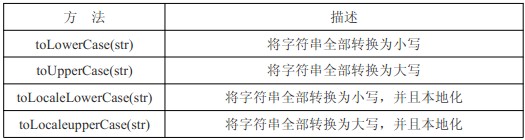
var box = 'Mr.Lee is Lee';
alert(box.toLowerCase());//全部小写
alert(box.toUpperCase());//全部大写
alert(box.toLocaleLowerCase());
alert(box.toLocaleUpperCase());
PS:仅少数语言(如土耳其语)具备本地化大小写特性,通常情况下本地化效果一致。
字符串的模式匹配方法
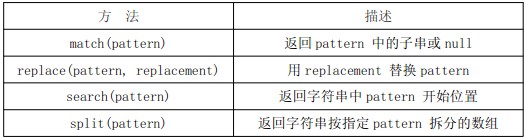
正则表达式在字符串中的应用已在前期章节详述,此处不再赘述。上述 match()、replace()、search()、split() 在普通字符串操作中同样适用。
var box = 'Mr.Lee is Lee';
alert(box.match('L'));//找到 L,返回 L 否则返回 null
alert(box.search('L'));//找到 L 的位置,和 indexOf 类型
alert(box.replace('L', 'Q'));//把 L 替换成 Q
alert(box.split(' '));//以空格分割成字符串
其他方法

alert(String.fromCharCode(76)); // 输出 L,即对应 ASCII 码值
localeCompare(str1, str2) 方法详解:用于比较两个字符串,返回以下结果之一:
1. 若字符串在字母表顺序中位于参数字符串之前,返回负数(通常为 -1)。 2. 若字符串与参数字符串相等,返回 0。 3. 若字符串在字母表顺序中位于参数字符串之后,返回正数(通常为 1)。
[task]var box = 'Lee';
alert(box.localeCompare('apple'));//1
alert(box.localeCompare('Lee'));//0
alert(box.localeCompare('zoo'));//-1
HTML 方法
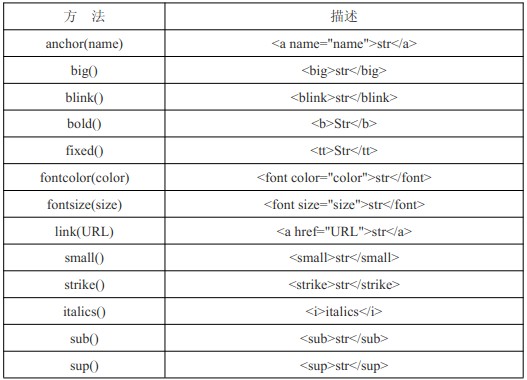
上述代码演示了通过 JS 生成 HTML 标签,据经验判断其实用性有限,仅作了解。
var box = 'Lee';
alert(box.link('https://www.jb51.net'));//超链接
总结与参考
教程内容源自李炎恢老师 JavaScript 教程
以下为其他网友整理的补充文章:
一、基本包装类型概述
实际上,每当读取一个基本类型值时,后台会自动创建对应的基本包装类型对象,从而允许调用相关方法操作这些数据;
  var box = 'Mr.Lee';          // 定义一个String字符串;
  var box2 = box.substring(2);     // 截掉字符串前两位;
  console.log(box2);          // 输出新字符串;=>.Lee;
  // 变量box是一个字符串String类型,而box.substring(2)又说明它是一个对象(只有对象才会调用方法);
  console.log('Mr.Lee'.substring(3));  // 直接通过字符串值来调用方法=>Lee;
引用类型与基本包装类型的主要区别在于对象生存期: 自动创建的基本包装类型对象仅在当前行代码执行期间存在,随后立即被销毁; 这意味着我们无法在运行时为基本类型值动态添加属性和方法;
var s1 = 'some text'; // => var s1 = new String('some text'); var s2 = s1.substring(5); // => var s2 = s1.substring(5); // s1 = null; 销毁该实例;后台自动执行; 1. 字面量写法
  var box = 'Mr.Lee';         // 字面量;
  box.name = 'Lee';          // 无效属性;
  box.age = function(){        // 无效方法;
    return 100;
  };
  console.log(box.substring(3));    // =>Lee;
  console.log(typeof box);       // =>string;
  console.log(box.name);        // =>undefined;
  console.lgo(box.age());       // =>错误;
2. new 运算符写法
  var box = new String('Mr.Lee');
  box.name = 'Lee';
  box.age = function(){
    return 100;
  };
  console.log(box.substring(3));    // =>Lee;
  console.log(typeof box);       // =>object;
  console.log(box.name);        // =>Lee;
  console.lgo(box.age());        // =>100;
// 上述字面量声明与 new 运算符声明清晰展示了两者的区别; // 然而,无论是字面量还是 new 运算符,均可使用其内置方法(如 substring);
二、Boolean 类型
// Boolean 类型未提供特定的属性或方法;
三、Number 类型
// Number 类型包含若干静态属性(可直接通过 Number 调用,无需 new 运算符)及方法;
1. Number 对象的静态属性
MAX_VALUE 表示最大数值; MIN_VALUE 表示最小数值; NaN 表示非数值; NEGATIVE_INFINITY 表示负无穷大,溢出时返回该值; POSITIVE_INFINITY 表示正无穷大,溢出时返回该值; prototype 原型,用于扩展新属性和方法;
2. Number 对象的方法
toString() 将数值转换为字符串,并可指定进制; toLocaleString() 根据本地数字格式转换为字符串; toFixed() 将数字保留指定小数位数并转换为字符串; toExponential() 以指数形式表示数字; toPrecision() 以指数形式或定点形式表示数字;
四、String 类型
String 类型包含三个属性及大量可用的内置方法;
1. String 对象属性
length 返回字符串的字符长度; constructor 返回创建 String 对象的函数; prototype 通过添加属性和方法扩展字符串定义; 2. String 对象字符方法 charAt(n) 返回指定索引位置的字符; charCodeAt(n) 以 Unicode 编码形式返回指定索引位置字符的编码; var box = 'Mr.Lee'; console.log(box.charAt(1)); // => r; console.log(box.charCodeAt(1)); // => 114; console.log(box[1]) // => r; 通过数组方式截取; 3. String 对象字符串操作方法
concat(str1...str2) 将字符串参数串联到调用该方法的字符串; slice(n, m) 返回字符串位置 n 到 m 之间的子串; substring(n, m) 同上; substr(n, m) 返回从位置 n 开始的 m 个字符的子串; var box = 'Mr.Lee'; console.log(box.concat('Ok!')); // => Mr.Lee Ok!; console.log(box.slice(3)); // => Lee; (截取从索引 3 开始的所有字符); console.log(box.substring(3, 5)); // => Le; (截取索引 3 到 5 的字符); 4. String 对象字符串位置方法
indexOf(str, n) 从索引 n 开始向后搜索第一个 str,并返回其索引值; lastIndexOf(str, n) 从索引 n 开始向前搜索第一个 str,并返回其索引值; var box = 'Mr.Lee is Lee'; console.log(box.indexOf('L')); // => 3; (从前向后搜索到的第一个 L 的索引值为 3); console.log(box.lastIndexOf('L')); // => 10; (从后向前搜索到的第一个 L 的索引值为 10); console.log(box.indexOf('L', 5)); // => 10; (从第 5 个位置开始向后搜索到的第一个 L 的索引值为 10); // 若未找到目标字符串,则返回 -1; // 查找所有 L; var box = 'Mr.Lee is Lee'; var boxarr = []; // 存放 L 的数组; var pos = box.indexOf('L'); // 获取第一个 L 的位置; while (pos > -1) { // 若位置大于 -1,说明仍存在 L; boxarr.push(pos); // 将找到的索引添加到数组中; pos = box.indexOf('L', pos + 1); // 重新赋值 pos 为当前位置; } console.log(boxarr); // [3, 10] // trim() 方法 // ECMAScript 5 为所有字符串定义了 trim() 方法;该方法会创建字符串副本,删除前置及后缀的所有空格,然后返回结果; var str = ' hello world '; var trimstr = str.trim(); console.log(trimstr); // => hello world; console.log(str); // => hello world 24 // 由于 trim() 返回的是字符串副本,因此原始字符串中的前置及后缀空格保持不变; 5. String 对象字符串大小写转换方法 toLowerCase(str) 将字符串全部转换为小写; toUpperCase(str) 将字符串全部转换为大写; toLocaleLowerCase(str) 将字符串全部转换为小写,并应用本地化规则; toLocaleLowerCase(str) 将字符串全部转换为大写,并应用本地化规则; 6. String 对象字符串的模式匹配方法
// 具体使用方法已在正则表达式章节介绍; match(pattern) 返回 pattern 中的子串或 null;// 与 pattern.exec(str) 等效; replace(pattern, replacement) 用 replacement 替换 pattern; search(pattern) 返回字符串中 pattern 开始的位置; split(pattern) 返回按指定 pattern 拆分的字符串数组; var box = 'Mr.Lee is Lee'; var p = /L/g; // 开启全局正则; console.log(box.match(p)); // => [L, L]; console.log(box.search(p)); // => 3; console.log(box.replace(p, 'Q')); // => Mr.Qee is Qee; console.log(box.split(' ')); // => ['Mr.Lee', 'is', 'Lee']; 7. String 对象其他方法 fromCharCode(ascii) 静态方法,输出 ASCII 码对应值; localeCompare(str1, str2) 比较两个字符串,并返回相应值; 8. String 对象 HTML 方法 // 通过 JS 生成 HTML 标签,实用价值有限; var box = "Lee"; console.log(box.link('www.baidu.com')); // <a href="www.baidu.com">Lee</a>; 五、小结 // 由于存在基本包装类型,JS 中的基本类型值可被视为对象进行访问; // 基本类型特征: // 1. 每个包装类型均映射到同名的基本类型; // 2. 在读取模式下访问基本类型值时,会创建对应的基本包装类型对象,从而便于数据操作; // 3. 操作基本类型值的语句执行完毕后,新创建的包装对象会立即销毁;