

本文深入分析JavaScript插件开发中常见的问题,如代码重复、职责不清及流程混乱。通过具体实例,演示如何从过程化代码重构为面向对象架构。重点讲解如何通过抽象接口、分离初始化与渲染逻辑、封装数据操作方法,实现组件的高内聚低耦合,提升代码可维护性与复用性。
JavaScript插件化开发:基于面向对象的重构实践
一、开篇分析
承接上篇文章,我们将针对之前代码中存在的不足之处进行重构。本文旨在通过深入浅出的方式,逐步剖析重构过程,帮助读者实现循序渐进的技术提升。
首先回顾之前的 JavaScript 部分代码,具体实现如下:
代码如下:
function ItemSelector(elem,opts){
this.elem = elem ;
this.opts = opts ;
 } ;
var ISProto = ItemSelector.prototype ;
ISProto.getElem = function(){
return this.elem ;
 } ;
ISProto.getOpts = function(){
return this.opts ;
 } ;
/* data manip*/
ISProto._setCurrent = function(current){
this.getOpts()["current"] = current ;
 } ;
ISProto.getCurrentValue = function(current){
return this.getOpts()["current"] ;
 } ;
/* data manip*/
ISProto.init = function(){
var that = this ;
this.getOpts()["current"] = null ; // 数据游标
this._setItemValue(this.getOpts()["currentText"]) ;
var itemsElem = that.getElem().find(".content .items") ;
this.getElem().find(".title div").on("click",function(){
itemsElem.toggle() ;
     }) ;
this.getElem().find(".title span").on("click",function(){
itemsElem.toggle() ;
     }) ;
$.each(this.getOpts()["items"],function(i,item){
item["id"] = (new Date().getTime()).toString() ;
that._render(item) ;
     }) ;
 } ;
ISProto._setItemValue = function(value){
this.getElem().find(".title div").text(value)
 } ;
ISProto._render = function(item){
var that = this ;
var itemElem = $("<div></div>")
.text(item["text"])
.attr("id",item["id"]) ;
if("0" == item["disabled"]){
itemElem.on("click",function(){
var onChange = that.getOpts()["change"] ;
that.getElem().find(".content .items").hide() ;
that._setItemValue(item["text"]) ;
that._setCurrent(item) ;
onChange && onChange(item) ;
         })
.mouseover(function(){
$(this).addClass("item-hover") ;
         })
.mouseout(function(){
$(this).removeClass("item-hover") ;
         }) ;
     }
else{
itemElem.css("color","#ccc").on("click",function(){
that.getElem().find(".content .items").hide() ;
that._setItemValue(item["text"]) ;
         }) ;
     }
itemElem.appendTo(this.getElem().find(".content .items")) ;
 } ;
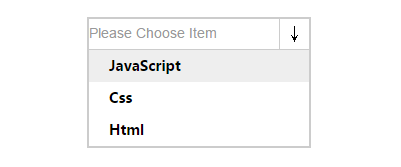
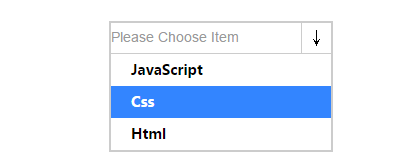
效果如下图所示:
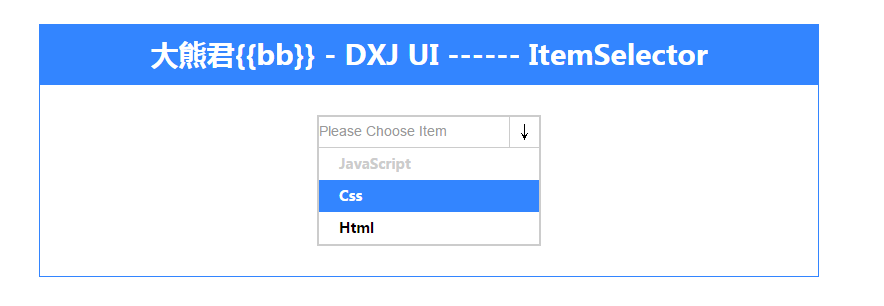
a)------非可操作状态
b)------可操作状态
问题诊断与重构思路
(二)、打开思路,进行重构
从上述代码可以看出,虽然已经利用 JavaScript 的语法特性,以面向对象的方式对代码进行了有效组织,相比松散的过程化形式有了显著改进,但仍存在诸多不足。
(1)、内部存在大量重复代码
(2)、职责划分不够清晰
(3)、业务流程梳理尚不健全
基于以上问题,我们需要进行有效的重构。首先梳理该组件的需求,主要功能点包括:
(1)、初始化配置组件
代码如下:
$(function(){
var itemSelector = new ItemSelector($("#item-selector"),{
currentText : "Please Choose Item" ,
items : [
             {
text : "JavaScript" ,
value : "js" ,
disabled : "1"
             } ,
             {
text : "Css" ,
value : "css" ,
disabled : "0"
             } ,
             {
text : "Html" ,
value : "html" ,
disabled : "0"
             }
         ] ,
     }) ;
itemSelector.init() ;
 }) ;
这段代码结构清晰,无需修改。但开发者可基于此配置扩展功能,例如增加“mode”配置项以支持多种选项模式,如“checkbox勾选模式”。
接下来是初始化逻辑的实现,代码如下:
代码如下:
ISProto.init = function(){
var that = this ;
this.getOpts()["current"] = null ; // 数据游标
this._setItemValue(this.getOpts()["currentText"]) ;
var itemsElem = that.getElem().find(".content .items") ;
this.getElem().find(".title div").on("click",function(){
itemsElem.toggle() ;
     }) ;
this.getElem().find(".title span").on("click",function(){
itemsElem.toggle() ;
     }) ;
$.each(this.getOpts()["items"],function(i,item){
item["id"] = (new Date().getTime()).toString() ;
that._render(item) ;
     }) ;
 } ;
这段代码存在较多问题,职责不明确,初始化逻辑中混杂了具体功能点的实现细节。
继续查看渲染部分的代码:
代码如下:
ISProto._render = function(item){
var that = this ;
var itemElem = $("<div></div>")
.text(item["text"])
.attr("id",item["id"]) ;
if("0" == item["disabled"]){
itemElem.on("click",function(){
var onChange = that.getOpts()["change"] ;
that.getElem().find(".content .items").hide() ;
that._setItemValue(item["text"]) ;
that._setCurrent(item) ;
onChange && onChange(item) ;
         })
.mouseover(function(){
$(this).addClass("item-hover") ;
         })
.mouseout(function(){
$(this).removeClass("item-hover") ;
         }) ;
     }
else{
itemElem.css("color","#ccc").on("click",function(){
that.getElem().find(".content .items").hide() ;
that._setItemValue(item["text"]) ;
         }) ;
     }
itemElem.appendTo(this.getElem().find(".content .items")) ;
 } ;
问题显而易见,存在大量重复操作,应当进行合理抽象以实现代码复用。
整个组件的流程涵盖初始化、渲染(事件绑定)、数据操作方法以及 DOM 操作的辅助方法。
综上所述,经过简单梳理后,我们应明确各功能的操作目的及流程主线,进行任务分配,确保各司其职。
因此,重构的目标非常明确:对功能点进行抽象,实现友好的职责划分。那么具体如何实现呢?
第一步,建立流程功能方法(即方法接口):
代码如下:
ISProto.init = function(){
// put you code here !
} ;
ISProto._render = function(){
// put you code here !
} ;
第二步,建立抽象后的方法接口:
代码如下:
ISProto._fnItemSelectorDelegateHandler = function(){
// put you code here !
} ;
ISProto._fnTriggerHandler = function(){
// put you code here !
} ;
ISProto._addOrRemoveClass = function(){
// put you code here !
} ;
第三步,建立数据操作接口:
代码如下:
ISProto._setCurrent = function(){
// put you code here !
 } ;
ISProto._getCurrent = function(){
// put you code here !
 } ;
更多细节可参考下方完整源码,此处仅阐述重构思路。
重构后的完整代码实现
(三)、完整代码以供学习,本代码已经过测试
代码如下:
function ItemSelector(elem,opts){
this.elem = elem ;
this.opts = opts ;
this.current = -1 ; // 数据游标
} ;
var ISProto = ItemSelector.prototype ;
/* getter api*/
ISProto.getElem = function(){
return this.elem ;
} ;
ISProto.getOpts = function(){
return this.opts ;
} ;
ISProto._getCurrent = function(){
return this.current ;
} ;
/* getter api*/
/* data manip*/
ISProto._setCurrent = function(current){
this.current = current ;
} ;
ISProto._setItemText = function(text){
this.getElem().find(".title div").text(text) ;
} ;
/* data manip*/

/* update on 2015 1/31 23:38 */
ISProto._fnTriggerHandler = function(index,text,value){
if(this._isDisabled(value)){
index = -1 ;
text = this.getOpts()["currentText"] ;
    }
this._setItemText(text) ;
this._setCurrent(index) ;
this.getElem().find(".content .items").hide() ;
} ;
ISProto._addOrRemoveClass = function(elem,className,addIs){
if(addIs){
elem.addClass(className) ;
    }
else{
elem.removeClass(className) ;
    }
} ;
ISProto._fnItemSelectorDelegateHandler = function(){
var that = this ;
this.getElem().on("click","[data-toggle]",function(){
that.getElem().find(".content .items").toggle() ;
    }) ;
} ;
ISProto._isDisabled = function(value){
return ("1" == value) ? true : false ;
} ;
/* update on 2015 1/31 23:38 */
ISProto.init = function(){
var that = this ;
this._fnItemSelectorDelegateHandler() ;
$.each(this.getOpts()["items"],function(i,item){
item["index"] = i ;
that._render(item) ;
    }) ;
this._fnTriggerHandler(this._getCurrent(),this.getOpts()["currentText"],"1") ;
} ;
ISProto._render = function(item){
var that = this ;
var itemElem = $("<div></div>").text(item["text"]).attr("id",item["index"]) ;
var activeClass = ("0" == item["disabled"]) ? "item-hover" : "item-disabled-hover" ;
itemElem.on("click",function(){
that._fnTriggerHandler(item["index"],item["text"],item["disabled"]) ;
    })
.mouseover(function(){
that._addOrRemoveClass($(this),activeClass,true) ;
    })
.mouseout(function(){
that._addOrRemoveClass($(this),activeClass,false) ;
    }) ;
itemElem.appendTo(this.getElem().find(".content .items")) ;
} ;
总结与展望
(四)、最后总结
(1)、采用面向对象的思考方式,合理分析功能需求。
(2)、以类的方式组织插件逻辑。
(3)、不断重构上述实例。如何进行合理重构?避免过度设计,力求游刃有余。推荐采用过程化设计与面向对象思想相结合的方式。
(4)、下篇文章将扩展相关功能,例如“mode”属性。当值为"1"时,支持 checkbox 多选模式,当前仅为默认下拉模式。
对比本文代码,是否比上一篇更加优秀?希望小伙伴们在项目中能多思考、多实践,尽量使代码更加合理。